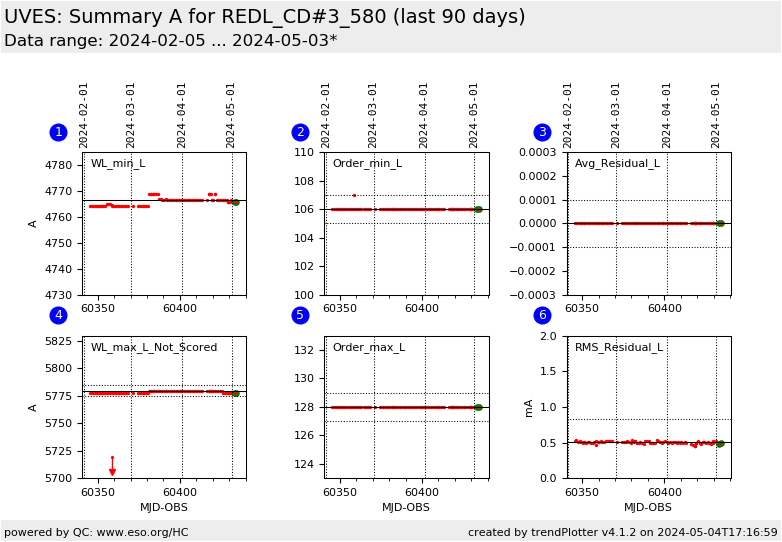
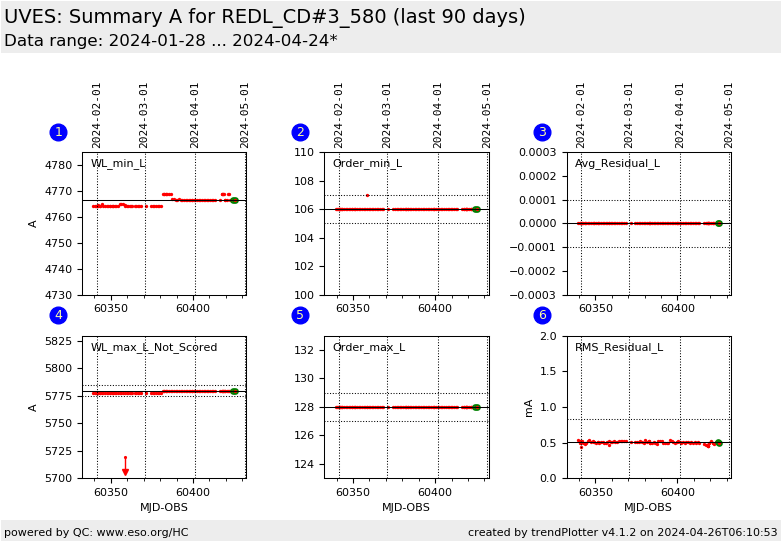
Plot
? |
Symb
? |
Source
* |
Average ? |
Thresholds ? |
N_
data |
QC1
parameter |
Data
downloads |
Remarks |
| method |
value |
unit |
method |
value |
| 1 |
• | QC1DB |
MEDIAN |
4.77e+03 |
Angstrom |
VAL | 4726.9,4806.7 |
95 |
lambda_min |
this |
last_yr |
all
|
Minimum wavelength in A, from ARCLAMP data for REDL 580.0nm, 1x1, 0.3arcs slit |
| 2 |
• | QC1DB |
MEDIAN |
106 |
Angstrom |
VAL | 105,107 |
95 |
order_min_det |
this |
last_yr |
all
|
Minimum order number, same data |
| 3 |
• | QC1DB |
MEDIAN |
0 |
Angstrom |
VAL | -0.0001,0.0001 |
95 |
resid_avg |
this |
last_yr |
all
|
Average residual in A, same data |
| 4 |
• | QC1DB |
MEDIAN |
5.78e+03 |
Angstrom |
OFF | ± 5 |
95 |
lambda_max |
this |
last_yr |
all
|
maximum wavelength in A, same data |
| 5 |
• | QC1DB |
MEDIAN |
128 |
Angstrom |
VAL | 127,129 |
95 |
order_max_det |
this |
last_yr |
all
|
Maximum order number, same data |
| 6 |
• | QC1DB |
MEDIAN |
0.506 |
milli-Angstrom |
VAL | 0,0.835 |
95 |
resid_rms |
this |
last_yr |
all
|
RMS of residuals in mA, same data |
| |
|
*Data sources: QC1DB: QC1 database; LOCAL: local data source
|
Plot 1
scores:  10| 10|
| | data source: | uves_wave
(QC1 database) |
| dataset: | lambda_min | • |
| median: | 4.77e+03 | Angstrom |
| fixed thresholds: | 4726.9...4806.7 | Angstrom |
| N_data plotted: | 95 |
| [click plot for closeup] |
Plot 2
scores: 10|
| | data source: | uves_wave
(QC1 database) |
| dataset: | order_min_det | • |
| median: | 106 | Angstrom |
| fixed thresholds: | 105...107 | Angstrom |
| N_data plotted: | 95 |
| [click plot for closeup] |
Plot 3
scores: 10|
| | data source: | uves_wave
(QC1 database) |
| dataset: | resid_avg | • |
| median: | 0 | Angstrom |
| fixed thresholds: | -0.0001...0.0001 | Angstrom |
| N_data plotted: | 95 |
| [click plot for closeup] |
Plot 4
scores: not implemented
| | data source: | uves_wave
(QC1 database) |
| dataset: | lambda_max | • |
| median: | 5.78e+03 | Angstrom |
| rel. thresholds: | 5774.835...5784.835 | Angstrom |
| N_data plotted: | 95 |
| [click plot for closeup] |
Plot 5
scores: 10|
| | data source: | uves_wave
(QC1 database) |
| dataset: | order_max_det | • |
| median: | 128 | Angstrom |
| fixed thresholds: | 127...129 | Angstrom |
| N_data plotted: | 95 |
| [click plot for closeup] |
Plot 6
scores: 10|
| | data source: | uves_wave
(QC1 database) |
| dataset: | resid_rms | • |
| median: | 0.506 | milli-Angstrom |
| fixed thresholds: | 0...0.835 | milli-Angstrom |
| N_data plotted: | 95 |
| [click plot for closeup] |
This is the trending report for monitoring UVES Resolution based on QC
parameters derived from Wavelength Calibration frames.
This report presents a first set of detailed parameters of the
wavelength solution for the LOWER chip of the RED 580.0nm, 1x1 binning
data, 4pts/625kHz/lg readout mode, 0.3 arcsec slit-width setup.
The individual plots describe:
- the minimum wavelength of the solution, changes of a few nm
usually occur because of changes in the last detected line, which
often happens when the position of the orders changes slightly (see
Grating Position trending).
Changes of tens-hundreds of nm are usually due to the pipeline failing
to locate entire orders
- the minimum order found in the solution. Previous to version 4.9.6 the PL only
reported the minimum order expected. Minimum order found
is available in the QC1 database only since 2011-05-05.
- The average of the residuals of the lines used in the final
solution with respect to their laborotory wavelengths
- the maximum wavelength of the solution, changes of a few nm
usually occur because of changes in the last detected line, which
often happens when the position of the orders changes slightly (see
Grating Position trending).
Changes of tens-hundreds of nm are usually due to the pipeline failing
to locate entire orders
- the maximum order found in the solution. Previous to version 4.9.6 the PL only
reported the maximum order expected. Maximum order found
is available in the QC1 database only since 2011-05-05
- the RMS of the residuals of the lines used in the final solution with
respect to their laborotory wavelengths
Here we give the lambda min and max as well as the gap between the 2 CHIPs.
from User manual (WL_min/central_WL/WL_max/gap):
# DIC1 CD1 303/346/388/na
# DIC1 CD2 326/390/445/na
# DIC1 CD3 458/564/668/2
# DIC1 CD3 476/580/684/5
# DIC2 CD1 303/346/388/na
# DIC2 CD2 326/390/445/na
# DIC1 CD3 476/580/684/5
# DIC2 CD1 303/346/388/na
# DIC2 CD2 326/390/445/na
# DIC2 CD2 373/437/499/na
# DIC2 CD4 565/760/946/7
# DIC2 CD4 660/860/1060/10
# blue CD1 303/346/388/na
# blue CD2 373/437/499/na
# red CD3 414/520/621/1
# red CD3 476/580/684/5
# red CD3 500/600/705/5
# red CD4 660/860/1060/10
from ETC (WL_min_L/WL_max_L/central_WL/WL_min_U/WL_max_U):
# 302/346/388
# 326/390/452
# 373/437/500
# 414/521.37/520/521.6/621
# 458/564.4/564/565.5/667
# 473/580.36/580/581.82/683
# 496/597.26/600/599.11/707
# 575/747.15/760/766.07/946
# 665/854.39/860/864.59/1060.57
Find more information about UVES Wavelength Solution monitoring here.
General information
Click on any of the plots to see a close-up version.
The latest date is indicated on top of the plot.
If configured,
- data points belonging to the latest date are specially marked
- statistical averages are indicated by a solid line, and thresholds by broken lines
- outliers are marked by a red asterisk. They are defined as data points outside the
threshold lines
- "aliens" (= data points outside the plot Y limits) are marked by a red arrow (↑ or ↓)
- you can download the data for each parameter set if the 'Data downloads' link shows up
|
 mirror sites:
PL (internal
link) HQ
[?]
mirror sites:
PL (internal
link) HQ
[?]