|

|
*Date on this monitor changes at 21:00 UT | |||||||||||||||||||||||||||||||||||||||||||||||||||||||||||


| Print: | Information and research: |
| - png file |
- advanced studies:
QC1 browser |
QC1 plotter |
| Plot | Symbol [info] |
Source* | Average [info] | Thresholds [info] | N_data | Data downloads | Remarks | |||
| method | value | unit | method | value | ||||||
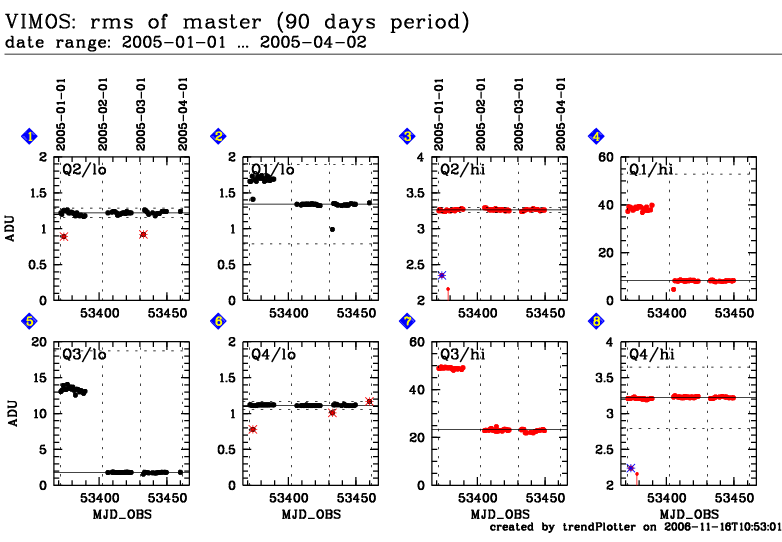
| 1 | • | QC1DB | MEDIAN | 1.220 | ADU | 3SIG | 0.067 | 49 | this | last_yr | all | Q2, rms of master, low gain, Garching values |
| 2 | • | QC1DB | MEDIAN | 1.340 | ADU | 3SIG | 0.551 | 49 | this | last_yr | all | Q1, rms of master, low gain, Garching values |
| 3 | • | QC1DB | MEDIAN | 3.260 | ADU | 3SIG | 0.036 | 50 | this | last_yr | all | Q2, rms of master, high gain, Garching values |
| 4 | • | QC1DB | MEDIAN | 8.410 | ADU | 3SIG | 44.357 | 49 | this | last_yr | all | Q1, rms of master, high gain, Garching values |
| 5 | • | QC1DB | MEDIAN | 1.820 | ADU | 3SIG | 16.887 | 49 | this | last_yr | all | Q3, rms of master, low gain, Garching values |
| 6 | • | QC1DB | MEDIAN | 1.110 | ADU | 3SIG | 0.055 | 49 | this | last_yr | all | Q4, rms of master, low gain, Garching values |
| 7 | • | QC1DB | MEDIAN | 23.370 | ADU | 3SIG | 37.792 | 50 | this | last_yr | all | Q3, rms of master, high gain, Garching values |
| 8 | • | QC1DB | MEDIAN | 3.220 | ADU | 3SIG | 0.426 | 49 | this | last_yr | all | Q4, rms of master, high gain, Garching values |
| *Data sources: OPSLOG: Paranal ops logs; QC1DB: QC1 database; LOCAL: local text file | ||||||||||
Trending plots for bias QC parameters.
All bias parameters are measured in the central 1600x1800 pixels of the detectors. The median bias level and the rms of the master should show a stable trend without sudden jumps or increase/decrease. The read-out noise (ron_raw) is calculated from the difference of the first two raw frames. Some outliers with high values are occasionally observed due to cosmic ray events. The read-out noise as measured from master frames (ron_master) should be extremely stable.
The new detectors (since July 2010) show a correlation of the bias level with temperature, especially for quadrant 2.
Bias frames are usually measured daily during day-time. They come in two different varieties: with low gain (used for imaging) and with high gain (used to calibrate the spectroscopic modes).
Template IDs: img_cal_Dark and spec_cal_Dark. Pipeline recipe: vmbias.
Click on any of the plots to see a close-up version.
The latest date is indicated on top of the plot, data points belonging to that date are specially marked. If configured,
General information