| close window | history: | 2006 | 2007 | 2008 | 2009 | HEALTH | |||||||||


|
... |  |
|
|
|
 |
|
|
|
|
 |
||||
| Print: | Information and research: |
| - png file |
- advanced studies:
QC1 browser |
QC1 plotter |
| Plot [info] |
Symbol [info] |
Source* | Average [info] | Thresholds [info] | N_data | Data downloads | Remarks | ||||
| method | value | unit | method | value | |||||||
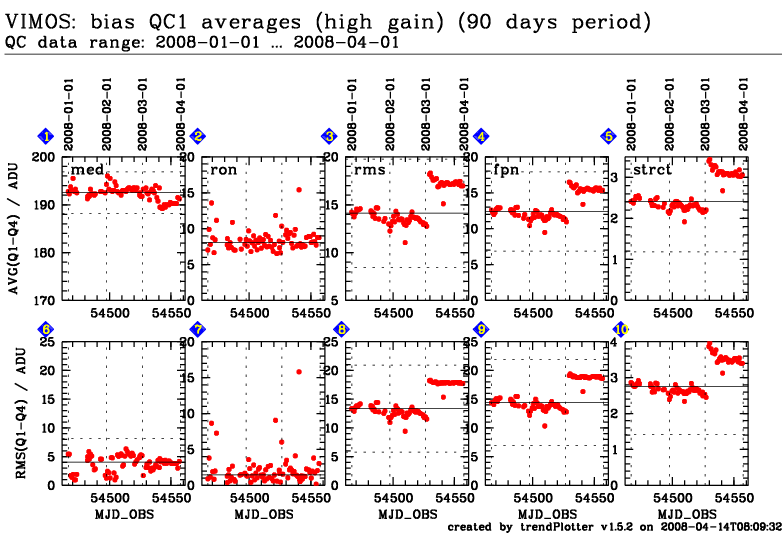
| 1 | • | QC1DB | MEDIAN | 192.50000 | ADU | 3SIG | ± 4.34999 | 80 | this | last_yr | all | average across all detectors, high gain | |
| 2 | • | QC1DB | MEDIAN | 8.07805 | ADU | none | 80 | this | last_yr | all | average across all detectors, high gain | ||
| 3 | • | QC1DB | MEDIAN | 14.11540 | ADU | 3SIG | ± 5.64507 | 80 | this | last_yr | all | average across all detectors, high gain | |
| 4 | • | QC1DB | MEDIAN | 12.37900 | ADU | 3SIG | ± 5.52498 | 80 | this | last_yr | all | average across all detectors, high gain | |
| 5 | • | QC1DB | MEDIAN | 2.41297 | ADU | 3SIG | ± 1.22737 | 80 | this | last_yr | all | average across all detectors, high gain | |
| 6 | • | QC1DB | MEDIAN | 4.04145 | ADU | 3SIG | ± 4.13056 | 80 | this | last_yr | all | rms of average across all detectors, high gain | |
| 7 | • | QC1DB | MEDIAN | 1.47203 | ADU | none | 80 | this | last_yr | all | rms of average across all detectors, high gain | ||
| 8 | • | QC1DB | MEDIAN | 13.34990 | ADU | 3SIG | ± 7.56395 | 80 | this | last_yr | all | rms of average across all detectors, high gain | |
| 9 | • | QC1DB | MEDIAN | 14.42420 | ADU | 3SIG | ± 7.48590 | 80 | this | last_yr | all | rms of average across all detectors, high gain | |
| 10 | • | QC1DB | MEDIAN | 2.75944 | ADU | 3SIG | ± 1.34444 | 80 | this | last_yr | all | rms of average across all detectors, high gain | |
| *Data sources: QC1DB: QC1 database; LOCAL: local text file | |||||||||||
[an error occurred while processing this directive]
General information
Click on any of the plots to see a close-up version. The latest date is indicated on top of the plot, data points belonging to that date are specially marked.
If configured,
- statistical averages are indicated by a solid line, and thresholds by broken lines
- outliers are marked by a red asterisk. They are defined as data points outside the
threshold lines
- "aliens" (= data points outside the plot Y limits) are marked by a red arrow (↑ or ↓)
- you can download the data for each parameter set if the 'Data downloads' link shows up