Plot
? |
Symb
? |
Source
* |
Average ? |
Thresholds ? |
N_
data |
QC1
parameter |
Data
downloads |
Remarks |
| method |
value |
unit |
method |
value |
| 1 |
• | QC1DB |
none |
|
NONE |
none | |
14 |
dey_12 |
this |
last_yr |
all
|
distortion applied in the left beam |
| 2 |
• | QC1DB |
none |
|
NONE |
none | |
14 |
dey_22 |
this |
last_yr |
all
|
distortion applied in the left beam |
| 3 |
• | QC1DB |
none |
|
NONE |
none | |
14 |
dey_12 |
this |
last_yr |
all
|
distortion applied in the right beam |
| 4 |
• | QC1DB |
none |
|
NONE |
none | |
14 |
dey_22 |
this |
last_yr |
all
|
distortion applied in the right beam |
| 5 |
• | QC1DB |
none |
|
NONE |
none | |
14 |
dey_11 |
this |
last_yr |
all
|
distortion applied in the left beam |
| 6 |
• | QC1DB |
none |
|
NONE |
none | |
14 |
dey_21 |
this |
last_yr |
all
|
distortion applied in the left beam |
| 7 |
• | QC1DB |
none |
|
NONE |
none | |
14 |
dey_11 |
this |
last_yr |
all
|
distortion applied in the right beam |
| 8 |
• | QC1DB |
none |
|
NONE |
none | |
14 |
dey_21 |
this |
last_yr |
all
|
distortion applied in the right beam |
| |
|
*Data sources: QC1DB: QC1 database; LOCAL: local data source
|
Plot 1
scores: not implemented
| | data source: | sphere_irdis_distmap
(QC1 database) |
| dataset: | dey_12 | • |
| average: | none |
| thresholds: | none |
| N_data plotted: | 14 |
| [click on plot for closeup] |
Plot 2
scores: not implemented
| | data source: | sphere_irdis_distmap
(QC1 database) |
| dataset: | dey_22 | • |
| average: | none |
| thresholds: | none |
| N_data plotted: | 14 |
| [click on plot for closeup] |
Plot 5
scores: not implemented
| | data source: | sphere_irdis_distmap
(QC1 database) |
| dataset: | dey_11 | • |
| average: | none |
| thresholds: | none |
| N_data plotted: | 14 |
| [click on plot for closeup] |
Plot 6
scores: not implemented
| | data source: | sphere_irdis_distmap
(QC1 database) |
| dataset: | dey_21 | • |
| average: | none |
| thresholds: | none |
| N_data plotted: | 14 |
| [click on plot for closeup] |
Plot 3
scores: not implemented
| | data source: | sphere_irdis_distmap
(QC1 database) |
| dataset: | dey_12 | • |
| average: | none |
| thresholds: | none |
| N_data plotted: | 14 |
| [click on plot for closeup] |
Plot 4
scores: not implemented
| | data source: | sphere_irdis_distmap
(QC1 database) |
| dataset: | dey_22 | • |
| average: | none |
| thresholds: | none |
| N_data plotted: | 14 |
| [click on plot for closeup] |
Plot 7
scores: not implemented
| | data source: | sphere_irdis_distmap
(QC1 database) |
| dataset: | dey_11 | • |
| average: | none |
| thresholds: | none |
| N_data plotted: | 14 |
| [click on plot for closeup] |
Plot 8
scores: not implemented
| | data source: | sphere_irdis_distmap
(QC1 database) |
| dataset: | dey_21 | • |
| average: | none |
| thresholds: | none |
| N_data plotted: | 14 |
| [click on plot for closeup] |
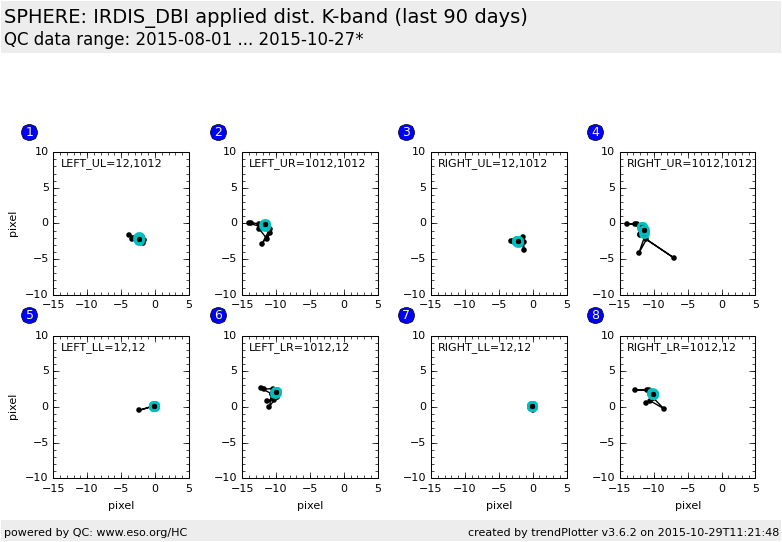
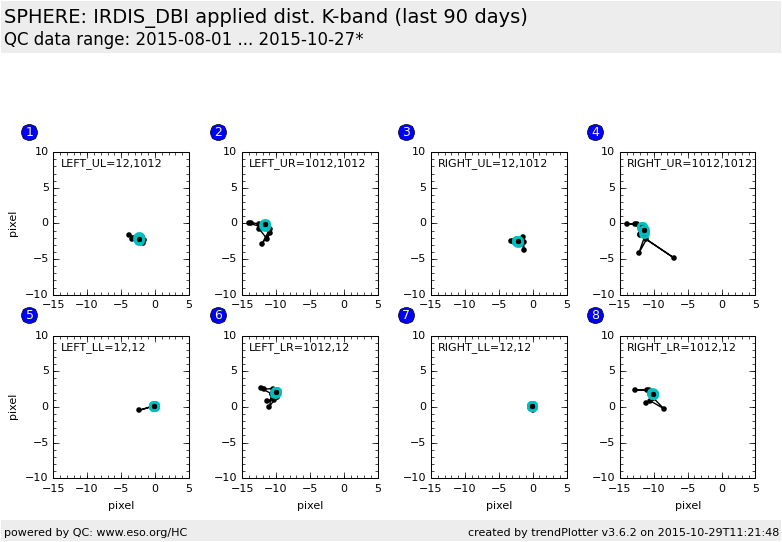
This plot shows the pixel shift introduced by the IRDIS optical distortion. The left four boxes are for the left beam and the right four boxes are for the right beam.
The four lowest order polynomial coefficients are applied to four reference
pixel positions in the 1024x1024 large FOV
- upper left quadrant (UL): x=12,y=1012 (512 +- 500)
- upper right quadrant (UR): x=1012,y=1012
- lower left quadrant (LL): x=12,y=12
- lower right quadrant (LR): x=1012,y=12
E.g.
Box (1) shows the shift for pixel [512-500,512+500] in the upper left (UL) quadrant of the 1024x1024 pixel large FOV of the left channel.
Box (6) shows the shift for pixel [512+500,512-500] in the lower right (LR) quadrant of the 1024x1024 pixel large FOV of the left channel.
This plot is provisional, as the irdis distortion recipe is not yet fully
operational.
General information
Click on any of the plots to see a close-up version.
The latest date is indicated on top of the plot.
If configured,
- data points belonging to the latest date are specially marked
- statistical averages are indicated by a solid line, and thresholds by broken lines
- outliers are marked by a red asterisk. They are defined as data points outside the
threshold lines
- "aliens" (= data points outside the plot Y limits) are marked by a red arrow (↑ or ↓)
- you can download the data for each parameter set if the 'Data downloads' link shows up
|