What are the minimum HW requirements to run the ELT DevEnv?

  • 4x CPUs x86_64 (Intel or AMD)

  • 8GB RAM

  • 100GB disk

  • 1x NIC

  • HW compatible with Fedora 40

You may need more memory and CPU for heavy software compilations. At ESO, VMs for the DevEnv are, by default, created with:

  • 8x CPUs x86_64 (Intel or AMD)

  • 16GB RAM

However, when installing the DevEnv on a laptop or desktop you might be limited by the physical HW of the host. DevEnv can still be operative with:

  • 2x CPUs x86_64 (Intel or AMD)

  • 4GB RAM

Which accounts are installed with the DevEnv?

With the installation of the DevEnv there are three accounts available:

  • Username: root password: the-one-given-during-OS-installation

  • Username: eltdev password: 2Garch1ng

  • Username: eltmgr password: pass4u

Account eltdev is meant to be used for ELT software development. Account eltmgr is reserved to be used for ELT administration tasks (TBD).

How I do create other user accounts for ELT software development?

As administrator of a system with the ELT DevEnv, you can create new user accounts with the command useradd.

Example: (as root):

# useradd -g elt newuser    # newuser is created under /home/newuser
# passwd newuser            # set a password for account newuser

You can also remove them with the command userdel:

# userdel -f newuser        # account newuser is deleted, including its home dir

Which release of DevEnv is running in my host?

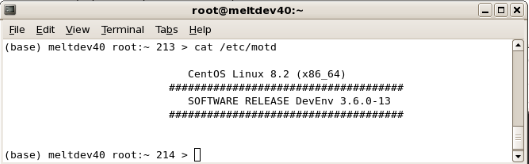
DevEnv installation modifies the content of the file /etc/motd (Message Of The Day), indicating the OS and DevEnv release. Example:

# cat /etc/motd
../_images/cat_motd.png

What does the release number mean?

The ELT Linux DevEnv is defined by the environment variable $ELT_RELEASE* It follows standard numeration major.minor.patch-iteration, where an increase in:

  • The major number indicates a considerable change largely affecting the complete DevEnv, e.g. with a new OS.

(2: CentOS-7, 3: CentOS-8, 4: Fedora-34, 5: Fedora-38, 6: Fedora-40, 7: AlmaLinux-10). * The minor number indicates a change affecting important components of the DevEnv, like toolkits or their releases. * The patch number will be used to fix a severe bug of a minor release. * The iteration number is meaningless. Only for integration purposes.

Typically DevEnv will be released with the following frequency:

  • Major releases will be released with a frequency of at least 6 months. A major the release will be announced at least two months in advance.

  • Minor releases are expected to be released with a frequency of months

  • Patch releases will be made available to fix a severe bug in a Minor release.

Which environment variables are relevant to DevEnv installations?

# echo $ELT_ROLE
ELTDEV

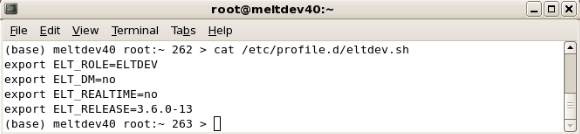
These variables are defined in /etc/profile.d/eltdev.sh Example:

../_images/eltdev_script.png

With the following meanings:

  • $ELT_ROLE with the following values: ELTDEV DevEnv was installed as a development machine; MINIMAL DevEnv has been installed with the minimal set of packages

    Note: you can upgrade from MINIMAL to ELTDEV but not the other way around.

    To upgrade from MINIMAL to ELTDEV execute, as root:

    # export ELT_ROLE=ELTDEV
    # /root/elt/ansible-force-align
    

Is there a newer DevEnv release already available?

Newer releases of the DevEnv are not automatically installed in your system (unless your sysadmin does it for you), therefore your system might be running an obsolete version of the DevEnv. However, the file /etc/motd is updated by a cronjob process to highlight the latest version of DevEnv available. Example:

# cat /etc/motd
../_images/newer_version.png

You can also check all releases of the DevEnv available in the repository with the command:

# dnf --showduplicates list elt-devenv-ansible

Or for DevEnv versions previous to version 7 (so previous to Platform-26):

# yum --showduplicates list puppet-elt
../_images/noarch_puppet_elt.png

The output of the command shows the current release of the RPM installed in the system in bright green, newer releases below in blue, and older ones above in green.

Which are the YUM repositories available for DevEnv

The YUM repositories are listed in the directory /etc/yum.repo.d/<name>.repo. Not all of them are enabled. By default, only these files contain repositories enabled:

TODO

Can I search for a specific RPM in the repositories?

Yes, but only on those enabled repositories in /etc/yum.repos.d/<name>.repo with the command:

# dnf repoquery <package>
../_images/rpm_search.png

How can I add an extra RPM to my host?

Two ways, and always as root:

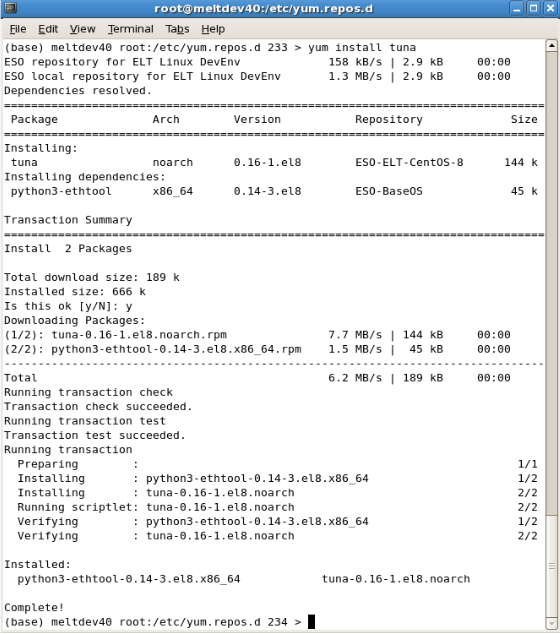
  1. With the command yum you can download RPMs from those enabled repositories in etc/yum.repo.d/<name>repo. Example:

    # dnf install <package>
    
    ../_images/rpm_install.png

    With dnf, the package and its dependencies will be first downloaded and then installed.

  2. With the command rpm -ihv <packages>, you can install packages previously downloaded by hand in your system. The same example above with rpm:

    ../_images/rpm_download.png

    Notice, that with the command rpm you need to give your primary RPM (tuna) and all its missing dependencies (python3-ethtool).

How can I remove an RPM from my host?

As root, and with the command dnf remove <packages>. Example:

# dnf remove tuna

How can I find if an RPM is already installed?

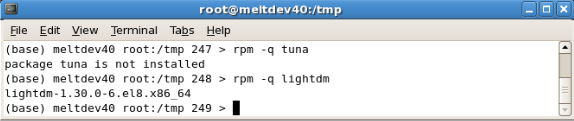
With the command rpm -q <package>. Example:

../_images/rpm_find.png

Can I list the files included in an RPM?

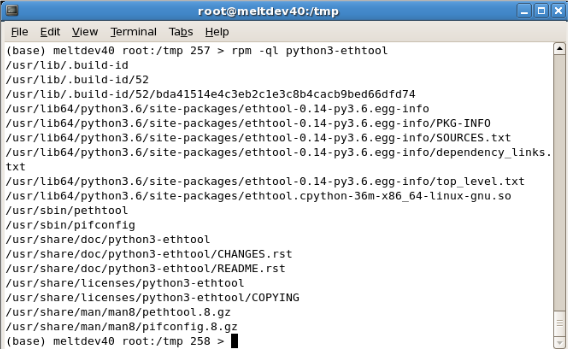
With the command rpm -ql <package>, if the RPM is already installed. Example:

../_images/rpm_files_list.png

With the command rpm -qpl <file.rpm> if the RPM has not been yet installed. Example:

../_images/rpm_file_find.png

How I do get DevEnv installation support?

For ESO internal use only: Support to the ELT Linux DevEnv installation will be provided via creating a new ticket in our JIRA ticketing system EELTMGR or with an email to eeltmgr@eso.org For external users and developers: please send any problem regarding the ELT Linux DevEnv installation to the JIRA ticketing system associated with your project.
How can I switch from text mode to desktop?

The procedure is standard for Fedora/CentOS/RHEL/AlmaLinux OS. With usage of systemd the target is switched to graphical:

$ systemctl set-default graphical.target
$ systemctl start graphical.target