Introduction
Cryo HMI Framework Control is a collection of TE2000 HMI Framework Controls that are made specifically to be used with IFW PLC’s Cryo Library.
Warning
Usually, any user of ESO Cryo Framework should not directly use this package. IFW provides an HMI Template Project with pre-made user controls. But we leave this available for documentation purposes and, if for any reason, the developer decides to implement a project specific user control based on the framework.
ESO shall be contacted first to decide if there is a real need or not.
Scope
This document is the user manual for Cryo HMI Framework Control. The intended audience are ELT users, consortia developers or Cryogenic Engineers.
This package is one of the deliverables for ESO Cryo Framework, which is composed by:
Cryo Library: PLC Library for standard ESO Cryogenic devices.
Cryo HMI Framework Controls: Collection of HMI Framework controls that will interface with Cryo Library (this document)
Cryo HMI Template Project: Start-up project to create an HMI Application. The project comes with a base project structure, UserControls and references to ESO libraries.
Acronyms
ELT |
Extremely Large Telescope |
FB |
Function Block |
GUI |
Graphical User Interface |
HMI |
Human Machine Interface |
IFW |
Instrument Framework |
PLC |
Programmable Logic Controller |
Concepts
Quick guide of some recurring concepts in the documentation.
Color scheme
Cryo HMI Framework Controls use a color scheme to deliver visual messages, like states or events. The following table summarizes the ideas behind the chosen colors.
Color |
Description |
|---|---|
Red |
Abnormal, Alarm condition which requires attention. |
Purple |
Abnormal, Warning condition, raising awareness about a potential upcoming alarm condition. |
White |
Normal condition, Actuator Off/Closed. |
Green |
Normal condition, Actuator On/Opened. |
Yellow |
Manual Operation Mode activated |
Orange |
Engineering Mode activated / Interlock bypassed |
Light blue |
Simulation mode activated. |
This general color scheme is supplemented by flashing between two colors. which is used to indicate changes and/or transitions. When in transition, the first color will be the color of the desired new state, the second color is a transition color (Normally is a Dark Gray color).
Data validity
Data Validity is a way to inform the user that the current data displayed or device cannot be trusted or is disabled.
When Data Validity is False, the controls will show a dark grey background with a diagonal yellow line across its diagonal.
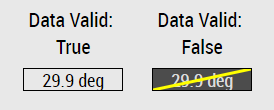
Example of Data Label with Data Valid and Not Valid