Overview
The FcfSim project is composed of the following modules/packages:
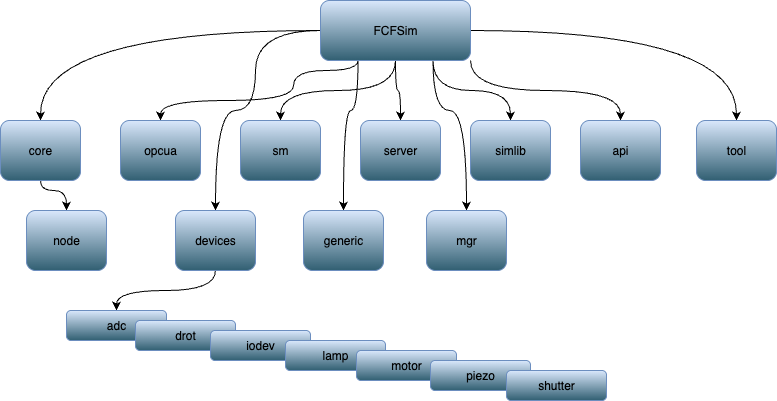
core: Contains common components, interfaces and exceptions for fcfsim.
core.node: Implements tools to abstract data exchange and subscription between python objects and something else (e.g. an opcua server or client).
opcua: A library to handle the OPC-UA server (and client) side of a fcfsim application. Serialisation/de-serialisation of namespace files, manages the build of the server and maintains links between OPC-UA server (/client) and python objects.
sm: Stands for State Machine. This is a wrapper around the scxml4py package to simplify implementation of state machine business logic within fcfsim.
server: Provides an opcua Server Interface dedicated to device simulation.
simlib: High-level tools for device implementation. Offers a base standardised configuration schema and tools.
generic: A config file schema and python engine to run a generic simulator with configuration only and no business logic.
mgr: Config schema and python engine to run several device simulators in one process.
api: A single api to build a device simulator; it contains the packages mentioned above. For future-proofing, this should be the only dependency to be imported to build a device simulator.
devices: Contains simulators of standard devices.
tools: Contains ifwFcfSimTmcExport, the executable to create a device simulator using a Beckhoff TwinCAT3 TMC file as input.
fcfsimServer
There is only one executable script needed to run one or several device simulations.
> fcfsimServer -h

     usage: fcfsimServer [-h] -c CFG [--cfgname CFGNAME] -p PORT [--use-ext-ip] [--debug]
                         [--log-level {CRITICAL,ERROR,WARNING,INFO,DEBUG}] [--loggers LOGGERS]
                         [--list-loggers] [--verbose]

     Device Server SCXML/OPC UA Server

     options:
       -h, --help            show this help message and exit
       -c CFG, --cfg CFG     configuration resource file
       --cfgname CFGNAME     instance name in configuration. If not given the first one is used
       -p PORT, --port PORT  server port number
       --use-ext-ip          use the external IP address of deployment host
       --debug               Enter in debug iptyhon shell
       --log-level {CRITICAL,ERROR,WARNING,INFO,DEBUG}
                             set log level
       --loggers LOGGERS     set loggers on which to apply log level ("<logger1>[,<logger2>...]")
       --list-loggers        list loggers defined and exit
       --verbose             output log on stdout
Two options are mandatory:
–cfg/-c configuration file
–port/-p OPC-UA port
As we will see in the tutorial, the python-specific code to be executed is built from information located in the configuration file.
Architecture
FcfSim can be seen more like a framework rather than a monolithic application or an application built over a single base class. It uses, when suitable, composition rather than class inheritance, with some base classes for heavy- lifting methods and some standardisation of parameters.
The whole package is entirely type checked and passes the mypy type checker in strict mode. It is highly recommended that device simulator implementations follow the same strict type checking. It helps for code reliability, maintenance and code navigation.
The user does not have to worry about OPC-UA inputs and outputs when coding the business logic of simulators. A mapping between python object instances and OPC-UA nodes can be given independently of the source code, or within class annotations and decorators. The FcfSim Server takes care of building the OPC-UA server nodes and maintains links between OPC-UA nodes and python object attributes. This is actually very similar to how it is done in a TwinCAT project.
Basically FcfSim simulation works with the following components:
A Server is furnished by
ifw.fcfsim.opcua. It holds an OPC-UA server and some Signals shared between device simulators (typically a kill signal, like SIGTERM). Its role is also to aggregate and execute “Runners” (threads) declared by each device simulator (e.g. business logic, state machine threads, …); also it takes care of synchronizing OPC-UA server and python object attributes in both ways: from OPC-UA server to python attributes and from python attributes (simulator) to OPC-UA server.A Device Engine This defines the business logic of the simulator and it is the main thing to be developed. It can be any class, however it should follow some constraints in order to work with the furnished Server Interface.
Simulator Interface It links the Device Engine and the OPC-UA server. It builds OPC-UA nodes and links them to Engine attributes and engine (RPC) methods. It also declares the runners (threaded tasks) to be executed by the server: mostly a simulator business logic task and the state machine thread. A generic Interface is provided and should work out of the box for most applications. As mentioned above, the provided interface imposes some standard methods on the device engine. The interface also holds the information to declare new OPC-UA nodes and RPCs as well as the mapping with the Engine.
A factory A simple function to make the application runnable by the fcfsimServer application. This function takes a dictionary of config as input and outputs a Simulator Interface instance. The provided Interface also offers a standard factory working with the standard configng schema
schema/ifw/fcfsim/simlib/fcfsim.schema.yaml.
In most cases, one will only need to implement the Device Engine and use a standard interface to build OPC-UA nodes, run threads and state machine. It is however possible to customize an interface. This is not documented here but one can have a look at how it is done with the standard Interface included in fcfsim.