The FGF SDK
This chapter provides a brief overview of the various classes, constants data types and tools provided by the FGF Package.
Not many details are provided here, but can be found in the FGF Doxygen documentation.
The FGF SDK is provided by the module “common” in the FGF source tree: “ifw-fgf/fgf/common”.
The namespace is defined as “ifw::fgf::common”.
The classes provided by the FGF common module are (snapshot from the Doxygen documentation):
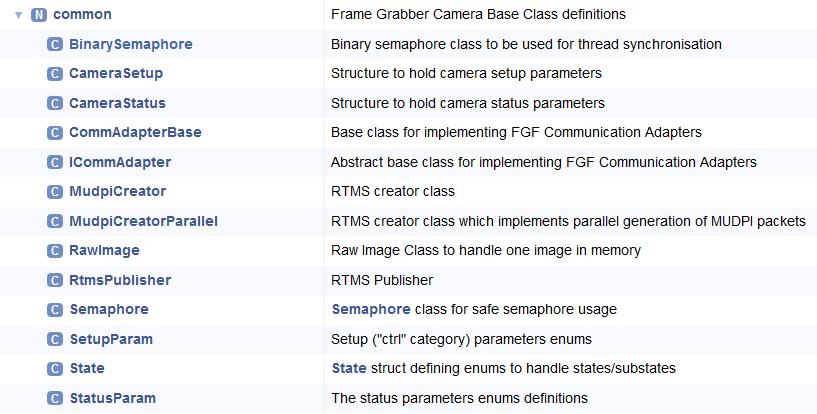
The most significant class for a user of the FGF SDK, is the abstract FGF Communication Adapter Class, “ifw::fgf::common::ICommAdapter” (header: “ifw-fgf/fgf/common/src/include/ifw/fgf/common/iCommAdapter.hpp”), from which the dedicated communication adapters for the specific cameras must be derived.
A derived adapter must implement the following pure virtual methods:
Method |
Responsibility |
|---|---|
|
Reset the adapter/camera: re-load and apply the configuration and (re)establish the connection to the camera, invoking the camera’s reset mechanism if available. Backs the ENVision |
|
Apply the current control (“ctrl”) parameter values as the camera’s working setup. Backs the ENVision |
|
Start the frame acquisition (and RTMS publishing). Backs the ENVision |
|
Stop the frame acquisition. Backs the ENVision |
|
Return the names of the loggers currently allocated. Backs the ENVision |
|
Set the log level for the given logger (empty logger = all). Backs the ENVision |
|
Read one or more parameter values from the adapter (batch / single). |
|
Write one or more parameter values to the adapter (batch / single). |
The methods returning short follow the ENVision status convention: 0 = success, 1 = general error, other positive codes are application-allocated, and negative codes are reserved for the specific frame grabber application (see The ENVision Protocol). The ctrl/stat parameter names exchanged via Read/Write are the var_comm_adapter_label constants defined in “ifw/fgf/common/setupParam.hpp” and “statusParam.hpp”.
The application template (“ifw-fgf/fgf/template/fgf-dvc”), which is itself a working simulator-based example, provides the simplest reference implementation of an FGF Communication Adapter: see “adapter/src/$commAdaptor.cpp” and its header in the template tree. Refer to Creating an FGF Application for how the template is instantiated and adapted.