Graphical User Interface
The SLM ships a Taurus-based engineering GUI (slm/gui). It connects to a
running server over CII/MAL (commands) and to the OLDB (live state).
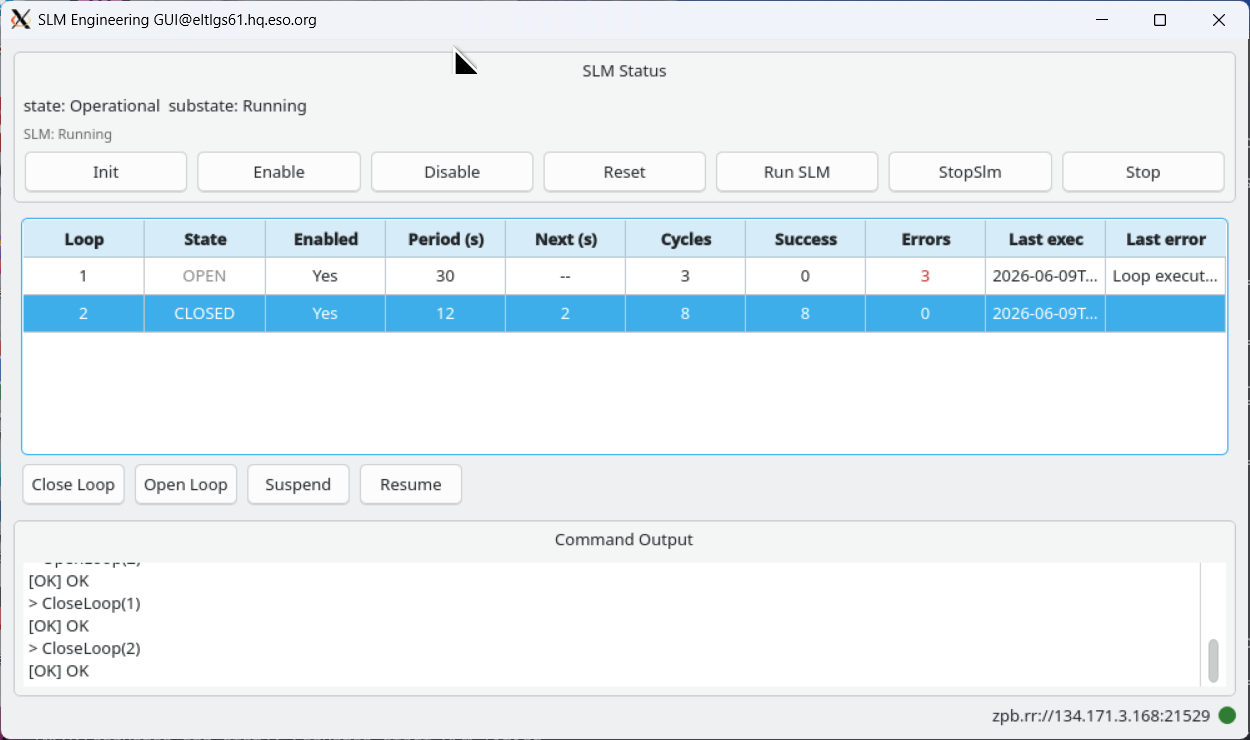
The SLM Engineering GUI: loop 2 is closed and cycling (counting down to the next execution), loop 1 has auto-opened after reaching its error limit.
Launching
The GUI needs the service URI (or a registered name to resolve it) and, to monitor live loop state, the OLDB prefix derived from the configuration:
# by explicit URI
slmGui --uri zpb.rr://127.0.0.1:12091 --config config/ifw/slm/config.yaml

# or by registered name (resolved via Nomad/Consul)
slmGui --name slm-req --namespace default --config config/ifw/slm/config.yaml
Layout
SLM Status — the overall state and substate, plus global buttons (
Init,Enable,Disable,Reset,Run SLM,StopSlm,Stop).Loop table — one row per loop, showing all loops at a glance:
State (OPEN / CLOSED / SUSPENDED, colour-coded), Enabled, Period;
Next (s) — a per-second countdown to the next execution of a closed loop;
Cycles, Success, Errors;
Last exec and Last error.
A command bar below the table (
Close/Open/Suspend/Resume) acts on the selected loop. These buttons are enabled only while the SLM isRunning.Command Output — each command sent is echoed (e.g.
> CloseLoop(1),> RunSlm) followed by the[OK]reply or[ERR]error.Connection status — a coloured indicator and the server URI at the bottom of the panel (green = connected, red = not connected), driven by the connection state of the MAL client.