Release Notes
Summary
This release includes the following artefacts:
RTC Toolkit (
rtctk) - 6.0.0
What is the scope of this version?
This release does not yet cover the full RTC Toolkit functionality.
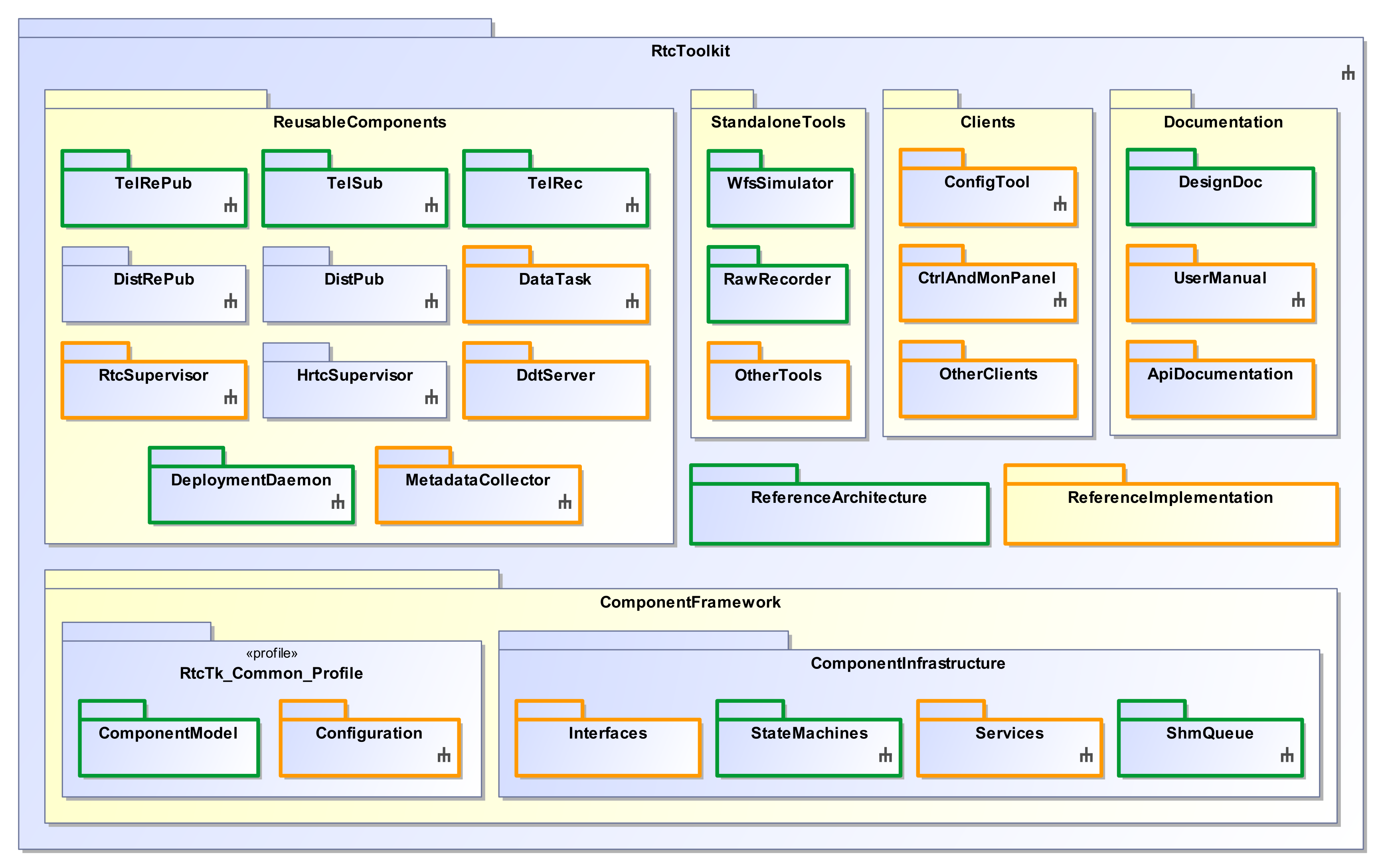
Fig. 2 Availability of various software artefacts.
Assets that are not yet delivered with this version are depicted without a colored frame in Fig. 2. Assets that are part of this release, but are not yet feature-complete, are depicted with an orange frame. Assets that are part of this release and also considered feature-complete are depicted with a green frame.
The most important features of this release are:
Component Framework
Core Framework for RTC Components
Persistent Configuration Repository interface
Runtime Configuration Repository interface
Online Database interface
Service Discovery interface
Logging integration
Recording Infrastructure
Event channel service
Component metrics service
Alert service
Reusable Components
Deployment Daemon
RTC Supervisor
MUDPI Publisher
Telemetry Republisher
Telemetry Subscriber
Telemetry Recorder
Metadata Collector
Data Task libraries
DDT Server
Examples and Tutorials
Creating bare RTC Components
Customising reusable components
GPU Data Task example (using CUDA)
Python Data Task example (embedded interpreter via Pybind11)
Custom Grafana visualization
Creating a minimalistic SRTC system
Creating a distributed SRTC system
Other Features
CII MAL integration
CII OLDB integration
CII configuration service integration
Consul and Nomad deployment integration
InfluxDB and Telegraf metrics pipeline
Grafana visualization support
GPU/CUDA support for Data Tasks
Standalone testing and troubleshooting tools
Documentation
User’s manual (using Sphinx)
API documentation (using Doxygen)
Limitations and Constraints
This version provides the core functionality to implement SRTC components that form part of a Telemetry Data Path. However, not all features are yet available or optimised.
There are still some limitations when using the Persistent Configuration Repository. See section Limitations and Known Issues in the Persistent Configuration Repository for details.
The Configuration Tool has some issues related to error reporting and usage limitations. See section Limitations and Known Issues in the Configuration Tool for details.
The Control and Monitoring Tool has some functionality still missing. See section Limitations and Known Issues in the Control and Monitoring Tool for details.
RTC Supervisor has limitations for generating the overall system status, user extensibility, error recovery and command abortion. See section Limitations and Known Issues in the RTC Supervisor for details.
Telemetry Recording is not yet fully optimised. Only certain output formats are supported and certain types are missing. In addition, there are currently some naming limitations and timing constraints. See section Limitations and Known Issues in the Telemetry Recorder for details.
The Waf build system currently has problems handling transitive dependencies in cases where a mix of wdep and pkg-config dependencies are provided, such as the case in the RTC Toolkit. This means that many transitive dependencies from upstream projects need to be manually added in down-stream projects that build against the toolkit. In most cases, adding the following dependency checks for pkg-config dependencies to the
configuremethod in your project’swscriptfile will resolve the dependency issues:pkgs = ( "CLI11", "log4cplus", "cpp-netlib-uri", "CCfits", "cfitsio", "yaml-cpp", "backtrace", "fmt", "benchmark", "openblas", "libpcap", "ppconsul", "llnetio", "ipcq", "numapp", "perfc", "tbb", ) for pkg in pkgs: cnf.check_cfg(package=pkg, uselib_store=pkg, args="--cflags --libs")
However, the dependencies can change in upstream projects. Therefore, if the above workaround is still not enough, look at the top level
wscriptfile in the RTC Toolkit source code to identify additional missing dependencies. You should be able to mostly copy the relevant code in theconfiguremethod from that file.
Disclaimer
ESO does not warrant that the provided functions of the RTC Toolkit will meet all requirements or that the operation of the components and libraries will be flawless.
ESO does not ensure that solutions included in this version of the RTC Toolkit are not subject to changes in future releases. The future upgrade to newer versions of ICS Framework, Core Integration Infrastructure (CII) and adaptation to CCS development standards may introduce significant modifications to the actual interfaces and services.
While every precaution has been taken in the development of the RTC Toolkit software and in the preparation of the documentation, ESO assumes no responsibility for errors or omissions, or for damage resulting from the use of the software or of the information contained in the documentation.
Note
The RTC Toolkit is distributed outside ESO for the development of applications related to the ELT Project and ruled by the “General Conditions of ESO Contracts”. Any other use is not permitted without prior authorisation from ESO.
The rights of third party products, whose software is included for convenience in the development environment, are ruled by their copyright notice included in their software.
Dependencies
Mandatory dependencies are as follows:
ELT Development Environment (
ELT DevEnv) - v7Middleware Abstraction Layer (
CII MAL) - v6.1.0Common Integration Infrastructure Services (
CII SRV) - v6.0.0DDS Middleware (
FastDDS) - v3.3.0Application Framework (
RAD) - v8.0.0Roadrunner (
numapp,ipcqandperfc) - v0.12.0Data Display Tool (
DDT) - v1.4.0Control UI Toolkit (
CUT) - v3.3.1STD Interface (
stdif) - v4.0.0METADAQ Interface (
metadaqif) - v3.0.0Low-latency Networking Library (
llnetio) - v0.6.0TAI Clock - v0.9.0
Msgsend - v0.8.2
Extensible Test Runner (
etr) - v3.4.0
Optional dependencies are as follows:
CUDA - v13.3
InfluxDB - v3.8
Telegraf - v1.38
Grafana - v12.3.1 OSS
Other 3rd party dependencies are as follows:
astropy - Python package containing utilities for astronomy and astrophysics.
boost - Portable C++ utility libraries.
CCfits - A C++ wrapper for cfitsio.
cfitsio - I/O library for FITS files.
click - Command line parser for Python.
CLI11 - Command line parser for C++.
Doxygen - Documentation generator for API documentation.
fmt - String formatting library for C++.
google benchmark - A library to benchmark code snippets, similar to unit tests.
gtest/gmock - Google testing/mocking framework.
jinja2 - Fast, expressive, extensible templating engin
Guidelines support library - provides a C++ span implementation.
libbacktrace - A library to produce symbolic backtraces.
libpcap - Library for handling network packet capture.
log4cplus - Logging library
nlohmann/json - A C++ JSON parsing library.
nose - A Python test runner.
numpy - Python package for efficient multi-dimensional array computations.
openblas - BLAS implementation for linear algebra.
Plantuml - UML diagram generator.
ppconsul - API library for Consul.
pybind11 - Library for producing Python bindings to C++ code.
pylint - Python linting tool.
pytest - A Python test runner.
Sphinx - Documentation generator for user manual.
tbb - Intel Thread Building Blocks.
yaml-cpp - A C++ YAML parsing library.
Development Environment ELT DevEnv
The ELT Linux Development Environment (DevEnv) comprises a collection of hardware, software procedures and tools for the development, testing and debugging of software components for the ELT. It has to support large-scale and long-term maintenance of software.
Further information regarding the ELT Development Environment can be found here:
Deployment
The ELT standard tools for deployment (which is the action of activating or deactivating software
processes on remote server hardware) are based on Nomad and Consul.
The toolkit integrates with Nomad and Consul, such that the end user does not need to
interact with these directly.
Instead, the user interacts with the deployment daemon to perform the deployment of the
SRTC components (see Deployment Daemon),
and with the service discovery mechanism for rudimentary name service support
(see Service Discovery).
Core Integration Infrastructure CII
The RTC Toolkit makes use of the CII MAL (Middleware Abstraction Layer) for non-time-critical inter-component messaging. The two main mechanisms used are request/reply and publish/subscribe. The following documents provide details regarding CII MAL:
In addition, this version also supports:
Note
The CII_LOGS environment variable is deprecated and no longer used. The cii-postinstall tool does not set this variable anymore.
DDS Middleware FastDDS
FastDDS is an open source implementation of OMG’s Data Distribution Service (DDS). It is a middleware framework standard for data exchange using a publish–subscribe pattern. It is used in the RTC Toolkit for reliable multicast telemetry data transfer, in particular between Telemetry Republisher and Telemetry Subscriber components.
FastDDS and related tools are provided as part of the ELT Development Environment.
Note
FASTRTPS_DEFAULT_PROFILES_FILE environment variable is not used anymore to specify the FastDDS QoS file for different parts of the system like Telemetry Republisher, Telemetry Subscriber and Event Channel. Please refer to the particular (component) section for details about how FastDDS QoS profiles are handled. It is advised not to set/use the environment variable anymore as it can cause the system to misbehave.
Rapid Application Development RAD
The RAD application framework is an ESO software product that enables the development of event-driven applications for the ELT. It is based on call-backs and state machines.
The RTC Toolkit mainly uses RAD to instantiate its state machines and handle internal events. More details can be found in the RAD User Manual.
Roadrunner
Roadrunner is a project containing independent and reusable C++ libraries for high performance applications.
RTC Toolkit uses the following features:
ipcq - a shared memory queue library.
NUMA++ - a library to help simplify application of NUMA policies.
perfc - a library to implement performance counters.
These are essentially a set of APIs to interact with libnuma and certain pthread APIs to control memory policy, CPU affinity and scheduler. For details see the documentation provided in the source code for each roadrunner component.
Data Display Tool DDT
Data Display Tool is a collection of libraries and applications that shall be used in the scope of the ESO ELT for the transfer, display and manipulation of data coming from the telescope.
The DDT is grouped into the components Data Transfer, Data Visualisation, Image Handling and Python Components. The RTC Toolkit depends only on the Data Transfer library.
The DDT includes applications such as:
ddtBroker- The Data Broker is a command line application which is used to transfer the data from the Publisher to the Subscriber either on the same or on different hosts. When running the setup on different hosts, a single Data Broker needs to be started on each of the hosts.ddtViewer- The DDT Standard Viewer is a reference implementation of a DDT Subscriber GUI using all of the existing DDT Widgets. The DDT Standard Viewer displays one Image Widget plus some auxiliary widgets that are connected to the Image Widget. Via the context menu of the Image Widget the user can access a number of DDT Dialogs, plus a File Open dialog, which allows for the loading of FITS files from disk.
For more information refer to the DDT User Manual.
Control UI Toolkit (CUT)
The Control UI Toolkit enables ELT Developers to create graphical user interfaces using declarative MVC components, based on Qt and Taurus. It provides models, views and widgets that can quickly access the control system datapoints through their URIs.
The RTC Toolkit uses the CUT library to implement its GUI panels for the Configuration Tool and Control and Monitoring Tool.
STD Interface (stdif)
The STD Interface is the standard MAL interface implemented by every SRTC component.
METADAQ Interface (metadaqif)
The RTC Toolkit uses the METADAQ Interface in implementations of the Metadata Collector component.
Low-latency Networking Library (llnetio)
The Low-latency Networking Library is used in the RTC Toolkit for MUDPI communication.
TAI Clock
The TAI Clock library is a C++ library which provides a std::chrono
compatible clock counting SI seconds since 1970-01-01T00:00:00 TAI.
Msgsend
The RTC Toolkit uses the libraries in Msgsend for sending commands to SRTC components from the Python based clients in cases where the MAL interface must be deduced dynamically.
Extensible Test Runner etr
The RTC Toolkit makes use of the Extensible Test Runner for integration testing.
The following features are available:
Run Robot Framework tests with the robot plugin.
Request test resources with the resources plugin.
Modify template files with Jinja2 template engine and the jinja2 plugin.
Deploy software with Nomad with the nomad plugin (experimental support).
For details refer to the ETR User Manual.
Porting Instructions
MUDPI Publisher: The MUDPI publisher component configuration has been changed: The hostname configuration data point has been renamed to network_adapter_ip to better reflect its purpose, and the enabled configuration flag for each publisher is now mandatory. To update your configuration, ensure all publisher configurations include the enabled flag and use network_adapter_ip instead of hostname:
static:
  # ...
  publishers:
    pub_ex_1:
      enabled: !cfg.type:boolean true
      network_adapter_ip: !cfg.type:string "127.0.0.1"
      # ... other static configuration
The deprecated TypedEventService has been removed. Usage of obsolete code in the following format:
#include <rtctk/componentFramework/typedEventService.hpp>
...
TypedEventService svc = services.Get<EventServiceIf>();
...
auto pub = svc.MakePublisher<ConfigurationUpdatedEvent>();
pub->Publish({"data_task_1", "control_matrix"});
...
auto pub = svc.MakeSubscriber<ConfigurationUpdatedEvent>();
pub->Subscribe([](const ConfigurationUpdatedEvent& e){});
has to be converted to:
#include <rtctk/componentFramework/eventServiceIf.hpp>
#include <rtctk/componentFramework/eventDefinitions.hpp>
...
EventServiceIf& svc = services.Get<EventServiceIf>();
...
auto pub = svc.MakePublisher(ConfigurationEvent::TOPIC_NAME);
pub->Publish(ConfigurationUpdatedEvent{"data_task_1", "control_matrix"});
...
auto sub = svc.MakeSubscriber(ConfigurationEvent::TOPIC_NAME);
sub->Subscribe([](const JsonPayload& p){
    if(auto ev = ConvertTo<ConfigurationUpdatedEvent>(p); ev.has_value()) {
        ConfigurationUpdatedEvent& e = ev.value();
        ...
    }
});
The deprecated TypedEventRecordingUnit and JsonEventRecordingUnit classes have been removed. Use the EventRecordingUnit instead and do not forget to configure it with the desired event channel topic.
The DataPointRecordingUnit class has been deprecated and the DynamicDataPointRecordingUnit has been removed. Use the RepositoryRecordingUnit class instead and configure it correctly.
Legacy methods and subclasses in RepositoryIf and RepositorySubscriberIf have been removed. The replacement methods must be used instead.
The old classes ReadRequest, WriteRequest, SubscribeRequest and UnsubscribeRequest must be replaced by BatchRequest, with the appropriate changes to the method invocations of those classes to reproduce the same request type as before. See the API of BatchRequest for the new method details.
The Response class must be replaced with BatchResponse.
The methods SendReadRequest, SendWriteRequest, SendSubscribeRequest and SendUnsubscribeRequest must be replaced by SendRequest.
The callback function type NotifyHandler must be replaced by NotifyCallbackType, and ValueHandler must be replaced by ValueCallbackType. Note that the new callback signatures support receiving metadata. Thus the callback implementations need to add an additional argument for metadata.
The Subscribe methods must be changed to only take a datapoint path and callbacks as arguments. The new version returns a Subscription object that can be used to manage the subscription lifecycle.
The Unsubscribe method has been removed. The Subscription::Unsubscribe method of the subscription object returned by the Subscribe method must be used instead.
The CreateDataPoint method that takes a std::type_info reference must be changed to the version that takes a default value instead.
The legacy adapters RuntimeRepoAdapterLegacy (using URI scheme cii.oldb:) and OldbAdapterLegacy (using URI scheme cii.oldb.legacy:) have been removed. The rtr: scheme should be used instead of cii.oldb:, and plain cii.oldb: instead of cii.oldb.legacy:. This also means the invocation of
rtctkConfigTool init-metadatais no longer possible nor necessary during installation.Telemetry Subscriber and Telemetry Republisher: The enabled configuration flag for DDS topics is now mandatory. The multicast_address configuration is now optional for Telemetry Subscriber. If provided, it must be a valid multicast address. If no multicast_address is specified, the default DDS behavior applies. To update your configuration, ensure all DDS topic configurations include the enabled flag:
static:
  dds_topics:
    topic_name:
      enabled: !cfg.type:boolean true
      multicast_address: !cfg.type:string "224.0.0.5"
Telemetry Republisher simulated_dds_topics: The enabled configuration flag for each simulated topic is now mandatory. To update your configuration, ensure all simulated topic configurations include the enabled flag:
static:
  simulated_dds_topics:
    sim_topic_name:
      enabled: !cfg.type:boolean true
      sim_freq: !cfg.type:uint16 10