1. Introduction
This User Manual describes how to build C++ applications for the ELT using the Rapid Application Development (RAD) toolkit.
RAD is an application framework that enables the development of event-driven distributed applications based on state machines.
The rest of the document describes:
How an application based on RAD looks like.
RAD libraries and tools.
How to configure the user development environment, retrieve, build, and install RAD.
How to create an application based on RAD from templates.
Examples of applications based on RAD.
COMODO tool for UML/SysML model transformations.
2. RAD Based Applications
An application based on RAD toolkit reacts to internal or external events by invoking actions and/or starting activities as specified in a State Machine model.
2.1. Events
RAD based applications reacts to events. Events can be:
Requests
Replies
Topics
Timeouts
Unix signals (CTRL-C, etc.)
Internal events (events generated by the application itself)
Events are implemented by C++ classes containing an event identifier and a payload. To facilitate the application development, it is possible to define in a text file with extension .rad.ev the list of events (the identifier and the payload data structure). This file is then processed at compile time by the RAD tool codegen to generate the C++ classes (see for example events.rad.ev).
2.2. Event Loop
The event loop is responsible for continuously listening to requests, replies, topics, timeouts, UNIX signals, etc. and for invoking the associated callback. The callback creates an event which is inject it into the State Machine Engine. The State Machine engine depending on the current state and the injected event, selects which actions to invoke, which activities to start and to which state to move in.
In RAD the event loop is implemented using BOOST ASIO.
2.3. Actions
Actions represent short lasting tasks (ideally lasting 0 time) implemented using methods of a C++ class. They are similar to callback functions invoked when an event occurs and the application is in a given state.
2.4. Activities
Activities represent long lasting tasks. They are started when entering a given state and are stopped when exiting the state. They can be implemented by:
classes with a run() method which is executed on a separate thread.
classes implementing co-routines.
2.5. State Machine Model
When to invoke an action or to start/stop an activity is defined in the State Machine model. The model describes for each state and event which action to invoke and which activity to start/stop. The State Machine model is specified using a domain specific language: StateChartXML (SCXML). SCXML is a W3C recommendation that allows to specify a State Machine using XML (for an example see sm.xml). The SCXML State Machine model can be executed at run-time using an SCXML interpreter. RAD provides scxml4cpp library as SCXML interpreter. Note that events, actions, and activities C++ implementation have an identifier that should match the names in the SCXML model.
2.6. Error Handling
Exceptions and errors occurring within Actions, Guards, or Do-Activities, can be handled in three ways:
Local Error Handling: catching the exception and, in case of request, sending an error reply to the originator of the request, or, in case of other events, logging the error.
State Machine Error Handling: catching the exception and triggering a related error event. In this case the error event should be handled by another action locally (via the Local Error Handling). E.g. an exception occurs in a Do-Activity (secondary thread) and the Do-Activity post an error event into the State Machine (main thread) to, for example, send an error reply.
Global Error Handling, the exception is caught by the main() function within the global try-catch.
2.7. Application Development
In order to develop a RAD based application, the developer has to provide:
A text file with extension .rad.ev containing the list of internal and external events processed by the application.
A text file in SCXML format containing the State Machine model.
C++ implementation of the actions and activities classes.
C++ implementation of the application configuration, runtime data, and Online DB interface classes.
RAD provides a fast way to create an application using Cookiecutter templates. By running the template(s) a fully working application with a basic State Machine model, events, and actions are generated.
See the tutorial Tutorial 1: Creating an Application with RAD + CII for detailed information on how to develop an application using RAD.
3. RAD Libraries and Tools
RAD libraries provide transparent access and integration with the Software Platform services. They also group functionalities common to all applications and not provided by the Software Platform.
3.1. Application Stack
ELT applications based on RAD are built on top of the following application stack:
Level |
Application Stack |
Description |
|---|---|---|
4 |
Application |
Your application(s) |
3 |
Application Framework |
RAD Libraries and Tools |
2 |
Software Platform |
Core Integration Infrastructure (CII) |
1 |
Development Env. |
Linux CentOS, GNU C++, waf, etc. |
0 |
Hardware or VM |
Servers |
The ground level of the application stack are the ESO standard servers and Virtual Machines (VM). They are installed with the ELT Development Environment.
The ELT Development Environment, level 1, is based on Linux Cent OS and includes the GNU C++ compiler, waf building tool, and many other libraries such the Google Unit Tests, Robot framework for the integration tests, etc. (see: Guide to Developing Software for the EELT).
The Software Platform, level 2, is a set of libraries, running on top of the Development Environment, that provides common services such as: Error Handling, Logging, Messaging, Configuration, In-memory DB (Online-DB), Alarms, etc. The official ELT Software Platform is the Core Integration Infrastructure (CII). Since there was the need to start developing applications before the introduction of CII, a Prototype SW platform (made of ZeroMQ, Google Protocol Buffers, C++ exceptions, EasyLogging, Redis in-memory DB, YAML configuration files) can also be used.
The currently official services to be used are listed in the following table.
Service |
Description |
|---|---|
Error Handling |
C++ Exceptions |
Logging |
CII logging API based on log4cplus |
Messaging |
CII/MAL ZPB Req/Rep and Pub/Sub |
Configuration |
CII Config-NG service |
Online-DB |
CII OLDB in-memory key/value DB |
The application framework, level 3, can be used to develop State Machine based applications that use the services described in the table above.
Warning
RAD will use more CII services as soon as they become available, therefore applications developed with the current version of RAD may have to be ported.
3.2. Libraries
RAD is made of the following libraries:
utils
core
events
mal
cii
services
sm
All RAD classes and functions are declared within the rad namespace. Classes and functions using CII specific features have an additional namespace: rad::cii. For example: rad::Helper, rad::cii::Publisher.
For detailed information on the libraries classes and methods see the online RAD Doxygen documentation.
3.2.1. utils
Library providing common utility classes and functions. It does not depend on other RAD libraries.
Class |
Description |
|---|---|
Helper |
Helper class providing static methods such as: GetHostname(), FindFile(), FileExists(), GetEnvVar(), CreateIdentity(), SplitAddrPort(), GetVersion(). |
The following free functions are going to be replaced by the Time Library once available (see ESO-331947).
Function |
Description |
|---|---|
GetTime |
Get time of the day as double. |
ConvertToIsoTime |
Covert time of the day to ISO time string. |
GetTimestamp |
Get current time in ISO format. |
3.2.2. core
Library providing error handling and logging services. It depends on utils library.
Class |
Description |
|---|---|
ErrorCategory |
Class representing RAD errors. |
Exception |
RAD exception. |
Function |
Description |
|---|---|
Assert |
Assert a condition. If the condition is false, it logs a fatal error. |
LogInitialize |
Initializes log services. |
LogConfigure |
Load and configure log properties. |
logGetLogger |
Returns the default RAD logger (name = “rad”). |
logGetSmLogger |
Returns the RAD State Machine logger (name = “rad.sm”). |
3.2.3. events
Library providing events related services. It does not depend on other RAD libraries.
Class |
Description |
|---|---|
EventT |
Class representing a specific event with template type for the payload. |
AnyEvent |
Class used to represent any event. |
Function |
Description |
|---|---|
getPayload |
Return a reference to the event payload. |
3.2.4. mal
Library providing CII messaging services. It depends on core library and requires CII MAL libraries.
Class |
Description |
|---|---|
Publisher |
Class that can be used to publish a topic using CII/ZPB. |
Subscriber |
Class that can be used to subscribe to topic using CII/ZPB. |
Replier |
Class that can be used to receive commands and send replies using CII/ZPB. |
Requestor |
Class that can be used to send commands and receive replies using CII/ZPB. |
Request |
Class representing a command and the associated [error] reply. |
3.2.5. cii
Library providing CII services. It depends on core library and requires CII MAL, Config, OLDB, and open-trace libraries.
Class |
Description |
|---|---|
OldbAdapter |
Class that can be used to set/get OLDB attributes in CII OLDB. |
3.2.6. services
Library providing messaging and in memory DB services for applications based on the Prototype Software Platform.
Class |
Description |
|---|---|
DbAdapter |
Interface to read/write to a key-value in-memory DB. |
DbAdapterRedis |
Realization of DbAdapter interface for Redis DB. |
MsgHandler |
Base class for a ZMQ message handler. |
MsgReplier |
Class to deal with incoming ZMQ commandss |
MsgRequestor |
Class to send typed ZMQ commands and receive type ZMQ replies. |
MsgRequestorRaw |
Class to send raw ZMQ commands and receive raw ZMQ replies. |
TopicHandler |
Base class for a ZMQ pub/sub topic handler. |
TopicPub |
Class to publish ZMQ topics. |
TopicSub |
Class to subscribe and receive ZMQ topics. |
Note
This library is to be considered obsoleted and replaced by the mal and cii libraries. It is still part of RAD to provide support to old applications like M1LCS which are still based on the Prototype Software Platform.
3.2.7. sm
Library providing State Machine services. It depends on mal, services, events, and scxml4cpp libraries.
Class |
Description |
|---|---|
ActionCallback |
Class mapping a void class method to an scxml4cpp::Action object. |
GuardCallback |
Class mapping a boolean class method to an scxml4cpp::Action object. |
ActionGroup |
Base class for classes grouping action methods. |
ThreadActivity |
Base class for do-activities implemented as standard C++ threads. |
PthreadActivity |
Base class for do-activities implemented as Posix threads. |
CoroActivity |
Base class for do-activities implemented as Co-routines. |
ActionMgr |
Base class for instantiating actions and do-activities. |
Signal |
Class for dealing with UNIX signals events. |
Timer |
Class for dealing with time-out events. |
TrsHealth |
Class for dealing with Time Reference Signal health notifications. |
SMEvent |
Class to wrap RAD events into SCXML events. |
SMAdapter |
Facade to the SCXML State Machine engine. |
Note
PthreadActivity allows to set some thread properties like priority, core assignment, scheduling algorithm via the constructor, ThreadActivity does not. CoroActivity is still experimental should allow to implement long lasting I/O operations without blocking using a method invocation instead of a thread.
3.2.8. scxml4cpp
scxml4cpp is an ESO product able to parse and execute an SCXML model. It is made two libraries: the parser and the engine. The parser is based on xerces-c++ and it is used to parse the XML file containing the SCXML State Machine model. The engine is used to interpret at run-time the SCXML State Machine model following the W3C algorithm. Only a subset of the SCXML features are supported. In particular the SCXML standard actions and the possibility to use an interpreted action language is not implemented. Instead actions are mapped to methods of C++ classes.
3.3. Tools
The following tools are part of RAD toolkit:
cookiecutters to create C++ skeleton application.
codegen to create events C++ classes.
COMODO to translate State Machine models from SysML/UML to SCXML.
3.3.1. Cookiecutters
Cookiecutters is an open-source tool (see Cookiecutter) that is used to generate a RAD based applications from templates. The templates are stored in rad/rad/cpp/templates/config directory.
3.3.2. codegen
codegen is an ESO tool that takes as input a YAML text file and generates C++ classes with events implementation. It is invoked by waf at compile time. Generated files are in the build/ directory.
4. RAD Installation
4.1. Environment Configuration
To configure environment variables LMOD tool (see LMOD User Guide) is used. It replaces the VLT PECS tool.
LMOD is based on LUA language. The configuration of the env. variables should be stored in the $HOME/modulefiles/private.lua file. For example:
local home = os.getenv("HOME")

local introot = pathJoin(home, "ELT/ELT-INTROOT")
setenv("INTROOT", introot)
setenv("PREFIX", introot)

load("introot")

local cfgpath = pathJoin(home, "ELT/ELT-INTROOT/resource/config")
setenv("CFGPATH", cfgpath)

setenv("CII_LOGS", home)
Note
PREFIX is needed by waf to know where to install binaries and libraries.
INTROOT is usually the same as PREFIX.
CFGPATH can be used to define the paths where applications configuration files are located. It has therefore to include the INTROOT/PREFIX directory.
CII_LOGS is used by CII Logging to store the log files.
To (re-)load your private.lua module from the terminal:
>module load private
4.2. Retrieving RAD from GIT
RAD is archived in GIT repository: https://gitlab.eso.org/ifw/rad
It can be retrieve with the following command:
>git clone git@gitlab.eso.org:ifw/rad.git
Note
Username and password have to be provided.
4.3. Building and Installing RAD
RAD can be compiled on a (virtual) machine installed with the ELT DevEnv 3.5.0-7 (or more recent version) with the following commands:
>waf configure
>waf build
RAD can be installed into the $PREFIX directory by:
>waf install
RAD documentation, doxygen and User Manual, can be generated using:
>waf --with-docs
The doxygen documentation is in in rad/build/docs directory. The User Manual is in in rad/build/doc/manual/html directory.
4.4. Directory Structure
RAD project is organized in the following directories:
Directory |
Description |
|---|---|
doc |
RAD User Manual. |
rad |
RAD Libraries and tools. |
rad/rad/codegen |
Code generator tool to create C++ event classes. |
rad/rad/cpp |
Libraries for C++ Applications |
rad/rad/py |
Libraries for Python Applications (not supported) |
scxml4cpp |
SCXML State Machine engine for C++. |
scxml4py |
SCXML State Machine engine for Python. |
test |
RAD Integration Tests. |
The Libraries for C++ Applications are organized in the following directories:
Directory |
Description |
|---|---|
utils |
Library providing common utility functions (e.g. FindFile) |
core |
Library providing error handling and logging services. |
events |
Library providing events related services. |
mal |
Library providing CII messaging services. |
cii |
Library providing other CII messaging services like OLDB. |
services |
Library providing ZMQ messaging, DB, and other services. |
sm |
Library providing State Machine service. |
gtlogcap |
Library that allows to capture Unit Test log messages. |
templates |
Templates to create RAD projects and applications. |
_examples |
Examples of applications based on RAD. |
5. RAD Integration Tests
RAD has two sets of integration tests located in rad/test directory:
The first set is in rad/test/rad. They use the application described in Examples to test RAD libraries.
The second set is in rad/test/template and are used to test the templates. These integration tests use the Cookiecutter templates illustrated in the tutorials to generate RAD applications and associated interfaces. Then it compiles the generated modules and executes the generated tests to verify RAD libraries.
These tests are executed daily by the ELT Continuous Integration infrastructure using the latest RAD sources.
6. Tutorial 1: Creating an Application with RAD + CII
In order to develop an application based on RAD, the following steps are performed:
Generate WAF Project
Generate Interface Module
(optional) Generate Topic Subscriber Module
Generate Application Module
Generate Integration Test Module
Build and Install Generated Modules
Run Integration Tests
Customize Application, Test, and Interface modules
Note
Steps 1 and 2 can be skipped if you are adding your application to an existing project.
6.1. Generate CII WAF Project
In order to be able to build, an ELT application needs to be part of a WAF project. This means that there must be a directory (e.g. “hello”) that contains a “wscript” file declaring the root of a WAF project. See WAF User Manual for information on WAF projects.
An “hello” WAF project can be created by executing the following commands and entering the requested information:
> cookiecutter rad/rad/cpp/templates/config/rad-waftpl-ciiprj

project_name [hello]: hello
modules_name [hellociiif hellocii hellociisub]:
The input values to the template are:
project_name the name of the WAF project which is used to create the directory containing the project SW modules.
modules_name the name of the SW modules part of this project.
Note
By pressing enter, the default values in square brackets are selected.
From the template Cookiecutter generates the directory hello and inside the file wscript. This file contains the WAF project declaration, the features and libraries required to compile this project, and the name of SW modules to compile.
6.2. Generate CII Interface Module
All commands, replies, and topics used to communicate between ELT applications, must be specified in dedicated interface modules. For the CII Software Platform, interfaces are specified using XML.
A CII interface module containing a copy of the “standard” commands can be created by executing the following commands and entering the requested information:
> cd hello
> cookiecutter ../rad/rad/cpp/templates/config/rad-cpptpl-ciiapplif

module_name [hellociiif]: hellociiif
parent_package_name [hello]: hello
The input values to the template are:
module_name the name of the SW module to be generated (which contains the interface specification).
parent_package_name the name of the directory that contains the module. In this case it is the project directory.
From the template Cookiecutter generates the directory hellociiif containing the following files:
File |
Description |
|---|---|
hellociiif/wscript |
WAF file to compile the SW module. |
hellociiif/src/hellociiif.xml |
CII MAL XML file with the interface specification. |
The file hellociiif.xml looks like:
<?xml version="1.0" encoding="UTF-8"?>
<types xmlns:xsi="http://www.w3.org/2001/XMLSchema-instance"
xsi:noNamespaceSchemaLocation="schemas/icd_type_definition.xsd">

 <package name="hellociiif">

  <struct name="TelPosition">
   <member name="ra" type="float" />
   <member name="dec" type="float" />
  </struct>

  <exception name="ExceptionErr">
   <member name="desc" type="string"/>
   <member name="code" type="int32_t"/>
  </exception>

  <struct name="LogInfo">
     <member name="level" type="string"/>
     <member name="logger" type="string"/>
  </struct>

  <interface name="StdCmds">
   <method name="Init" returnType="string" throws="ExceptionErr"/>
   <method name="Reset" returnType="string" throws="ExceptionErr"/>
   <method name="Enable" returnType="string" throws="ExceptionErr"/>
   <method name="Disable" returnType="string" throws="ExceptionErr"/>
   <method name="GetState" returnType="string" throws="ExceptionErr"/>
   <method name="GetStatus" returnType="string" throws="ExceptionErr"/>
   <method name="GetVersion" returnType="string" throws="ExceptionErr"/>
   <method name="Stop" returnType="string" throws="ExceptionErr"/>
   <method name="Exit" returnType="string" throws="ExceptionErr"/>
   <method name="SetLogLevel" returnType="string" throws="ExceptionErr">
     <argument name="info" type="nonBasic" nonBasicTypeName="LogInfo"/>
   </method>

   <!-- Non-standard commands added to test config -->
   <method name="SetConfig" returnType="string" throws="ExceptionErr">
     <argument name="keyval" type="string"/>
   </method>
   <method name="GetConfig" returnType="string" throws="ExceptionErr">
     <argument name="key" type="string"/>
   </method>
   <method name="LoadConfig" returnType="string" throws="ExceptionErr">
     <argument name="filename" type="string"/>
   </method>
  </interface>

 </package>
</types>
It specifies:
the exception ExceptionErr, that can be used for error replies.
the data structure LogInfo, used as parameter in the SetLogLevel command.
list of commands that return a string as normal reply and raising a ExceptionErr exception in case of error. Some commands (e.g. SetLogLevel, SetConfig, GetConfig, LoadConfig) take a parameter.
For more information on the CII/MAL XML interface definition language, refer to MAL ICD User Manual.
The hellociiif.xml is transformed into C++ code at compile time by the CII/MAL code generator and by Google ProtoBuf compiler. Generated code is located in hello/build directory.
6.3. Generate CII Topic Subscriber Module
The subscriber module implements a simple tool can be used to verify that the server application is really publishing the telescope position.
> cd hello
> cookiecutter ../rad/rad/cpp/templates/config/rad-cpptpl-ciisub

module_name [hellociisub]: hellociisub
application_name [hellociisub]: helloCiiSub
parent_package_name [hello]: hello
interface_name [hellociiif]: hellociiif
interface_module [hellociiif]: hellociiif
topic_name [TelPosition]: TelPosition
The input values to the template are:
module_name the name of the SW module to generate.
application_name the name of the binary to be produced when compiling the generated module.
parent_package_name the name of the directory that contains the SW module. In this case it is the project directory.
interface_name the name of SW module containing the interface specification.
interface_module the fully qualified name name of the interface library.
topic_name The name of the topic to subscribe to (and published by the server application).
From the template Cookiecutter generates the directory hellociisub containing one file main.cpp implementing a tool to subscribe to the given topic.
6.4. Generate CII Application Module
RAD provides the templates to create a simple server application implementing the standard ELT State Machine model using the CII Software Platform services.
An application that uses the services of the CII Software Platform can be created by executing the following commands and entering the required information:
> cd hello
> cookiecutter ../rad/rad/cpp/templates/config/rad-cpptpl-ciiappl

module_name [hellocii]: hellocii
application_name [hellocii]: helloCii
parent_package_name [hello]: hello
interface_name [hellociiif]: hellociiif
interface_module [hellociiif]: hellociiif
The input values to the template are:
module_name the name of the SW module to generate.
application_name the name of the binary to be produced when compiling the generated module.
parent_package_name the name of the directory that contains the SW module. In this case it is the project directory.
interface_name the name of SW module containing the interface specification.
interface_module the fully qualified name name of the interface library.
From the template Cookiecutter generates the directory hellocii containing the following files:
File |
Description |
|---|---|
wscript |
WAF file to build the application. |
resource/config/hellocii/config.yaml |
YAML application configuration file. |
resource/config/hellocii/sm.xml |
SCXML file with the State Machine model. |
resource/config/hellocii/log.properties |
Logging configuration file. |
src/events.rad.ev |
List of events processed by the application. |
src/actionMgr.[hpp|cpp] |
Class responsible for instantiating actions and activities/ |
src/actionsStd.[hpp|cpp] |
Class implementing standard action methods. |
src/config.[hpp|cpp] |
Class loading YAML configuration file. |
src/dataContext.[hpp|cpp] |
Class used to store application run-time data shared between action classes. |
src/olddbInterface.[hpp|cpp] |
Class interfacing with the Online DB. |
src/logger.[hpp|cpp] |
Default logger definition. |
src/cmdsImpl.hpp |
Class implementing CII/MAL asynchronous server interface. |
src/main.cpp |
Application entry function. |
test/testActionMgr.cpp |
Example of Unit Test. |
6.4.1. wscript
This file is used by WAF to build the application binary.
from wtools.module import declare_cprogram

declare_cprogram(target='helloCii',
                 features='radgen',
                 use=('BOOST log4cplus cpp-netlib-uri xerces-c config-ng.cpp.config-ng '
                      'rad.cpp.utils rad.cpp.core rad.cpp.mal rad.cpp.cii '
                      'rad.cpp.events rad.cpp.sm hellociiif-cxx'))
It specifies the target binary name hellocii, which tools to use for building (e.g. radgen to transform events.rad.ev into C++ classes), and which libraries to link:
BOOST for event loop etc.
log4cplus for logging.
yaml-cpp to load YAML configuration files.
hiredis to access Redis DB.
protobuf to serialize/deserialize Google Protocol Buffers messages.
xerces-c required to parse SCXML State Machine Model.
config-ng.cpp.config-ng CII Config Service.
rad.cpp.utils, rad.cpp.core, …, RAD libraries.
hellocii-cxx CII/MAL generated interface library.
6.4.2. config.yaml
This file contains the application configuration in YAML format.
app:
  cfg.req.endpoint    : "zpb.rr://127.0.0.1:12081/"
  cfg.sm.scxml        : "config/hellocii/sm.xml"
  cfg.log.properties  : "config/hellocii/log.properties"
  cfg.oldb.uri_prefix : "cii.oldb:/elt/"
The fields are mapped to the configuration attributes defined in the Config class (see config.hpp|cpp) which is responsible for loading the config.yaml file.
cfg.req.endpoint CII/MAL endpoint to be used to receive commands.
cfg.sm.scxml SCXML State Machine model file path (see sm.xml).
cfg.log.properties Logging configuration file path (see log.properties).
cfg.oldb.uri_prefix Prefix to be used to build the CII OLDB URI.
6.4.3. log.properties
Logging APIs are provided by log4cplus library. Logging service can be configured via the following configuration file.
log4cplus.logger.malZpbClientAsyncImpl=ERROR
log4cplus.logger.malZpbServer=ERROR
log4cplus.logger.rad=INFO
log4cplus.logger.rad.sm=INFO
log4cplus.logger.scxml4cpp=INFO
log4cplus.logger.hellocii=INFO
In the file it is possible to specify the log level for each logger (e.g. rad, scxml4cpp, hellocii). The log appenders, used to print the log messages to console or save to file, are specified via API for the root logger and inherited by all the loggers.
The default application logger is specified in logger.hpp|cpp files.
6.4.4. sm.xml
This file contains the SCXML representation of the standard ELT State Machine model.
<?xml version="1.0" encoding="us-ascii"?>
<!-- hellocii StateMachine -->
<scxml xmlns="http://www.w3.org/2005/07/scxml" xmlns:customActionDomain="http://my.custom-actions.domain/CUSTOM"
 version="1.0" initial="On">

  <state id="On">
   <initial>
     <transition target="On::NotOperational"/>
   </initial>

   <state id="On::NotOperational">
     <initial>
       <transition target="On::NotOperational::NotReady"/>
     </initial>

     <state id="On::NotOperational::NotReady">
       <transition event="Events.Init" target="On::NotOperational::Ready">
         <customActionDomain:ActionsStd.Init name="ActionsStd.Init"/>
       </transition>
     </state>

     <state id="On::NotOperational::Ready">
        <transition event="Events.Enable" target="On::Operational">
          <customActionDomain:ActionsStd.Enable name="ActionsStd.Enable"/>
        </transition>
     </state>

     <transition event="Events.LoadConfig">
       <customActionDomain:ActionsStd.LoadConfig name="ActionsStd.LoadConfig"/>
     </transition>
   </state>

   <state id="On::Operational">
     <transition event="Events.Disable" target="On::NotOperational::Ready">
       <customActionDomain:ActionsStd.Disable name="ActionsStd.Disable"/>
     </transition>
   </state>

   <transition event="Events.Reset" target="On::NotOperational::NotReady">
     <customActionDomain:ActionsStd.Reset name="ActionsStd.Reset"/>
   </transition>

 ...

   <transition event="Events.SetConfig">
     <customActionDomain:ActionsStd.SetConfig name="ActionsStd.SetConfig"/>
   </transition>
  </state>

  <final id="Off">
  </final>
</scxml>
The State Machine consists of the following states:
A composite outer state On indicating that the application has started.
A composite state On/NotOperational indicating that the application and controlled devices cannot be used yet for operation.
A leaf state On/NotOperational/NotReady indicating that the application and devices have not been fully initialized yet.
A leaf state On/NotOperational/Ready indicating that the application has been initialized (but the devices may not be ready).
A composite state On/Operational indicating that the application and controlled devices provide all operational functionalities.
A final pseudo-state Off to indicate that the application has terminated.
The State Machine presents the following transitions:
It is possible to move from On/NotOperational/NotReady to On/NotOperational/Ready via the Events.Init event.
It is possible to move from On/NotOperational/Ready to On/Operational via the Events.Enable event.
It is possible to move from On/Operational to On/NotOperational/Ready via the Events.Disable event.
It is possible to move from any state back to On/NotOperational/NotReady via the Events.Reset event.
It is possible to terminate the application from any state via the Events.Exit or the Events.CtrlC events.
All the remaining transitions (called internal transition) do not trigger a change of state (e.g. Events.GetState).
Note
The SCXML State Machine model is Software Platform independent. The same model is used for the CII Software Platform and for the Prototype Software Platform. The SCXML engine is also Software Platform independent: scxml4cpp is also used in WSF2 for the VLT Software Platform.
6.4.5. events.rad.ev
This file contains the definition of the events triggering the transitions in the State Machine model.
# Event definitions for hellocii application
version: "1.0"

namespace: Events

includes:
    - boost/exception_ptr.hpp
    - rad/mal/request.hpp
    - Hellociiif.hpp

events:
     Exit:
             doc: Event for the Exit request message.
             payload: rad::cii::Request<std::string>
     GetState:
             payload: rad::cii::Request<std::string>
     GetStatus:
             payload: rad::cii::Request<std::string>
     GetVersion:
             payload: rad::cii::Request<std::string>
     Stop:
             payload: rad::cii::Request<std::string>
     Reset:
             payload: rad::cii::Request<std::string>
     Init:
             payload: rad::cii::Request<std::string>
     Enable:
             payload: rad::cii::Request<std::string>
     Disable:
             payload: rad::cii::Request<std::string>
     SetLogLevel:
             payload: rad::cii::Request<std::string, std::shared_ptr<Hellociiif::LogInfo>>
     SetConfig:
             payload: rad::cii::Request<std::string, std::string>
     GetConfig:
             payload: rad::cii::Request<std::string, std::string>
     LoadConfig:
             payload: rad::cii::Request<std::string, std::string>
     CtrlC:
             doc: Event representing the CTRL-C (SIGINT) linux signal.
For each event it is possible to specify an optional event description and event payload type.
For CII commands, the event payload is associated to the command and reply payloads. RAD provides a wrapper class, rad::cii::Request, that allows to access the command payload and to set the replay payload. The wrapper class takes therefore two templates parameters:
the data type of the reply parameter
the data type of the command parameter (optional)
For example the SetLogLevel event is associated to the CII/MAL SetLogLevel command and reply. The reply payload data type is std::string while the command takes as parameter a shared pointer of the LogInfo data structure defined in CII Interface module.
Other events like Exit, …, Disable are associated to commands without parameters and with std::string as reply data type.
Finally CtrlC event has no payload and it is not associated to any command.
Note
There are two events: TrsEvents.HealthBad and TrsEvents.HealthGood which are used to indicate the health of the Time Reference Signal. They are defined in the rad/sm/TrsHealth.hpp file and do not appear in the events.rad.ev file since they cannot be changed by the developer.
From this file, if the feature “radgen” is specified in the wscript, the events.rad.hpp files are generated in the build/ directory and compiled as part of the WAF build process.
The events.rad.hpp file, generated from events.rad.ev, looks like:
#ifndef EVENTS_EVENTS_RAD_HPP
#define EVENTS_EVENTS_RAD_HPP

#include <vector>
#include <rad/AnyEvent.hpp>

#include <boost/exception_ptr.hpp>
#include <rad/mal/request.hpp>
#include <Hellociiif.hpp>

namespace Events {

class Init final : public rad::AnyEvent {
public:
 static constexpr char const* id = "Events.Init";
 static constexpr rad::EventInfo::Context ctx = rad::EventInfo::Context::any;
 using payload_t = rad::cii::Request<std::string>;
 ...
 explicit Init(rad::cii::Request<std::string> const&);
 ...
private:
 rad::cii::Request<std::string> m_payload;
};
...
6.4.6. cmdsImpl.hpp
The CmdsImpl class implements the CII/MAL/ZPB interface specified in CII Interface module. In the constructor it takes a reference to the rad::SMAdapter used to inject the event associated to the command into the State Machine engine.
class CmdsImpl : public hellociiif::AsyncStdCmds {
public:
 explicit CmdsImpl(rad::SMAdapter& sm) : m_sm(sm) {
     RAD_TRACE(GetLogger());
 }

 virtual elt::mal::future<std::string> Init() override {
     RAD_TRACE(GetLogger());
     auto ev = std::make_shared<Events::Init>();
     m_sm.PostEvent(ev);
     return ev->GetPayload().GetReplyFuture();
 }

 ...

 virtual elt::mal::future<std::string> SetLogLevel(const std::shared_ptr<hellociiif::LogInfo>& info) override {
     RAD_TRACE(GetLogger());
     auto ev = std::make_shared<Events::SetLogLevel>(info->clone());
     m_sm.PostEvent(ev);
     return ev->GetPayload().GetReplyFuture();
 }

private:
 rad::SMAdapter& m_sm;
};
The Init() method is invoked when the Init command is sent to the hellocii application (for example using the msgsend application). This method creates the event Events::Init associated to the command and post it to the State Machine engine via the rad::SMAdapter::PostEvent() method. Note that the Init command has no parameters and the reply has std::string as payload. Finally the Init() method return a future of type std::string to the CII/MAL server.
The SetLogLevel() method is similar to the Init() but, in addition, it takes a parameter of type hellociiif::LogInfo as argument. The parameter becomes the payload of the Events::SetLogLevel event.
Note
The methods of the CmdsImpl class are invoked from the CII/MAL server thread and not from the main application thread.
The CmdsImpl object is instantiated in the main.cpp as part of the CII/MAL server initialization.
6.4.7. actionsStd.hpp|cpp
The ActionsStd class implements the actions defined in the State Machine model (see sm.xml).
For example the action ActionStd.Init executed when the event Events.Init occurs:
<transition event="Events.Init" target="Ready">
   <customActionDomain:ActionsStd.Init name="ActionsStd.Init"/>
</transition>
is mapped to the C++ method defined in actionsStd.hpp which takes the scxml4cpp::Context ‘c’ as parameter:
/**
 * Implementation of the Init action. This action:
 * - re-initialize the application run-time data,
 * - replies back for the originator of the ReqInit request.
 *
 * @param[in] c Context containing the last event received by the State Machine.
 */
void Init(scxml4cpp::Context* c);
The method’s implementation in actionsStd.cpp extracts from the scxml4cpp::Context the payload of the last event received (GetLastEventPayloadNothrow). The payload, of type std::shared_ptr<rad::cii::Request<std::string>>>, is used to send the OK reply message (SetReplyValue).
void ActionsStd::Init(scxml4cpp::Context* c) {
    RAD_TRACE(GetLogger());

    auto req = rad::GetLastEventPayloadNothrow<Events::Init>(c);
    if (req == nullptr) {
        LOG4CPLUS_ERROR(GetLogger(), "Init event has no associated request!");
        return;
    }
    req->SetReplyValue("OK");
}
The one above is just the simple case where the action does nothing but replying to the originator of the Init command. More elaborated action implementation can be found in the Examples section.
6.4.8. actionMgr.hpp|cpp
The ActionMgr class is responsible, via the CreateActions method, for instantiating the classes implementing the actions methods (e.g. ActionsStd). This method sets up also the callbacks to be invoked by the State Machine engine when an action has to be executed. The callback mechanism is based on the a function call stored in the ActionCallback object.
void ActionMgr::CreateActions(boost::asio::io_context& ios,
                              rad::SMAdapter& sm,
                              DataContext& the_data) {
    RAD_TRACE(GetLogger());

    /* Create action group classes */
    ActionsStd* actions_std = new ActionsStd(ios, sm, the_data);
    if (actions_std == nullptr) {
        LOG4CPLUS_ERROR(GetLogger(), "Cannot create actions_std object.");
        return;
    }
    AddActionGroup(actions_std);

    /* Create SM call-backs */
    scxml4cpp::Action* the_action = nullptr;
    using std::placeholders::_1;

    the_action = new rad::ActionCallback("ActionsStd.Init",
                 std::bind(&ActionsStd::Init, actions_std, _1));
    AddAction(the_action);

    the_action = new rad::ActionCallback("ActionsStd.GetState",
                 std::bind(&ActionsStd::GetState, actions_std, _1));
    AddAction(the_action);

    ...
}
Moreover the ActionMgr class is responsible for instantiating the classes implementing the do-activities as threads or co-routines.
void ActionMgr::CreateActivities(rad::SMAdapter& sm,
                                 DataContext& the_data) {
    RAD_TRACE(GetLogger());
    /*
     * Instantiate here rad::ThreadActivity,
     * rad::PthreadActivity, or rad::CoroActivity.
     */
    /*
     * For example:
     * rad::ThreadActivity activity = nullptr;
     * activity = new ActivityMoving("ActivityMoving", sm, the_data);
     * AddActivity(activity);
     */
}
The CreateActions and CreateActivities methods take as parameters:
a reference to rad::SMAdapter which is used to post internal events to the State Machine engine.
a reference to the application DataContext to be able to share run-time data among actions and do-activities.
In addition, the CreateActions method takes a reference to the boost::asio::io_context to allow the ActionsStd::Exit and ActionsStd::ExitNoReply methods to stop the BOOST ASIO event loop.
The ActionMgr object is instantiated in main.cpp.
6.4.9. config.hpp|cpp
The Config class is responsible for providing access to the application configuration. The configuration can come from:
Default values defined in config.hpp
Environment Variables
Application configuration file config.yaml
Command line parameters
The Config class constructor initializes the configuration attributes with the default values and the environment variables values (if available). The class provides the methods ParseOptionsAndLoad() to load the configuration file and read the command line parameters.
Configuration parameters can be obtained via the GetParam<T>(param) method passing as parameter the configuration option name. The value of the configuration option of type T is returned (if available).
Note
Configuration files are loaded from the current directory or from any directory specified in the CFGPATH environment variable.
The Config object is instantiated in main.cpp.
6.4.10. oldbInterface.hpp|cpp
The OldbInterface class is responsible for getting/setting application information in the in-memory CII Online DB via the Get/Set methods.
The header file provides the key definitions to be used when writing key-value pairs in the Online DB or when reading the values associated to given keys.
The generated class provides some Get and Set methods to write the application configuration and state:
SetConfig(Config& cfg)
SetControlState(const std::string& value)
The developer can add all the Get/Set methods required by the application.
The OldbInterface constructor takes as parameters:
A string representing the prefix to be added to all the “keys” before writing in DB
A reference to a rad::OldbAdapter object that allows to talk to the CII Online DB.
The OldbInterface object instantiated in main.cpp and used by the DataContext class.
6.4.11. dataContext.hpp|cpp
The DataContext class allows to share run-time data among actions and activities. This class allows also to write the run-time information to the Online DB via the OldbInterface class.
Since run-time information may need to be initialized with application configuration parameters, a reference to the Config class is passed via the constructor. The class provides also a method to publish to the OLDB the runtime data and configuration (UpdateDb()).
The DataContext is instantiated in main.cpp.
6.4.12. logger.hpp|cpp
log4cplus library provides the possibility to associate logs to different loggers. This features allows to set the log level (and therefore enable/disable logging) for given loggers. For example it is possible to enable logging for an application secondary thread and disable the logging for the main thread by using different loggers: one associated to the main thread and one associated to the secondary thread.
It suggested to use, for the main application thread, a common global logger which takes the name from the SW module name and it is defined in the logger.hpp file.
const std::string LOGGER_NAME = "hellocii";
The logger can be obtained from the free function implemented in logger.cpp:
log4cplus::Logger& GetLogger() {
    static log4cplus::Logger logger = elt::log::CiiLogManager::GetLogger(LOGGER_NAME);
    return logger;
}
For secondary threads (e.g. Activity classes) or in case of loggers dedicated to given classes, it is suggested to declare the logger as class attribute and use it in the logging macros. The name of specialized logger should use the SW module name as prefix (e.g. “hellocii.ActivityName”) to allow an easy enabling/disabling of all application logs.
Note
There is an overhead in using the log4cplus::Logger::getInstance(loggerName) method and therefore it is preferable to avoid calling that method every time we need to log.
The RAD_ASSERT macros use the rootLogger.
6.4.13. main.cpp
The main() function of an application based on RAD is responsible for creating all the required objects, initializing the services and start the event loop.
It starts by initializing the logging library and loading of the application configuration via the Config class (see config.hpp|cpp). After, the “zpb” middleware is loaded and the RAD replier object, responsible to route the commands into the State Machine, is instantiated. This section ends with the creation of the adapter and interface classes to talk to the CII OLDB and the instantiation of the DataContext used to exchange run-time information between actions and activities.
int main(int argc, char *argv[]) {
 try {
     /*
      * Init logging and read configuration.
      */
     rad::LogInitializer log_initializer;
     hellocii::Config config;
     if (config.ParseOptionsAndLoad(argc, argv) == false) {
         // request for help
         return EXIT_SUCCESS;
     }

     LOG4CPLUS_INFO(hellocii::GetLogger(),
      "Application hellocii started.");

     /*
      * CII MAL Load middleware and create CII/MAL replier as soon as
      * possible to avoid problems when an exceptions is thrown from and
      * Action/Guard (EICSSW-717).
      */
     rad::cii::LoadMiddlewares({"zpb"});
     rad::cii::Replier mal_replier(elt::mal::Uri(
             config.GetParam<std::string>(hellocii::KEY_CONFIG_REQ_ENDPOINT)));

     /*
      * CII OLDB
      */
     rad::cii::OldbAdapter oldb_adapter;
     oldb_adapter.Connect();
     hellocii::OldbInterface oldb_interface(
             config.GetParam<std::string>(hellocii::KEY_CONFIG_OLDB_URI_PREFIX) +
             config.GetParam<std::string>(hellocii::KEY_CONFIG_PROCNAME) + "/",
             oldb_adapter);

     /*
      * Runtime data context
      */
     hellocii::DataContext data_ctx(config, oldb_interface);
...
At this point the event loop based on BOOST ASIO (io_context) and the State Machine engine related objects (external_events, state_machine_ctx, and state_machine) are created.
The state_machine_ctx is passed by the State Machine engine to any invoked actions.
The external_events is the event queue processed by the State Machine engine.
The state_machine is the RAD facade to the State Machine engine and it is used to load the State Machine model, register event/state listeners, and inject events.
Before loading the State Machine model, the actions and activities objects are created via the ActionMgr (see actionMgr.hpp|cpp).
After loading the State Machine model, the defult reject handlers for the Init, Enable, Disable commands are registered. These handlers are used to send “command rejected” error reply when the current state does not provide any transition for that command.
The last lines of this section register a callback to automatically update the OLDB application’s state attribute when a change of state occurs.
...
     /*
      * Event loop and State Machine
      */
     boost::asio::io_context io_context;
     scxml4cpp::EventQueue external_events;
     scxml4cpp::Context state_machine_ctx;

     // State Machine facade
     rad::SMAdapter state_machine(io_context,
                                  &state_machine_ctx,
                                  external_events);

     // Actions and activities
     hellocii::ActionMgr action_mgr;
     action_mgr.CreateActions(io_context, state_machine, data_ctx);
     action_mgr.CreateActivities(state_machine, data_ctx);

     // Load SM model
     state_machine.Load(config.GetParam<std::string>(hellocii::KEY_CONFIG_SM_SCXML),
             &action_mgr.GetActions(),
             &action_mgr.GetActivities());

     // Register handlers to reject events
     state_machine.RegisterDefaultRequestRejectHandler<Events::Init>();
     state_machine.RegisterDefaultRequestRejectHandler<Events::Enable>();
     state_machine.RegisterDefaultRequestRejectHandler<Events::Disable>();

     // Register publisher to write state information to OLDB
     using std::placeholders::_1;
     state_machine.SetStatusPublisher(std::bind(
             &hellocii::OldbInterface::SetControlState,
             &data_ctx.GetOldbInterface(), _1));
...
The last part of the main() function is dedicated to start:
register the interfaces in the CII/MAL server
the State Machine engine (state_machine.Start())
the BOOST ASIO event loop (io_context.run())
Note
The event loop io_context.run() methods returns only when there are no more callbacks registered or when it is stopped via the io_context.stop() method (see ActionsStd::Exit() method).
...
     /*
      * CII MAL - Register replier.
      */
     mal_replier.RegisterService<hellociiif::AsyncStdCmds>("StdCmds",
         std::make_shared<hellocii::CmdsImpl>(state_machine));

     /*
      * Start event loop and state machine interpreter.
      */
     state_machine.Start();
     io_context.run();
     state_machine.Stop();

     LOG4CPLUS_INFO(hellocii::GetLogger(),
             "Application hellocii terminated.");
 } catch (rad::Exception& e) {
     LOG4CPLUS_ERROR(hellocii::GetLogger(), e.what());
     return EXIT_FAILURE;
 } catch (...) {
     LOG4CPLUS_ERROR(hellocii::GetLogger(),
         boost::current_exception_diagnostic_information());
     return EXIT_FAILURE;
 }

 return EXIT_SUCCESS;
 }
6.5. Build and Install CII Generated Modules
Generated code can be compiled and installed by executing the following commands:
> cd hello
> waf configure
> waf build install
Note
Make sure that the PREFIX environment variable is set to the installation directory (which usually coincides with the INTROOT).
6.6. CII Applications Execution
In order to execute the generated application, the CII services must be started first. Since starting and stopping the CII services require root permission, the eltdev user should be added in the /etc/sudoers file with the entries to execute the cii-services start all and cii-services stop all commands.
To start the CII services as eltdev:
eltdev> sudo cii-services start all
Note
It is possible to monitor the status of the CII services via the commands cii-services info and cii-services status. To verify that the CII OLDB is working one can start the oldb-gui panel.
After the CII services have been started, the generated CII application can be executed in a dedicated terminal:
> helloCii -c config/hellocii/config.yaml -l DEBUG
The application state can be queried by running on a different terminal the following command:
> msgsend -u zpb.rr://127.0.0.1:12081/StdCmds ::hellociiif::StdCmds::GetState
The default application command line options are as follow:
-h [ --help ] Print help messages
-n [ --proc-name ] arg Process name
-l [ --log-level ] arg Log level: ERROR, WARN, INFO, DEBUG, TRACE
-c [ --config ] arg Configuration filename
-o [ --oldb-prefix ] arg OLDB URI prefix
Note
Make sure that the CFGPATH environment variable contains the path(s) where the configuration files are located and that the directory and files exist.
Make sure that the CII_LOGS environment variable is defined with the path where the log file will be located and that the directory exists.
To terminate the application it is enough to send an Exit command (or press Ctrl-C in the application’s terminal):
> msgsend -u zpb.rr://127.0.0.1:12081/StdCmds ::hellociiif::StdCmds::Exit
6.7. CII Applications Debugging with Eclipse
For each waf project it is possible to create an Eclipse C/C++ project via the following command:
> cd hello
> waf eclipse
From a terminal Eclipse can be started and the project imported via:
From the “File” menu select the “Import” option
Select “Existing Projects into Workspace”
Click on “Next” button
Select the “hello” root directory using the “Browse” button
Click on “Finish” button
Create a Debugging Configuration for the hellocii application:
From the “Run” menu select the “Debug Configurations…” option
Right click on “C/C++ Application” and select “New Configuration”
Enter Name = hellocii
In the “Main” tab enter: Project = hello
In the “Main” tab enter: C/C++ Application = /home/landolfa/EELT/TUTORIAL/hello/build/hellocii/hellocii
In the “Arguments” tab enter: Program arguments = -l DEBUG -c hellocii/config.yaml
Click on “Debug” button to start debugging
6.8. Unit Tests Execution
An example of unit test for the class ActionMgr is generated by the template in the hellocii/test directory. In order to execute the Unit Tests:
> cd hello
> waf test
To force the re-execution of all unit tests:
> waf test --alltests
To run the unit tests with valgrind to detect memory leaks:
> waf test --alltests --valgrind
6.9. Generate CII Integration Test Module
RAD provides templates to generate some basic integration tests based on Robot Framework. The tests verify the “standard” commands and check for memory leaks.
A module containing some basic integration tests to verify applications using CII Software Platform can be created by executing the following commands and entering the requested information:
> cd hello
> cookiecutter ../rad/rad/cpp/templates/config/rad-robtpl-ciitest/

module_name [hellociitest]: hellociitest
module_to_test [hellocii]: hellocii
application_to_test [hellocii]: helloCii
interface_prefix [hellociiif]: hellociiif
application_to_send [msgsend]: msgsend
The input values to the template are:
module_name the name of the SW module to be generated (which contains the tests).
module_to_test the name of the SW module to test.
application_to_test the name of application to test.
interface_prefix the name of the interface module.
application_to_send the name of the application to use in the tests to send commands. By default it is the python msgsend one installed in the ELT DevEnv.
From the template Cookiecutter generates the directory hellociitest containing the following files:
File |
Description |
|---|---|
hellociitest/etr.yaml |
Configuration file to be able to run the tests with ETR tool. |
hellociitest/src/genStdcmds.robot |
Tests verifying the “standard” commands. |
hellociitest/src/genMemleaks.robot |
Similar to genStdcmds.robot tests but executed with Valgrind tool to check for memory leaks. |
hellociitest/src/genUtilities.txt |
Utility functions and configuration parameters used by the tests. |
6.10. Execute CII Integration Tests
Integration tests can be executed via Extensible Test Runner (ETR) tool (see ETR User Manual) or directly using Robot Framework.
In the first case:
> cd hellociitest
> etr
Note
ETR is not part of the ELT DevEnv and therefore it has be installed separately.
Using Robot directly:
> cd hellociitest/src
> robot *.robot
6.11. Doxygen Documentation Generation
In order to generate the doxygen documentation:
> cd hello
> waf --with-docs
The generated html files are in hello/build/docs directory.
7. Tutorial 2: Customizing an Application with RAD + CII
This tutorial explains how to customize an application created in Tutorial 1: Creating an Application with RAD + CII. It shows how to add a custom command with associated actions, an activity, and run-time data to be shared between actions and activities.
The resulting application is similar to the exmalserver example that can be found in rad/rad/cpp/_examples directory.
7.1. Add a Command
As example, we introduce a new Preset command that should emulate the pointing of a telescope.
In order to add a new command to the application the following files have to be updated/created:
update hellociiif/src/hellociiif.xml (CII Interface Module)
update hellocii/src/events.rad.ev (CII Application Module)
update hellocii/src/cmdsImpl.hpp (CII Application Module)
update hellocii/resource/config/sm.xml (CII Application Module)
create hellocii/src/actionsPreset.hpp|cpp (CII Application Module)
update hellocii/src/actionMgr.cpp (CII Application Module)
7.1.1. Update CII Interface Module
If a command has to be added (modified, or removed), the file hellociiif/src/hellociiif.xml has to be edited.
For example, in order to introduce a Preset command that takes 2 parameters (e.g. ra and dec), a new data structure (TelPosition) and the new interface method can be added to the CII interface specification:
...
<interface name="StdCmds">
  ...
  <method name="Preset" returnType="string">
    <argument name="pos" type="nonBasic" nonBasicTypeName="TelPosition" />
  </method>
  ...
</interface>
...
7.1.2. Update CII Application Module
7.1.2.1. Update events.rad.ev
In the application we need to define a new Preset event associated to the new command in hellocii/src/events.rad.ev file:
events:
     ...
     Preset:
             doc: event triggered when the Preset command is received.
             payload: rad::cii::Request<std::string, std::shared_ptr<hellociiif::TelPosition>>
     ...
7.1.2.2. Update cmdsImpl.hpp
The MAL interface implementation must be updated with the introduction of a new method Preset() which creates the corresponding event and inject it into the State Machine engine.
virtual elt::mal::future<std::string> Preset(const std::shared_ptr<hellociiif::TelPosition>& pos) override {
    RAD_TRACE(GetLogger());
    auto ev = std::make_shared<Events::Preset>(pos->clone());
    m_sm.PostEvent(ev);
    return ev->GetPayload().GetReplyFuture();
}
7.1.2.3. Update sm.xml
The State Machine model can be updated by adding a new Presetting state. This state indicates that a preset command is being executed. Since Preset involves moving the telescope axes, the Presetting state is added as substate of Operational and is can be reached once the system has been initialized (e.g. from On/Operation/Idle). The resulting State Machine model looks like:
...
<state id="On::Operational">
  <initial>
    <transition target="On::Operational::Idle"/>
  </initial>

  <state id="On::Operational::Idle">
    <transition event="Events.Preset" target="On::Operational::Presetting"/>
  </state>

  <state id="On::Operational::Presetting">
    <onentry>
      <customActionDomain:ActionsPreset.Start name="ActionsPreset.Start"/>
    </onentry>
  </state>

  <transition event="Events.Disable" target="On::NotOperational::Ready">
    <customActionDomain:ActionsStd.Disable name="ActionsStd.Disable"/>
  </transition>
</state>
...
Note that when entering the state Presetting, the new action ActionsPreset.Start will be executed. This action should be responsible for initiating the preset of the telescope.
7.1.2.4. Create actionsPreset.hpp|cpp
Instead of implementing the Preset action by adding a new method to the existing ActionsStd class, we introduce a new class: ActionsPreset dedicated to deal with the Preset use case. To create the class, simply copy actionsStd.hpp and actionsStd.cpp files, rename them, and remove the superfluous code. The header hellocii/src/actionsPreset.hpp should look like:
#include <rad/actionGroup.hpp>
#include <rad/smAdapter.hpp>

namespace hellocii {

class DataContext;

class ActionsPreset : public rad::ActionGroup {
 public:
    ActionsPreset(rad::SMAdapter& sm,
                  DataContext& data);

    void Start(scxml4cpp::Context* c);

    ActionsPreset(const ActionsPreset&) = delete;         //! Disable copy constructor
    ActionsPreset& operator=(const ActionsPreset&) = delete;  //! Disable assignment operator

 private:
    rad::SMAdapter&          m_sm;
    DataContext&             m_data;
};
}  // namespace hellocii
The source file hellocii/src/actionsPreset.cpp implementing the action should look like:
#include "actionsPreset.hpp"
#include "dataContext.hpp"
#include "logger.hpp"
#include <events.rad.hpp>
#include <rad/mal/request.hpp>
#include <rad/smEvent.hpp>

namespace hellocii {

ActionsPreset::ActionsPreset(rad::SMAdapter& sm,
                             DataContext& data)
                : rad::ActionGroup("ActionsPreset"),
                  m_sm(sm),
                  m_data(data) {
}

void ActionsPreset::Start(scxml4cpp::Context* c) {
    auto req = rad::GetLastEventPayloadNothrow< Events::Preset > (c);
    if (req == nullptr) {
        LOG4CPLUS_ERROR(GetLogger(), "Preset event has no associated request!");
        return;
    }
    auto reqParams = req->GetRequestPayload();
    float ra = reqParams->getRa();
    float dec = reqParams->getDec();
    LOG4CPLUS_DEBUG(GetLogger(), "Received Preset to RA " << ra << " DEC " << dec);
    req->SetReplyValue("Preset Started");
}

}  // namespace hellocii
The action implementation prints the RA/DEC and replies back to the originator of the Preset command.
7.1.2.5. Update actionMgr.cpp
Once the action has been implemented it can be added to the ActionMgr class so that it is created at application start-up. The method CreateActions() in hellocii/src/actionMgr.cpp can be updated as follows:
#include "actionsPreset.hpp"
...
void ActionMgr::CreateActions(boost::asio::io_context& ios,
                              rad::SMAdapter& sm,
                              DataContext& the_data) {
...
    ActionsPreset* actions_preset = new ActionsPreset(sm, the_data);
    if (actions_preset == nullptr) {
        LOG4CPLUS_ERROR(GetLogger(), "Cannot create ActionsPreset object.");
        return;
    }
    AddActionGroup(actions_preset);
...
    the_action = new rad::ActionCallback(
                    "ActionsPreset.Start",
                    std::bind(&ActionsPreset::Start, actions_preset, _1));
    AddAction(the_action);
...
}
7.2. Add an Activity
After having added the Preset command (see Add a Command), we introduce an activity that is started after entering the Presetting state. This activity simulates the moving of the telescope axis. The activity takes some time (long lasting task) and when it is completed, it triggers an internal event, MoveDone, to go back to the Idle state. This behavior can be achieved by updating/creating the following files:
update hellocii/resource/config/hellocii/log.properties (CII Application Module)
update hellocii/src/events.rad.ev (CII Application Module)
update hellocii/resource/config/hellocii/sm.xml (CII Application Module)
create hellocii/src/activityMoving.hpp|cpp (CII Application Module)
update hellocii/src/actionMgr.cpp (CII Application Module)
7.2.1. Update CII Application Module
7.2.1.1. Update log.properties
A dedicate logger for the activity ActivityMoving is added and configured as follows:
...
log4cplus.logger.hellocii.ActivityMoving=DEBUG
...
7.2.1.2. Update events.rad.ev
The MoveDone and Error events (without payload) are added in hellocii/src/events.rad.ev file to indicate that the activity has terminated or an error has occured:
events:
     ...
     MoveDone:
             doc: event triggered when the ActivityMoving has terminated.
     Error:
             doc: event triggered when an error occurs.
     ...
7.2.1.3. Update sm.xml
The State Machine model is updated with the invocation of the activity ActivityMoving and the new transitions from Presetting to Idle on event MoveDone and from Presetting to NotOperation/NotReady in case of errors:
<state id="On::Operational">
  <initial>
    <transition target="On::Operational::Idle"/>
  </initial>

  <state id="Idle">
    <transition event="Events.Preset" target="On::Operational::Presetting"/>
  </state>

  <state id="On::Operational::Presetting">
    <onentry>
      <customActionDomain:ActionsPreset.Start name="ActionsPreset.Start"/>
    </onentry>

    <invoke id="ActivityMoving"/>
  </state>

  <transition event="Events.Disable" target="On::NotOperational::Ready">
    <customActionDomain:ActionsStd.Disable name="ActionsStd.Disable"/>
  </transition>

  <transition event="Events.MoveDone" target="On::Operational::Idle"/>
  <transition event="Events.Error" target="On::NotOperational::NotReady"/>
</state>
...
7.2.1.4. Create activityMoving.hpp|cpp
The activity that simulates the telescope axes movement can be implemented using a dedicated thread. The thread is implemented by the Run() method of the ActivityMoving class.
#include "logger.hpp"
#include <rad/activity.hpp>
#include <rad/smAdapter.hpp>
#include <string>

namespace hellocii {

class DataContext;

class ActivityMoving : public rad::ThreadActivity {
 public:
    ActivityMoving(const std::string& id,
                   rad::SMAdapter& sm,
                   DataContext& data);
    virtual ~ActivityMoving();

    void Run() override;

    ActivityMoving(const ActivityMoving&) = delete;         //! Disable copy constructor
    ActivityMoving& operator=(const ActivityMoving&) = delete;  //! Disable assignment operator

 private:
    log4cplus::Logger m_logger = log4cplus::Logger::getInstance(LOGGER_NAME + ".ActivityMoving");
    rad::SMAdapter& m_sm;
    DataContext& m_data;
};
}  // namespace hellocii
The Run() method waits 10s and then trigger the MoveDone event.
#include "activityMoving.hpp"
#include "dataContext.hpp"
#include "config.hpp"
#include "oldbInterface.hpp"
#include <events.rad.hpp>

#include <rad/mal/publisher.hpp>

namespace hellocii {

ActivityMoving::ActivityMoving(const std::string& id,
                               rad::SMAdapter& sm,
                               DataContext& data)
                : rad::ThreadActivity(id),
                  m_sm(sm),
                  m_data(data) {
}

ActivityMoving::~ActivityMoving() {
}

void ActivityMoving::Run() {
    RAD_TRACE(m_logger);

    int i = 0;
    const int max_iterations = 10;
    while (IsStopRequested() == false) {
        LOG4CPLUS_DEBUG(m_logger, "Moving ALT/AZ ...");
        using namespace std::chrono;
        std::this_thread::sleep_for(1s);
        if (i == max_iterations) {
            LOG4CPLUS_INFO(m_logger, "Target position reached.");
            m_sm.PostEvent(rad::UniqueEvent(new Events::MoveDone()));
            break;
        }
        i++;
    }
}
}  // namespace hellocii
7.2.1.5. Update actionMgr.cpp
In order to have the activity created at application start-up, the ActionMgr::CreateActivities() method has to be updated as follows:
#include "activityMoving.hpp"
...
void ActionMgr::CreateActivities(rad::SMAdapter& sm, DataContext& the_data) {
    rad::ThreadActivity* the_activity = nullptr;
    the_activity = new ActivityMoving("ActivityMoving", sm, the_data);
    AddActivity(the_activity);
}
7.3. Add Data Attributes
The telescope axes movement can be made more realistic by logging the intermediate telescope positions. We need therefore a way to inform the ActivityMoving about the target RA/DEC. This can be achieved by sharing the RA/DEC via the DataContext class adding the SetRaDec() and GetRaDec() methods. The DataContext::SetRaDec() method can be used by the ActionsPreset::Start() to store the target position while ActivityMoving::Run() uses the DataContext::GetRaDec() to compute the current position.
To make debugging easier, the target RA/DEC are also written in the OLDB and therefore the class OldbInterface needs also to be updated.
This behavior can be achieved by updating the following files:
update hellocii/src/oldbInterface.hpp|cpp (CII Application Module)
update hellocii/src/dataContext.hpp|cpp (CII Application Module)
update hellocii/src/actionsPreset.cpp (CII Application Module)
update hellocii/src/activityMoving.cpp (CII Application Module)
7.3.1. Update CII Application Module
7.3.1.1. Update oldbInterface.hpp|cpp
The OldbInterface class is updated with a method to write in the DB the RA and DEC attributes and the associated keys.
...
const std::string KEY_MON_TARGET_RA = "mon/target/ra";
const std::string KEY_MON_TARGET_DEC = "mon/target/dec";
const std::string KEY_MON_ACTUAL_RA = "mon/actual/ra";
const std::string KEY_MON_ACTUAL_DEC = "mon/actual/dec";
...

class OldbInterface {
 public:
 ...
 void SetTargetRaDec(const float ra, const float dec);
 void SetActualRaDec(const float ra, const float dec);
 ...
}
...
void OldbInterface::SetTargetRaDec(const float ra, const float dec) {
    RAD_TRACE(GetLogger());
    m_oldb.Set<float>(m_prefix + KEY_MON_TARGET_RA, ra);
    m_oldb.Set<float>(m_prefix + KEY_MON_TARGET_DEC, dec);
}

void OldbInterface::SetActualRaDec(const float ra, const float dec) {
    RAD_TRACE(GetLogger());
    m_oldb.Set<float>(m_prefix + KEY_MON_ACTUAL_RA, ra);
    m_oldb.Set<float>(m_prefix + KEY_MON_ACTUAL_DEC, dec);
}
...
7.3.1.2. Update dataContext.hpp|cpp
Two member attributes, mRa and mDec, and the associated getter and setter methods are added to the DataContext class. The setter method is also for writing the new target position to the DB.
class DataContext {
 public:
    ...
    void GetTargetRaDec(float& ra, float& dec);
    void SetTargetRaDec(const float ra, const float dec);

 private:
    ...
    float m_ra;
    float m_dec;
};
DataContext::DataContext(Config& config, OldbInterface& oldb_interface)
: m_config(config),
  m_oldb_interface(oldb_interface),
  m_ra(0.0),
  m_dec(0.0) {
    RAD_TRACE(GetLogger());
    UpdateDb();
}

void DataContext::GetTargetRaDec(float& ra, float& dec) {
    RAD_TRACE(GetLogger());
    ra = m_ra;
    dec = m_dec;
}

void DataContext::SetTargetRaDec(const float ra, const float dec) {
    RAD_TRACE(GetLogger());
    m_ra = ra;
    m_dec = dec;
    m_oldb_interface.SetTargetRaDec(ra, dec);
}
7.3.1.3. Update actionsPreset.cpp
The ActionsPreset::Start() method is updated with the writing into the DataContext of the pointing target coordinates.
void ActionsPreset::Start(const rad::AnyEvent& last_event) {
    auto req = rad::getPayloadNothrow< Events::Preset > (last_event);
    if (req == nullptr) {
        LOG4CPLUS_ERROR(GetLogger(), "Preset event has no associated request!");
        return;
    }
    auto reqParams = req->GetRequestPayload();
    float ra = reqParams->getRa();
    float dec = reqParams->getDec();
    LOG4CPLUS_DEBUG(GetLogger(), "Received Preset to RA " << ra << " DEC " << dec);

    m_data.SetTargetRaDec(ra, dec);

    req->SetReplyValue("Preset Started");
}
7.3.1.4. Update activityMoving.cpp
The AcitivityMoving::Run() method can be re-factored to take into account the real target coordinates and to publish to the OLDB the actual coordinates.
void ActivityMoving::Run() {
    RAD_TRACE(m_logger);

    /*
     * Create dedicated OLDB adapter to avoid
     * concurrency problems.
     */
    rad::cii::OldbAdapter oldb_adapter;
    oldb_adapter.Connect();
    OldbInterface oldb_interface(
        m_data.GetConfig().GetParam<std::string>(KEY_CONFIG_OLDB_URI_PREFIX) +
        m_data.GetConfig().GetParam<std::string>(KEY_CONFIG_PROCNAME) + "/",
        oldb_adapter);

    /*
     * Retrieve target coordinates.
     */
    float target_ra = 0.0;
    float target_dec = 0.0;
    m_data.GetTargetRaDec(target_ra, target_dec);

    int i = 0;
    const int max_iterations = 10;

    float cur_ra = 0.0;
    float cur_dec = 0.0;
    float step_ra = target_ra / max_iterations;
    float step_dec = target_dec / max_iterations;

    while (IsStopRequested() == false) {
        /*
         * Compute actual position.
         */
        cur_ra = i * step_ra;
        cur_dec = i * step_dec;
        LOG4CPLUS_DEBUG(m_logger, "Moving ALT/AZ: RA = " << cur_ra << " DEC = " << cur_dec);

        /*
         * Published actual position.
         */
        try {
            oldb_interface.SetActualRaDec(cur_ra, cur_dec);
        } catch (const std::exception& e) {
            LOG4CPLUS_DEBUG(m_logger, e.what());
        }

        /*
         * Check for preset completion.
         */
        using namespace std::chrono;
        std::this_thread::sleep_for(1s);
        if (i == max_iterations) {
            LOG4CPLUS_INFO(m_logger, "Reached target position RA = " << target_ra
                           << " DEC = " << target_dec);
            m_sm.PostEvent(rad::UniqueEvent(new Events::MoveDone()));
            break;
        }
        i++;
    }
}
7.3.1.5. Adding ZPB publisher to activityMoving.cpp
The AcitivityMoving::Run() method can be extended to publish the actual coordiates via ZPB.
void ActivityMoving::Run() {
    RAD_TRACE(m_logger);

    /*
     * Create dedicated OLDB adapter to avoid
     * concurrency problems.
     */
    rad::cii::OldbAdapter oldb_adapter;
    oldb_adapter.Connect();
    OldbInterface oldb_interface(
        m_data.GetConfig().GetParam<std::string>(KEY_CONFIG_OLDB_URI_PREFIX) +
        m_data.GetConfig().GetParam<std::string>(KEY_CONFIG_PROCNAME) + "/",
        oldb_adapter);

    /*
     * Create ZPB publisher
     */
    elt::mal::Mal::Properties mal_properties;
    mal_properties["zpb.ps.slowJoinerDelayMs"] =
        "100";  // small initial delay to allow pub/sub synchronization
    rad::cii::Publisher<hellociiif::TelPosition> publisher(
        elt::mal::Uri("zpb.ps://127.0.0.1:12345/TelPosition"), mal_properties);
    auto sample = publisher.CreateTopic();
    if (sample == nullptr) {
        LOG4CPLUS_ERROR(GetLogger(), "Instance publisher cannot create data entity");
        m_sm.PostEvent(rad::UniqueEvent(new Events::Error()));
        return;
    }

    /*
     * Retrieve target coordinates.
     */
    float target_ra = 0.0;
    float target_dec = 0.0;
    m_data.GetTargetRaDec(target_ra, target_dec);

    int i = 0;
    const int max_iterations = 10;

    float cur_ra = 0.0;
    float cur_dec = 0.0;
    float step_ra = target_ra / max_iterations;
    float step_dec = target_dec / max_iterations;

    while (IsStopRequested() == false) {
        /*
         * Compute actual position.
         */
        cur_ra = i * step_ra;
        cur_dec = i * step_dec;
        LOG4CPLUS_DEBUG(m_logger, "Moving ALT/AZ: RA = " << cur_ra << " DEC = " << cur_dec);

        /*
         * Publish the actual position.
         */
        try {
            oldb_interface.SetActualRaDec(cur_ra, cur_dec);

            sample->setRa(cur_ra);
            sample->setDec(cur_dec);
            publisher.Publish(*sample);
        } catch (const std::exception& e) {
            LOG4CPLUS_DEBUG(m_logger, e.what());
        }

        /*
         * Check for preset completion.
         */
        using namespace std::chrono;
        std::this_thread::sleep_for(1s);
        if (i == max_iterations) {
            LOG4CPLUS_INFO(m_logger, "Reached target position RA = " << target_ra
                           << " DEC = " << target_dec);
            m_sm.PostEvent(rad::UniqueEvent(new Events::MoveDone()));
            break;
        }
        i++;
    }
}
7.4. Building and Executing a Preset
The application binary can be obtained from the modified source with the following command:
> waf install
In order to be able to process the Preset command, the application has to be in On/Operational/Idle. This can be achieved with the following commands:
> helloCii -c config/hellocii/config.yaml -l DEBUG&
> msgsend -u zpb.rr://127.0.0.1:12081/StdCmds ::hellociiif::StdCmds::Init
> msgsend -u zpb.rr://127.0.0.1:12081/StdCmds ::hellociiif::StdCmds::Enable
> msgsend -u zpb.rr://127.0.0.1:12081/StdCmds ::hellociiif::StdCmds::GetState
The Preset command with the RA/DEC parameters can be sent as follows:
> msgsend -u zpb.rr://127.0.0.1:12081/StdCmds ::hellociiif::StdCmds::Preset '{ "ra":"10", "dec":"20" }'
> msgsend -u zpb.rr://127.0.0.1:12081/StdCmds ::hellociiif::StdCmds::GetState
In the stdout it should be visible from the log messages that the state has changed to On/Operational/Preset and the ActivityMoving has been started and it is simulating the telescope axes movement. The movement can be stopped by sending the Disable command:
> msgsend -u zpb.rr://127.0.0.1:12081/StdCmds ::hellociiif::StdCmds::Disable
The movement can be observed via the CII oldb-gui panel or using a ZPB subscriber started on a dedicated terminal:
> helloCiiSub -u zpb.ps://127.0.0.1:12345 -v
8. Tutorial 3: Creating an Application with RAD + Prototype (obsolete)
The steps to build an application with RAD and the Prototype Software Platform are identical to the ones defined in Tutorial 1: Creating an Application with RAD + CII. The differences lie:
on the name of the templates (they do not have mal postfix),
the way the application interface is specified (see Generate Prototype Interface Module),
the RAD classes used by the application, in particular the ones related to the middleware services.
Warning
RAD still provides the templates to create application using the Prototype Software Platform however these templates will be declared obsolete as soon as the complete CII Software Platform is delivered and integrated in RAD.
8.1. Generate Prototype WAF Project
Similar to Generate CII WAF Project but using rad/rad/cpp/templates/config/rad-waftpl-prj template:
> cookiecutter rad/rad/cpp/templates/config/rad-waftpl-prj

project_name [hello]: hello
modules_name [helloif helloifsend hello]:
The input values to the template are:
project_name the name of the WAF project which is used to create the directory containing the project SW modules.
modules_name the name of the SW modules part of this project.
8.2. Generate Prototype Interface Module
All commands, replies, and topics used to communicate between ELT applications, must be specified in dedicated interface modules. The Prototype Software Platform uses Google Protocol Buffers to specify the data structures exchanged by the application via request/reply (parameters) and pub/sub (topics).
An interface module containing the “standard” commands can be created by executing the following commands and entering the requested information:
> cd hello
> cookiecutter ../rad/rad/cpp/templates/config/rad-cpptpl-applif

module_name [helloif]: helloif
library_name [helloif]: helloif
package_name [examples]: hello
The input values to the template are:
module_name the name of the SW module to be generated (which contains the interface specification).
library_name the name of the binary to be produced when compiling the generated module.
package_name the name of the directory that contains the module. In this case it is the project directory.
From the template Cookiecutter generates the directory helloif containing the following files:
File |
Description |
|---|---|
helloif/wscript |
WAF file to compile the SW module. |
helloif/interface/helloif/requests.proto |
Google ProtoBuf data structures. |
The requests.proto file contains the definition data structures used to send requests and replies, for example the Init command (without parameters) and the related reply (with a string parameter):
syntax = "proto3"

package helloif;

message ReqInit {
}

message RepInit {
    string reply = 1;
}
The .proto files are complied by the protoc compiler which generates, in the build directory the following C++ files:
hello/build/…/helloif.pb.cpp
hello/build/…/helloif.ph.h
These files are used by the application to send/receive commands/replies. Generated files contain the C++ classes representing the data structures. These classes provide the methods to deserialize (parse) message payloads and to serialize.
The protoc compiler is invoked by waf every time you compile (and the .proto files have been modified).
8.3. Generate Prototype msgSend Module
A SW module implementing the msgSend tool to send the “standard” commands to applications based on Prototype Software Platform can be created by executing the following commands and entering the requested information:
> cd hello
> cookiecutter ../rad/rad/cpp/templates/config/rad-cpptpl-send/

interface_name [helloif]: helloif
interface_module [helloif]: helloif
module_name [helloifsend]: helloifsendhelloifsend
application_name [helloifSend]: helloifSend
parent_package_name [hello]: hello
The input values to the template are:
interface_name the name of the Prototype Interface module (which specifies the commands sent by the msgSend tool and it was defined in Generate Prototype Interface Module).
interface_module fully qualified name of Prototype Interface library.
module_name the name of the SW module to be generated (which contains the msgSend tool).
application_name the name of the binary to be produced when compiling the generated module.
parent_package_name the name of the directory that contains the tool. In this case it is the project directory.
From the template Cookiecutter generates the directory helloifsend containing the following files:
File |
Description |
|---|---|
helloifsend/wscript |
WAF file to compile the SW module. |
helloifsend/src/main.cpp |
Implementation of msgSend. |
The tool can be invoked by:
helloifSend <timeout> <IP> <port> <command> <parameters>

<timeout>    reply timeout in msec
<IP>         IP address
<port>       port
<command>    command to be sent (e.g. helloif.ReqStatus)
<parameters> parameters of the command
8.4. Generate Prototype Application Module
RAD provides the templates to create a simple server application implementing the standard ELT State Machine model using the Prototype Software Platform services.
A SW module implementing implementing a server application able to process the “standard” commands using ZeroMQ and ProtoBuf services can be created by executing the following commands and entering the requested information:
> cd hello
> cookiecutter ../rad/rad/cpp/templates/config/rad-cpptpl-appl

module_name [hello]:
application_name [hello]:
package_name [examples]: hello
interface_name [helloif]:
libs [cpp._examples.helloif]: helloif
From the template Cookiecutter generates the directory hello containing the following files:
File |
Description |
|---|---|
wscript |
WAF file to build the application. |
resource/config/config.yaml |
YAML application configuration file. |
resource/config/sm.xml |
SCXML file with the State Machine model. |
resource/config/log.properties |
Logging configuration file. |
src/events.rad.ev |
List of events processed by the application. |
src/actionMgr.[hpp|cpp] |
Class responsible for instantiating actions and activities/ |
src/actionsStd.[hpp|cpp] |
Class implementing standard action methods. |
src/config.[hpp|cpp] |
Class loading YAML configuration file. |
src/dataContext.[hpp|cpp] |
Class used to store application run-time data shared between action classes. |
src/dbInterface.[hpp|cpp] |
Class interfacing to the in-memory DB. |
src/logger.[hpp|cpp] |
Default logger definition. |
src/msgParsers.[hpp|cpp] |
Classes parsing the ZeroMQ commands/topics. |
src/main.cpp |
Application entry function. |
The generated application is very similar to the application generated for CII Software Platform (see Generate CII Application Module). Instead of getting the commands via the realization of the CII/MAL interface (cmdsImpl.hpp) the “naked” ZMQ messages are parsed by the MsgParsers and TopicParsers classes defined in msgParsers.[hpp|cpp] and injected into the State Machine Engine in form of events..
8.5. Generate Prototype Integration Test Module
A module containing some basic integration tests to verify applications using Prototype Software Platform can be created by executing the following commands and entering the requested information:
> cd hello
> cookiecutter rad/rad/cpp/templates/config/rad-robtpl-test/

module_name [hellotest]: hellotest
module_to_test [hello]: hello
application_to_test [hello]: hello
interface_prefix [helloif]: helloif
application_to_send [helloifSend]: helloifSend
The input values to the template are:
module_name the name of the SW module to be generated (which contains the tests).
module_to_test the name of the SW module to test.
application_to_test the name of application to test.
interface_prefix the name of the interface module.
application_to_send the name of the msgSend application to use in the tests.
From the template Cookiecutter generates the directory hellotest containing the following files:
File |
Description |
|---|---|
hellotest/etr.yaml |
Configuration file to be able to run the tests with ETR tool. |
hellotest/src/genStdcmds.robot |
Tests verifying the “standard” commands. |
hellotest/src/genMemleaks.robot |
Similar to genStdcmds.robot tests but executed with Valgrind tool to check for memory leaks. |
hellotest/src/genUtilities.txt |
Utility functions and configuration parameters used by the tests. |
8.6. Build and Install Generated Prototype Modules
Generated code can be compiled and installed by executing the following commands:
> cd hello
> waf configure
> waf install
Note
Make sure that the PREFIX environment variable is set to the installation directory (which usually coincides with the INTROOT).
8.7. Prototype Applications Execution
In order to execute the generated application, the DB must be started first:
> redis-server
Note
It is possible to monitor the content of Redis DB via a textual client like redis-cli or a graphical one dbbrowser.
After the DB has started, the generated CII application can be executed and its current state can be queried by:
> hello -c hello/config.yaml -l DEBUG&

> helloifSend 5000 127.0.0.1 5588 helloif.ReqStatus ""
The default application command line options are as follow:
-h [ --help ] Print help messages
-n [ --proc-name ] arg Process name
-l [ --log-level ] arg Log level: ERROR, WARNING, STATE, EVENT, ACTION, INFO, DEBUG, TRACE
-c [ --config ] arg Configuration filename
-d [ --db-host ] arg In-memory DB host (ipaddr:port)
Note
Make sure that the CFGPATH environment variable contains the path(s) where the configuration files are located.
Redis IP address and port number must be either the default one (127.0.0.1:6379), or specified as command line parameter with the option -d, or defined in the DB_HOST environment variable, or defined in the application configuration file.
To terminate the application it is enough to send an Exit command or press Ctrl-C:
> helloifSend 5000 127.0.0.1 5588 helloif.ReqExit ""
8.8. Execute Prototype Integration Tests
Integration tests can be executed via Extensible Test Runner (ETR) tool (see ETR User Manual) or directly using Robot Framework.
In the first case:
> cd hellotest
> etr
Note
ETR may not be part of the ELT DevEnv and therefore it has be installed separately.
Using Robot directly:
> cd hellotest/src
> robot *.robot
8.9. Adding New Command
In order to add a new command to the application the following steps have to be performed:
Add the request and related reply in the interface module (e.g. helloif/interface/helloif/Requests.proto file)
Add the event corresponding to the request in the event definition file (e.g. hello/src/Events.rad.ev file)
Update the SCXML model with the transition dealing with the new request (e.g. hello/config/hello/sm.yaml)
Add a new method in the ActionsStd class or add a new actions class
Update the ActionsMgr class with the registration of the new action
9. Examples
This section contains some example applications created using RAD.
Examples are located in rad/rad/cpp/_examples/ directory.
9.1. Example Using Prototype Software Platform
9.1.1. exif
This is an example of interface module with the definition of the commands, replies, topics used by the example applications.
It contains requests.proto for the definition of the requests/replies and topics.proto for the definition of the pub/sub topics.
9.1.2. exsend
This is an example of how to build a utility application (similar to the VLT msgSend) able to send requests and receive replies defined in exif interface module. This application is using some RAD libraries but it is not generated from the RAD templates.
The exsend module implements the exSend application that can be used as follow:
exSend <timeout> <IP> <port> <command> <parameters>

where:

   <timeout> reply timeout in msec
   <IP> IP address
   <port> port <command> command to be sent to the server (e.g. exif.ReqInit)
   <parameters> parameters of the command
for example to query the status (with 5 sec timeout) of an application running on the same local host on port 5577:
exSend 5000 127.0.0.1 5577 exif.ReqStatus ""
9.1.3. server
This is an example that shows how to create RAD based applications that uses request/reply, pub/sub, timers, Linux signals. It uses the interface defined in exif interface module and can be controlled by sending the commands via the exSend application (see exsend module).
The server module has two possible configuration files and state machines:
server/config/radServer/config.yaml server/config/radServer/sm.xml
server/config/radServer/config1.yaml server/config/radServer/sm1.xml
The first configuration (config.yaml and sm.xnl) is used to instantiate a prsControl application that is able to process exif.ReqPreset commands. When a exif.ReqPreset command is received, the application executes the ActionPreset::Start action which sends a exif.ReqMove to a second application (altazControl) that simulate the movement of the axes of a telescope. While waiting for the completion of the preset, it monitors the axes position by subscribing to topic XYMeas topic published on port 5560. The topic is processed by the XYMeas topic is processed by the ActionPreset::Monitor action. See the picture below for a more complete overview of the behaviour of prsControl application.
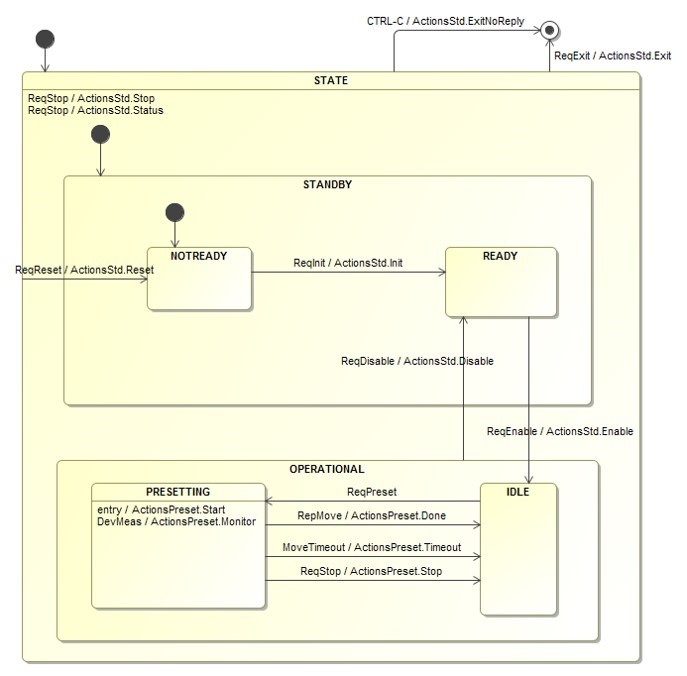
The second application (altazControl) is configured using config1.yaml and sm1.xml files. It receives the exif.ReqMove command and executes the ActionsMove::Start action and starts a do-activity: the ActivityMoving thread. The thread simulates the movement of the axes and publishes the intermediate positions via the XYMeas topic. When the target position is reached, the do-activity terminates and a reply (exif.RepMove) to the originator of the exif.ReqMove command is sent by the ActionsMove::Done action. See the picture below for a more complete overview of the behaviour of prsControl application. See the picture below for a more complete overview of the behaviour of altazControl application.
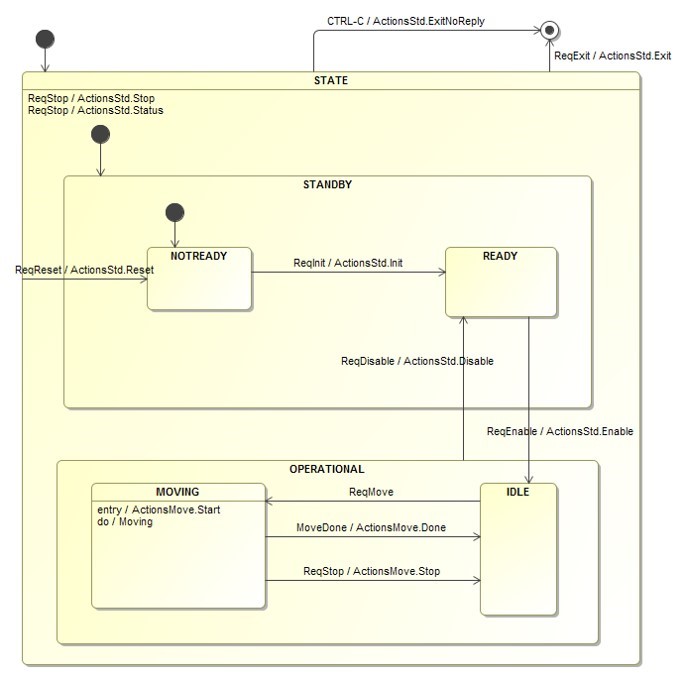
Note that both applications store the configuration, status, and telescope position information in the Redis runtime DB.
The sequence of messages to initialize, enable, and start the preset is shown below.
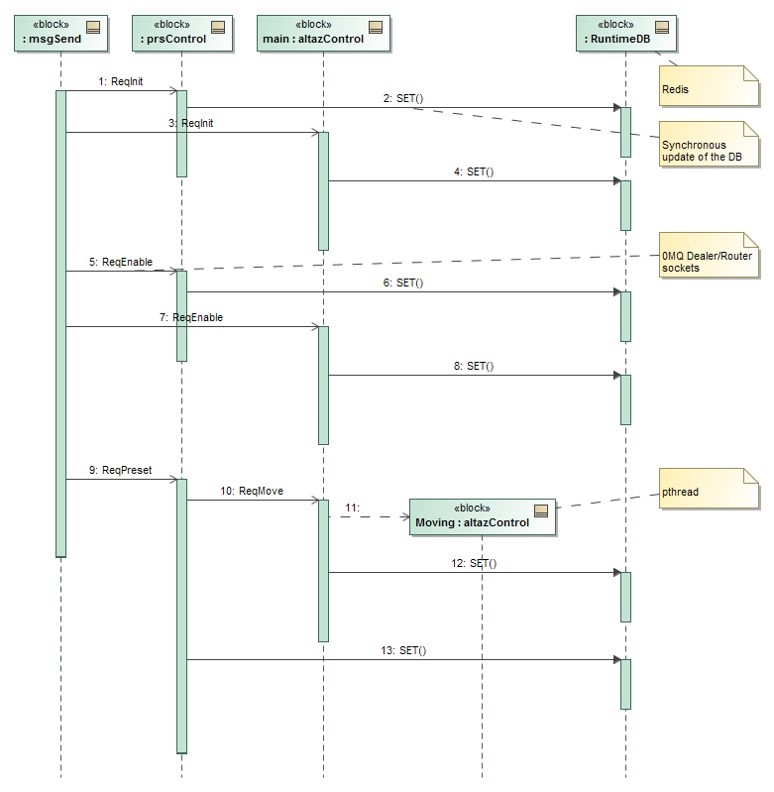
The sequence of messages to preset the axes is shown below.
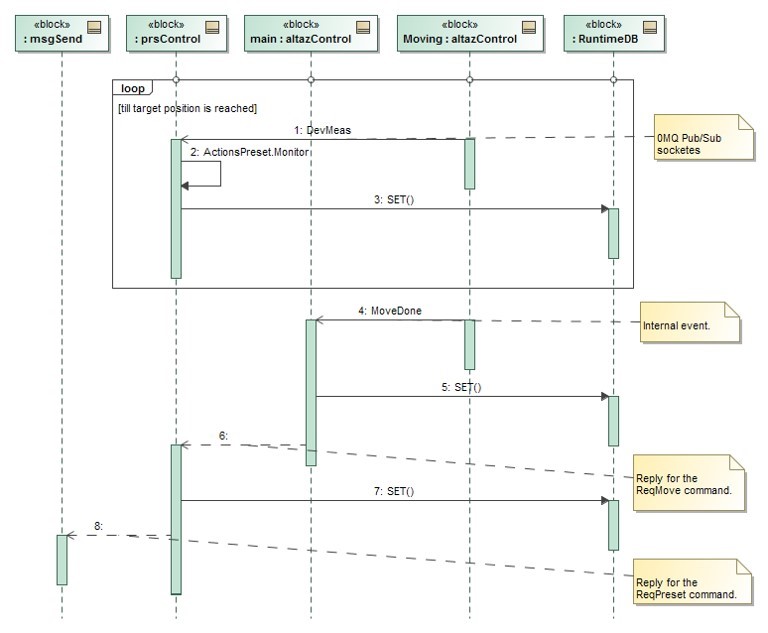
In order to run the server example refer to the RAD integration test section.
9.1.4. hellorad + server
This is an example that shows how a Python client can talk to a C++ server. The client sends a ReqTest request containing “Ping pong” text, the server receives the requests and replies with a RepTest reply. To run the example first start the server:
radServer -c radServer/config.yaml -l DEBUG &
and the start the client:
hellorad client --req-endpoint='tcp://localhost:5577'
9.2. Example Using CII Software Platform
9.2.1. exmalif
This is the porting of exif interface definition using CII MAL XML language.
9.2.2. exmalsend
This tool is similar to exsend and allows to send the commands specified in exmalif to a CII server (see exmalsever below) implementing the exmalif interface.
It shows how to send synchronous CII/MAL/ZPB requests and get the related replies.
9.2.3. exmalserver
This is the porting of the server example application to CII.
It shows how to implement a server that is able to:
reply asynchronously to commands including error replies and partial replies.
send commands synchronously and get replies asynchronously.
publish topics and subscribe to topics.