[Top] [Prev] [Next] [Bottom]
3.3 Analyzing HST Images
This section describes methods for using STSDAS and IRAF to work with two-dimensional image data from HST. Subjects include:
3.3.1 Basic Astrometry
This section describes how to determine the orientation of an HST image and the RA and Dec of any pixel or source within it, including:
Positional Information
The header of every calibrated HST two-dimensional image contains a linear astrometric plate solution, written in terms of the standard FITS astrometry header keywords: CRPIX1, CRPIX2, CRVAL1, CRVAL2, and the CD matrix-CD1_1, CD1_2, CD2_1, and CD2_2. IRAF/STSDAS tasks can use this information to convert between pixel coordinates and RA and Dec. Two simple tasks that draw on these keywords to relate your image to sky coordinates are:
sd> disconlab n3tc01a5r_cal.fits[1]
sd> xy2rd n3tc01a5r_cal.fits[1] x y
Table 3.1 lists some additional tasks that draw on the standard astrometry keywords.
Observers should be aware that these tasks do not correct for geometric distortion. Only FOC images currently undergo geometric correction during standard pipeline processing (the .c0h/.c0d and .c1h/.c1d FOC images have been geometrically corrected); STIS images will be geometrically corrected in the pipeline once suitable calibration files are in hand. If you need precise relative astrometry, you should use an instrument-specific task that accounts for image distortion, such as the metric task for WF/PC-1 and WFPC2 images, described on page 28-18.
 Do not use tasks like rimcursor or xy2rd directly on WF/PC-1 or WFPC2 images
if you require accurate relative positions. Calibrated WF/PC-1 and WFPC2
images retain a residual distortion which will affect the accuracy of relative positions. Both wmosaic and metric, found in the stsdas.hst_calib.wfpc package,
correct for this distortion.
Do not use tasks like rimcursor or xy2rd directly on WF/PC-1 or WFPC2 images
if you require accurate relative positions. Calibrated WF/PC-1 and WFPC2
images retain a residual distortion which will affect the accuracy of relative positions. Both wmosaic and metric, found in the stsdas.hst_calib.wfpc package,
correct for this distortion.
Improving Astrometric Accuracy
Differential astrometry (measuring a position of one object relative to another in an image) is easy and relatively accurate for HST images, while absolute astrometry is more difficult, owing to uncertainties in the locations of the instrument apertures relative to the Optical Telescope Assembly (OTA or V1) axis and the inherent uncertainty in the Guide Star positions. However, if you can determine an accurate position for any single star in your HST image, then your absolute astrometric accuracy will be limited only by the accuracy with which you know that star's location and the image orientation.
If there is a star on your image suitable for astrometry, you may wish to extract an image of the sky around this star from the Digitized Sky Survey and measure the position of that star using, for example, the GASP software (described in the STSDAS User's Guide). These tools can provide an absolute positional accuracy of approximately 0\xfd .7. Contact the Help Desk for assistance (send E-mail to help@stsci.edu).
3.3.2 Examining and Manipulating Image Data
This section describes implot and imexamine, two basic IRAF tools for studying the characteristics of an image, and Table 3.3 lists some useful IRAF/STSDAS tasks for manipulating image data.
implot
The IRAF implot task (in the plot package) allows you to examine an image interactively by plotting data along a given line (x axis) or column (y axis). When you run the task, a large number of commands are available in addition to the usual cursor mode commands common to most IRAF plotting tasks. A complete listing of commands is found in the on-line help, but the most commonly used are listed in Table 3.2. Figure 3.4 shows an example of how to use the implot task.
Figure 3.4: Plotting Image Data with implot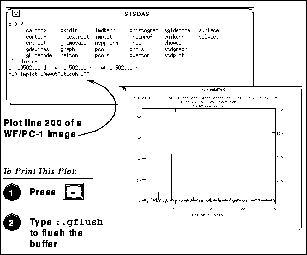
imexamine
The IRAF imexamine task (in the images.tv package) is a powerful task that integrates image display with various types of plotting capabilities. Commands can be passed to the task using the image display cursor and the graphics cursor. A complete description of the task and its usage are provided in the online help, available from within the IRAF environment by typing help imexamine.
3.3.3 Working with STIS and NICMOS Imsets
STIS and NICMOS data files contain groups of images, called imsets, associated with each individual exposure. A STIS imset comprises SCI, ERR, and DQ images, which hold science, error, and data quality information. A NICMOS imset, in addition to its SCI, ERR, and DQ images, also contains TIME and SAMP images recording the integration time and number of samples corresponding to each pixel of the SCI image. See the STIS and NICMOS Data Structures chapters for more details on imsets.
Here we describe several new STSDAS tasks, located in the stsdas.toolbox.imgtools.mstools package, that have been designed to help you work with with imsets as units and to deconstruct and rebuild them.
msarith
This tool is an extension of the IRAF task imarith to include error and data quality propagation. The msarith task supports the four basic arithmetic operations (+, -, *, /) and can operate on individual or multiple imsets. The input operands can be either files or numerical constants; the latter can appear with an associated error, which will propagate into the error array(s) of the output file. Table 3.4 below shows how this task operates on the SCI, ERR, and DQ images in a STIS or NICMOS imset, as well as the additional TIME and SAMP images belonging to NICMOS imsets:
In Table 3.4 the first operand (op1) is always a file, and the second operand (op2) can be either a constant or a file. The ERR arrays of the input files ( 1 and 2) are added in quadrature. If the constant is given with an error (2), the latter is added in quadrature to the input ERR array. Note that in Table 3.4 the pixels in the SCI images are in counts, but msarith can also operate on count rates.
mscombine
This task allows you to run the STSDAS task gcombine on STIS and NICMOS data files. It divides each imset into its basic components (SCI, ERR, and DQ, plus SAMP and TIME for NICMOS) to make them digestible for gcombine. The SCI extensions become the inputs proper to the underlying gcombine task, and the ERR extensions become the error maps. The DQ extensions are first combined with a user-specified Boolean mask allowing selective pixel masking and then fed ino the data quality maps. If scaling by exposure time is requested, the exposure times of each imset are read from the header keyword PIXVALUE in the TIME extensions.
Once gcombine finishes, mscombine reassembles the individual output images into imsets and outputs them as a STIS or NICMOS data file. The output images and error maps from gcombine form the SCI and ERR extensions of the output imset. The DQ extension will be a combination of the masking operations and the rejection algorithms executed by gcombine. For NICMOS, the TIME extension will be the sum of the TIME values from the input files minus the rejected values, divided on a pixel-by-pixel basis by the number of valid pixels in the output image. The final TIME array will be consistent with the output SCI image (average or median of the science data). The SAMP extension for NICMOS is built from all the input SAMP values, minus the values discarded by masking or rejection.
msstatistics
This tool is an extension of gstatistics in the STSDAS package, which is in turn an extension of imstatistics. The main novelty is the inclusion of the error and data quality information included with STIS and NICMOS images in computing statistical quantities. In addition to the standard statistical quantities (min, max, sum, mean, standard deviation, median, mode, skewness, kurtosis), two additional quantities have been added to take advantage of the error information: the weighted mean and the weighted variance of the pixel distribution. If xi is the value at the i-th pixel, with associated error i, the weighted mean and variance used in the task are:

and:

The data quality information carried by the STIS or NICMOS file is used to reject pixels in the statistical computation. Users can supply additional masks to reject objects or regions from the science arrays.
mssplit and msjoin
The mssplit task extracts user-specified imsets from a STIS or NICMOS data file and copies them into separate files. Each output file contains a single imset along with the primary header of the original file. You might find this task useful for reducing the size of a STIS or NICMOS file containing many imsets or for performing analysis on a specific imset. The msjoin task inverts the operation of mssplit: it assembles separate imsets into a single data file.
There are additional tasks in this package for deleting and sorting imsets, as well as tasks for addressing a specific image class within an imset.
3.3.4 Photometry
Included in this section are:
IRAF and STSDAS Photometry Tasks
The following are some useful IRAF/STSDAS packages and tasks for performing photometry on HST images:
http://iraf.noao.edu/
 The apphot package allows you to measure fluxes within a series of concentric
apertures. This technique can be used to determine the flux in the wings of the
PSF, which is useful if you wish to estimate the flux of a saturated star by scaling
the flux in the wings of the PSF to an unsaturated PSF.
The apphot package allows you to measure fluxes within a series of concentric
apertures. This technique can be used to determine the flux in the wings of the
PSF, which is useful if you wish to estimate the flux of a saturated star by scaling
the flux in the wings of the PSF to an unsaturated PSF.
Converting Counts to Flux or Magnitude
All calibrated HST images record signal in units of counts or Data Numbers (DN)1-NICMOS data is DN s-1. The pipeline calibration tasks do not alter the units of the pixels in the image. Instead they calculate and write the inverse sensitivity conversion factor (PHOTFLAM) and the ST magnitude scale zero point (PHOTZPT) into header keywords in the calibrated data. WF/PC-1 and WFPC2 observers should note that the four chips are calibrated individually, so these photometry keywords belong to the group parameters for each chip.
For all instruments other than NICMOS, PHOTFLAM is defined to be the mean flux density F in units of erg cm-2 s-1 Å-1 that produces 1 count per second in the HST observing mode (PHOTMODE) used for the observation. If the F spectrum of your source is significantly sloped across the bandpass or contains prominent features, such as strong emission lines, you may wish to recalculate the inverse sensitivity using synphot, described below. WF/PC-1 observers should note that the PHOTFLAM value calculated during pipeline processing does not include a correction for temporal variations in throughput owing to contamination buildup. Likewise, FOC observers should note that PHOTFLAM values determined by the pipeline before May 18, 1994 do not account for sensitivity differences in formats other than 512 x 512 (see "Format-Dependent Sensitivity" on page 7-10).
To convert from counts or DN to flux in units of erg cm-2 s-1 Å-1, multiply the total number of counts by the value of the PHOTFLAM header keyword and divide by the value of the EXPTIME keyword (exposure time). You can use the STSDAS task imcalc to convert an entire image from counts to flux units. For example, to create a flux-calibrated output image outimg.fits from an input image inimg.fits[1] with header keywords PHOTFLAM = 2.5E-18 and EXPTIME = 1000.0, you could type:
st> imcalc inimg.fits[1] outimg.fits "im1*2.5E-18/1000.0"
Calibrated NICMOS data are in units of DN s-1, so the PHOTFLAM values in their headers are in units of erg cm-2 Å-1. You can simply multiply these images by the value of PHOTFLAM to obtain fluxes in units of erg cm-2 s-1 Å-1. NICMOS headers also contain the keyword PHOTFNU in units of Jy s. Multiplying your image by the PHOTFNU value will therefore yield fluxes in Janskys.
 If your HST image contains a source whose flux you know from ground based
measurements, you may choose to determine the final photometry of your HST
image from the counts observed for this source.
If your HST image contains a source whose flux you know from ground based
measurements, you may choose to determine the final photometry of your HST
image from the counts observed for this source.
To convert a measured flux F, in units of erg cm-2 s-1 Å-1, to an ST magnitude, plug it into the following equation:
m = -2.5 x log10 (F) + PHOTZPT
where the value of the PHOTZPT keyword is the zero point of the ST magnitude scale. The zero point of the ST magnitude system has always been and probably always will be equal to -21.10, a value chosen so that Vega has an ST magnitude of zero for the Johnson V passband (see Koornneef et al., 1986; Horne, 1988; and the Synphot Users Guide).
synphot
The STSDAS synthetic photometry package, called synphot, can simulate HST observations of astronomical targets with known spectra. It contains throughput curves for the components of all HST instruments, such as mirrors, filters, gratings, apertures, and detectors, and can generate passband shapes for any combination of these elements. It can also generate synthetic spectra of many different types, including stellar, blackbody, power-law and H II region spectra, and can convolve these spectra with the throughputs of HST's instruments. You can therefore use it to compare results in many different bands, to cross-calibrate one instrument with another, or to relate your observations to theoretical models.
One useful application of synphot is to recalculate the value of PHOTFLAM for a given observation using the latest calibration files. For example, to recalculate PHOTFLAM for an FOC observation, you could use the calcphot task in synphot as follows:
sy> calcphot foc,f/96,x96zlrg,f501n `unit(1,flam)' counts
The first argument to calcphot gives the instrument and its configuration, in this case the FOC f/96 camera in full zoomed format with the F501 filter. (See the obsmode task in synphot and the Synphot User's Guide for help with these observation-mode keywords.) The second tells the task to model a flat F spectrum having unit flux, and the third tells the task to produce output in units of counts per second. After you run calcphot, its result parameter will contain the count rate expected from the FOC, given this configuration and spectrum. The PHOTFLAM keyword, defined to be the flux required to produce one count per second, simply equals the reciprocal of this value, which you can print to the screen by typing =1./calcphot.result at the IRAF prompt.
Please see the Synphot User's Guide for more details on this multipurpose package, and see Appendix A for information on getting the synphot dataset, which is not included with STSDAS.
Information about retrieving the synphot dataset can be found in Appendix A.
[Top] [Prev] [Next] [Bottom]
1
Except for 2-D rectified STIS images, which are in units of I (see Chapter 23).
stevens@stsci.edu
Copyright © 1997, Association of Universities for Research in Astronomy. All rights
reserved.
Last updated: 11/13/97 16:26:00







