[Top] [Prev] [Next] [Bottom]
23.5 Target Acquisition Data
Target Acquisition Basics
There are two types of STIS target acquisition: ACQ and ACQ/PEAK; for more details on target acquisition, see STIS ISR 97-03. For ACQ observations, there are three parts to the target acquisition data that you receive. The first is an image of the target in the target acquisition sub-array (100 x 100 pixel for POINT sources, user-defined for DIFFUSE sources) based on the initial pointing (see Figure 23.1a); image_raw.fits[sci,1]). The software then determines the position of the target with a flux-weighted pointing algorithm and calculates the slew needed to place the target at a reference point in the target acquisition sub-array; for DIFFUSE sources, an option to perform a geometric centroiding is available. An image of the target at this corrected position is then obtained (see Figure 23.1b) image_raw.fits[sci,2])-this is the coarse centering. To perform the fine centering (i.e., to place the object precisely in a slit), an image (32 x 32) of the reference 0.2X0.2 aperture is obtained (see Figure 23.1c) image_raw.fits[sci,3]), and the location of the aperture determined. A fine slew is then performed to center the target in the reference aperture, which should be accurate to 0.5 pixels (0.025 arcseconds). A final slew to center the target in the science aperture is performed at the start of the follow-on science observation.
Figure 23.1: Three Stages of an ACQ Observation

If a narrow slit is used for the science, an ACQ/PEAK acquisition may have been performed. The slit is scanned across the object with a pattern determined by the aperture selected. The telescope is then slewed to center the star in the aperture, and a confirmation image (a 32 x 32 grid) is obtained; the accuracy of the ACQ/PEAK is 5% of the slit width. Note that the last extension in the file (image_raw.fits[4]) contains the values in the individual steps of the ACQ/PEAK (use listpix to view these values).
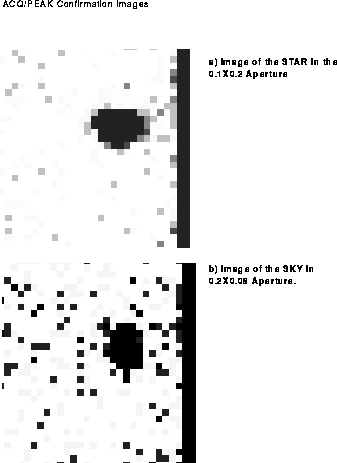
When examining the confirmation image, note that the slit will be illuminated by the sky even if no star is present (see Figure 23.2; image_raw.fits[sci,1]). To confirm the presence of a star, use the imexamine task and make certain that the FHWM is small. For the images in Figure 23.2, the measured values are given in Table 23.4.
Figure 23.2 ACQ/PEAK Confirmation Images
ACQ Data
An examination of the target acquisition data (either from the raw data or the paper products) will allow you to detect gross errors in the centering of your target. A comparison of the initial ([sci,1]) and post-coarse slew ([sci,2]) images should show the object moving close to the center of the acquisition sub-array. You can also verify that the fluxes in both images, which are found in pixel 722 of the _spt file, are consistent by performing the following steps in IRAF:
cl> listpix image_spt.fits[1] | grep 722

cl> listpix image_spt.fits[2] | grep 722
The first value will be the target flux in the maximum checkbox (3 x 3 for POINT sources, user-defined for DIFFUSE sources) in the initial image, while the second is the maximum checkbox in the post-coarse slew image. If the fluxes are not consistent, or if the object did not move closer to the center of the array, there is likely a problem with your acquisition.
ACQ/Peak Data
To verify that the ACQ/PEAK worked, examine the flux values at each stage of the peakup (listed in the paper products or in the data file). Comparison of the maximum flux value during the peakup with the flux in the post-ACQ/PEAK confirmation image should show that the flux in the confirmation image was greater than or equal to the maximum flux in the peakup grid. If this is not the case, then there is likely a problem with your peakup acquisition.
Note that you will need to perform two corrections to the data prior to your comparison. When calculating the flux in the confirmation image, you will need to subtract 32768 if the minimum flux value is greater than or equal to 32768. The flux values in the peakup scan also need to be adjusted to add back the minimum flux value that was subtracted prior to processing of the peakup data. This value can be found in pixel 712 of the _spt image; to display the value on the screen, do the following in IRAF:
cl> listpix image_spt.fits[1] | grep 712
[Top] [Prev] [Next] [Bottom]
stevens@stsci.edu
Copyright © 1997, Association of Universities for Research in Astronomy. All rights
reserved.
Last updated: 11/13/97 17:47:14