[Top] [Prev] [Next] [Bottom]
26.1 Overview of Pipeline Calibration
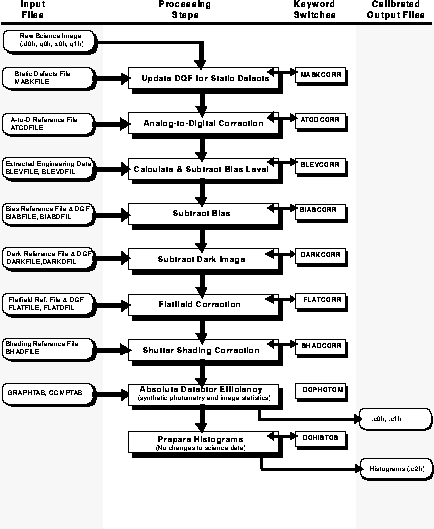
In this section we provide an overview of the steps comprising the routine pipeline calibration. The flow of the data through the pipeline is presented in schematic form in Figure 26.2. The pipeline calibration software (which the user can find as calwp2 in the STSDAS hst_calib package) takes as input the raw WFPC2 data file pairs (see Table 25.1) .d0h/.d0d, .q0h/.q0d, .x0h/.x0d, .q1h/.q1d and any necessary calibration reference images or tables. The software determines which calibration steps to perform by looking at the values of the calibration switches (e.g., MASKCORR, BIASCORR, etc.) in the header of the raw data (.d0h) file. Likewise, it selects the reference files to use in the calibration of your data by examining the reference file keywords (e.g., MASKFILE, BIASFILE, BIASDFILE, etc.). The appropriate values of the calibration switches and reference file keywords depend on the instrumental configuration used, the date of the observation, and any special pre-specified constraints. They were initially set in the headers of the raw data file in the OPUS pipeline during generic conversion; if reprocessing is necessary, they can be redefined by editing the raw header (.d0h) using the task chcalpar and then running calwp2 on the raw files.
The values of the calibration switches in the headers of the raw and calibrated data indicate what calibration steps the pipeline applied to the data and which calibration reference files were used. Calibration switches will have the value PERFORM, OMIT, or COMPLETE, depending on whether the step has yet to be performed, is not performed during the processing of this dataset, or was completed. For convenience, these keywords are reported in the dataset information page of the new-style paper products.
As with other header keywords, the calibration keywords can be viewed using, for example, imhead or hedit. Alternately, you can use the chcalpar task in the STSDAS tools package to view the calibration keywords directly.
 There are history records at the bottom of the header file of the calibrated data (as
well as the calibration reference file headers). These history records sometimes
contain important information regarding the reference files used to calibrate the
data in the pipeline.
There are history records at the bottom of the header file of the calibrated data (as
well as the calibration reference file headers). These history records sometimes
contain important information regarding the reference files used to calibrate the
data in the pipeline.
The flow chart below summarizes the sequence of calibration steps performed by calwp2, including the input calibration reference files and tables, and the output data files from each step. The purpose of each calibration step is briefly described in the accompanying table; a more detailed explanation is provided in the following section.
Figure 26.2: Pipeline Processing by calwp2
Calibration Steps and -Reference Files Used for WFPC2 -Pipeline
-Processing
[Top] [Prev] [Next] [Bottom]
stevens@stsci.edu
Copyright © 1997, Association of Universities for Research in Astronomy. All rights
reserved.
Last updated: 11/13/97 17:52:14