#include <ddtCutValuesWidget.hpp>
Signals | |
| void | SetCutValues (double low, double high) |
| void | SetAutoCuts () |
| void | SetMinMaxCuts () |
Properties | |
| double | default_low |
| double | default_high |
| DdtCutValuesWidget (QWidget *parent=nullptr) | |
| virtual | ~DdtCutValuesWidget () |
| void | set_default_low (const double low) |
| double | get_default_low () const |
| void | set_default_high (const double high) |
| double | get_default_high () const |
| void | SwitchToAutoCut () |
| void | SwitchToMinMaxCut () |
| void | SwitchToUserCut () |
| void | CurrentCutValues (const double cutvalue_min, const double cutvalue_max) |
Additional Inherited Members | |
 Public Member Functions inherited from DdtWidget Public Member Functions inherited from DdtWidget | |
| virtual | ~DdtWidget ()=default |
| DdtWidget (QWidget *parent=nullptr) | |
| DdtWidget. More... | |
| QWidget * | AddParentWidget (QLayout *child_layout) |
| AddParentWidget This will add the given layout to a QGroupBox Widget to integrate in the parent layout. More... | |
Detailed Description
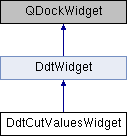
Class for the Cut Values Widget that can be used to defined cut values for the display of the image in an Image Widget
Constructor & Destructor Documentation
◆ DdtCutValuesWidget()
|
explicit |
Constructor
- Parameters
-
parent Pointer to the parent widget
◆ ~DdtCutValuesWidget()
|
virtualdefault |
Destructor
Member Function Documentation
◆ CurrentCutValues
|
slot |
Slot which is called when the cut values have changed (externally)
◆ get_default_high()
| double DdtCutValuesWidget::get_default_high | ( | ) | const |
Retrieve the default value for the high cut value
- Returns
- the default value for the high cut value
◆ get_default_low()
| double DdtCutValuesWidget::get_default_low | ( | ) | const |
Retrieve the default value for the low cut value
- Returns
- the default value for the low cut value
◆ set_default_high()
| void DdtCutValuesWidget::set_default_high | ( | const double | high | ) |
Set the default value for the high cut value
- Parameters
-
high the default maximum cut value that should be used
◆ set_default_low()
| void DdtCutValuesWidget::set_default_low | ( | const double | low | ) |
Set the default value for the low cut value
- Parameters
-
low the default minimum cut value that should be used
◆ SetAutoCuts
|
signal |
Signal that is used to switch to auto cut levels
◆ SetCutValues
|
signal |
Signal that is used to set the specified cut values, implying that the user defined cut levels are applied
- Parameters
-
low Lower cut value high Upper cut value
◆ SetMinMaxCuts
|
signal |
Signal that is used to switch to min max cut lavels
◆ SwitchToAutoCut
|
protectedslot |
Slot which is called when the auto cut radio button was selected
◆ SwitchToMinMaxCut
|
protectedslot |
Slot which is called when the min/max cut radio button was selected
◆ SwitchToUserCut
|
protectedslot |
Slot which is called when the user values radio button was selected
Property Documentation
◆ default_high
|
readwrite |
Default for the maximum cut value
◆ default_low
|
readwrite |
Default for the minimum cut value
The documentation for this class was generated from the following files:
- datavisualisation/widgetsdialogs/src/include/ddt/widgets/ddtCutValuesWidget.hpp
- datavisualisation/widgetsdialogs/src/widgets/ddtCutValuesWidget.cpp