7. SysSup Widgets
The SysSup (System Supervisor) widgets provide controls for subsystem-level state management and instrument-specific operation from the system supervisor perspective. These widgets are used in ccfGui for overall CCF and NGC monitoring and control.
7.1. Widget Constructor Signatures
Widget |
Parameters |
|---|---|
SubSysStateWidget |
|
CcfControlWidget |
|
NgcControlWidget |
|
7.2. SubSysStateWidget
This widget displays the state machine state and sub-state of an IFW subsystem via Taurus labels connected to the System Supervisor OLDB paths. It provides a combo box to send Init, Enable, Disable, and Reset commands through the system supervisor facade.
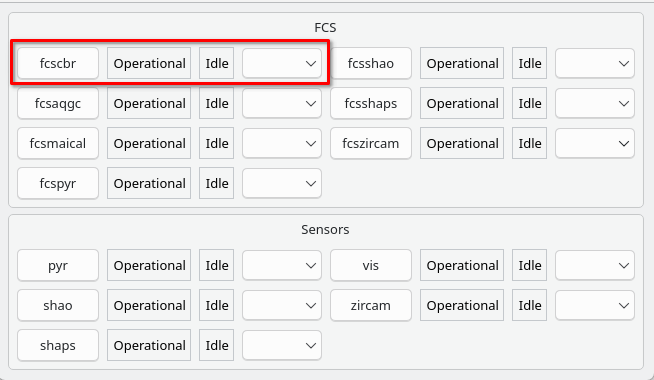
SubSysStateWidget instances in a panel layout, each displaying state and sub-state for a different subsystem. One widget instance is outlined in red.
The widget is unusual in that it takes an existing SysSupCmdsFacade
instance rather than a base_uri — the facade is looked up by the calling
application and passed in.
OLDB paths are constructed as:
stat/subsystems/{subsystem_name_lowercase}/states/state
stat/subsystems/{subsystem_name_lowercase}/states/substate
under the syssup_db_prefix.
Example:
from ifw.wdglib.comm import ConnectionManager
from ifw.wdglib.widgets.syssup import SubSysStateWidget

conn_mgr = ConnectionManager()
syssup_facade = conn_mgr.get_syssupcmds("zpb.rr://127.0.0.1:12081/AppCmds")

subsys_wdg = SubSysStateWidget(
    parent=self,
    syssup_facade=syssup_facade,
    syssup_db_prefix="cii.oldb:///elt/syssup/stat",
    subsystem_name="ccf",
)
layout.addWidget(subsys_wdg)
The combo box (action_comboBox) triggers facade commands on selection:
@Slot(str)
def on_action_comboBox_textActivated(self, text):
    if text == "Init":
        self._syssupcmds.init(self._subsystem_name)
    elif text == "Enable":
        self._syssupcmds.enable(self._subsystem_name)
    # ... etc.
7.3. CcfControlWidget
This is a composite widget for operating the CCF from a system supervisor or OCS (Observation Coordination System) perspective. It provides pages for state monitoring, acquisition control, recording, and setup.
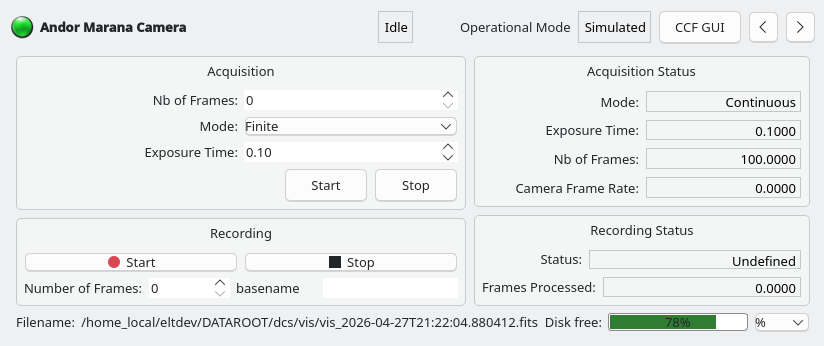
CcfControlWidget panel: state monitoring, acquisition control, and recording status
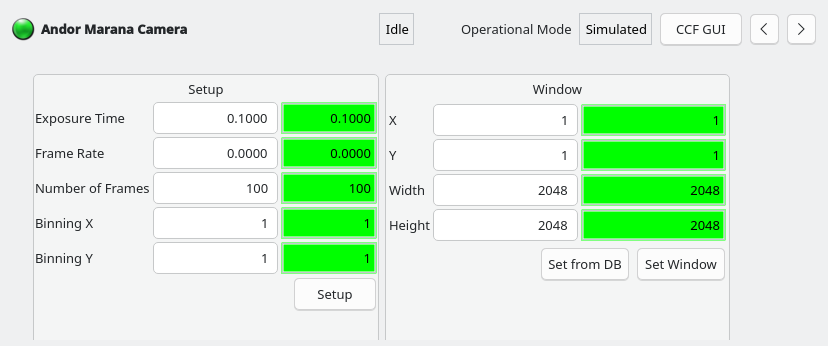
CcfControlWidget panel, setup page
Key features:
Displays state, sub-state, simulation mode, exposure time, frame rate, recording status, and frames processed via Taurus labels
Start/stop acquisition with
DcsCmdsFacadeandStdCmdsFacadeStart/stop recording with
RecCmdsFacadePubFits file publisher number-of-frames and basename setup
Disk free space monitoring bar, updated on file path changes
Page navigation through a stacked widget with left/right buttons
Green/red LED indicating overall connection state across StdCmds, DcsCmds, and RecCmds facades
Auto-connect action and external ccfGui launch button
The widget embeds a CcfSetupWidget on its setup page.
At startup, it queries OLDB for pipeline and publisher information to discover PubFits publishers:
get_children_from_ui_path()for pipeline and publisher names (see OLDB Query Functions)get_datapoint_value()to check the adapter type for each publisher (see OLDB Query Functions)
7.3.1. Connection State Handling
The widget tracks connection state for three facades independently
@Slot(bool)
def on_stdcmds_connection_changed(self, state):
    self.connection_state["StdCmds"] = state
    self._update_connection()

def _update_connection(self):
    final_state = all(self.connection_state.values())
    self.ui.statusQLed.setLedColor("green" if final_state else "red")
The LED turns green only when all three facades are connected.
7.3.2. Error Handling
Errors from facade commands are caught globally and shown in a modal
ErrorDialog (see ErrorDialog)
@Slot()
def _error_slot(self, exception_err):
    exctype, value, tb = exception_err
    dlg = ErrorDialog(str(value), str(tb))
    dlg.exec_()
Example:
from ifw.wdglib.widgets.syssup import CcfControlWidget

ccf_wdg = CcfControlWidget(
    self,
    "zpb.rr://127.0.0.1:12081",
    "cii.oldb:///ccftest/testdcs",
    "camera0",
    "CCF Camera 0",
)
layout.addWidget(ccf_wdg)
7.4. NgcControlWidget
This widget extends CcfControlWidget for the New General Detector
Controller instrument. It reuses the parent widget’s structure but overrides
OLDB paths via NgcOldbPaths (which extends CcfOldbPaths)
and replaces the embedded setup widget with NgcCompactSetupWidget.
Key differences from CcfControlWidget:
OLDB paths are adapted to NGC server structure
Simulated mode maps three string values (
NORMAL,HW-SIM,WS-SIM) usingEventValueMapAcquisition setup command is NGC-specific
The external GUI launched is
dcfGuiinstead ofccfGuiThe setup page embeds
NgcCompactSetupWidget
Because it inherits CcfControlWidget, its constructor signature is
the same:
from ifw.wdglib.widgets.syssup import NgcControlWidget

ngc_wdg = NgcControlWidget(
    self,
    "zpb.rr://127.0.0.1:12081",
    "cii.oldb:///ngctest/testdcs",
    "ngc0",
    "NGC Detector",
)
layout.addWidget(ngc_wdg)
7.5. Using SysSup Widgets in a Panel
A typical panel using SysSup widgets might show the overall subsystem state alongside instrument control widgets
from ifw.wdglib.comm import ConnectionManager
from ifw.wdglib.widgets.syssup import SubSysStateWidget
from ifw.wdglib.widgets.syssup import CcfControlWidget

conn_mgr = ConnectionManager()
conn_mgr.auto_connect = True

# System supervisor state widget
syssup_facade = conn_mgr.get_syssupcmds("zpb.rr://127.0.0.1:12081/AppCmds")
subsys_wdg = SubSysStateWidget(
    self, syssup_facade, "cii.oldb:///elt/syssup/stat", "ccf"
)

# CCF control widget
ccf_wdg = CcfControlWidget(
    self, "zpb.rr://127.0.0.1:12081",
    "cii.oldb:///ccftest/testdcs", "camera0", "CCF Camera 0",
)

sys_dock.addWidget(subsys_wdg)
instr_dock.addWidget(ccf_wdg)
The CcfControlWidget and NgcControlWidget are also the
widgets used directly in ccfGui by the OCS.