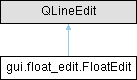
Widget for editing 32-bit and 64-bit floating-point values.
More...
|
| | __init__ (self, parent=None, *args, **kwargs) |
| | Initialise the FloatEdit widget.
|
| |
| | get_value (self) |
| | Getter for the value property will return the edited floating-point value.
|
| |
| | set_value (self, float value) |
| | Setter for the value property.
|
| |
| | get_minimum (self) |
| | Getter returns the minimum (inclusive) floating-point value allowed.
|
| |
| | set_minimum (self, float value) |
| | Setter for the minimum (inclusive) floating-point value allowed.
|
| |
| | get_maximum (self) |
| | Getter returns the maximum (inclusive) floating-point value allowed.
|
| |
| | set_maximum (self, float value) |
| | Setter for the maximum (inclusive) floating-point value allowed.
|
| |
| | set_range (self, float minimum=None, float maximum=None, type=None) |
| | Set the minimum and maximum range allowed for the floating-point value.
|
| |
|
| | value_changed = Signal() |
| | This signal is emitted whenever the value property changes.
|
| |
| | commit_data = Signal(QWidget) |
| | This signal is emitted whenever the user has made modifications to the data using this edit widget that should be committed.
|
| |
| | value |
| |
| | minimum |
| |
| | maximum |
| |
Widget for editing 32-bit and 64-bit floating-point values.
◆ __init__()
| gui.float_edit.FloatEdit.__init__ |
( |
| self, |
|
|
| parent = None, |
|
|
* | args, |
|
|
** | kwargs ) |
Initialise the FloatEdit widget.
- Parameters
-
| parent | The optional parent Qt widget object. |
| args | Additional positional arguments passed onto the base class. |
| kwargs | Additional keyword arguments passed onto the base class. |
◆ _editing_finished()
| gui.float_edit.FloatEdit._editing_finished |
( |
| self | ) |
|
|
protected |
◆ _text_changed()
| gui.float_edit.FloatEdit._text_changed |
( |
| self, |
|
|
| text ) |
|
protected |
◆ get_maximum()
| gui.float_edit.FloatEdit.get_maximum |
( |
| self | ) |
|
Getter returns the maximum (inclusive) floating-point value allowed.
◆ get_minimum()
| gui.float_edit.FloatEdit.get_minimum |
( |
| self | ) |
|
Getter returns the minimum (inclusive) floating-point value allowed.
◆ get_value()
| gui.float_edit.FloatEdit.get_value |
( |
| self | ) |
|
Getter for the value property will return the edited floating-point value.
◆ set_maximum()
| gui.float_edit.FloatEdit.set_maximum |
( |
| self, |
|
|
float | value ) |
Setter for the maximum (inclusive) floating-point value allowed.
Note that infinities are accepted irrespective of the maximum.
- Parameters
-
| value | The new maximum value allowed. |
◆ set_minimum()
| gui.float_edit.FloatEdit.set_minimum |
( |
| self, |
|
|
float | value ) |
Setter for the minimum (inclusive) floating-point value allowed.
Note that negative infinities are accepted irrespective of the minimum.
- Parameters
-
| value | The new minimum value allowed. |
◆ set_range()
| gui.float_edit.FloatEdit.set_range |
( |
| self, |
|
|
float | minimum = None, |
|
|
float | maximum = None, |
|
|
| type = None ) |
Set the minimum and maximum range allowed for the floating-point value.
The range as [minimum, maximum] should either be provided explicitly as arguments, or the type argument should be provided instead, from which the range will be derived.
- Parameters
-
| minimum | The minimum (inclusive) value allowed. |
| maximum | The maximum (inclusive) value allowed. |
| type | Alternative type (RtcFloat or RtcDouble) from which to derive the minimum/maximum. |
◆ set_value()
| gui.float_edit.FloatEdit.set_value |
( |
| self, |
|
|
float | value ) |
Setter for the value property.
If the set_range was used with a type argument, e.g. RtcFloat, this method will attempts to round the value appropriately using Numpy when converting to a string representation.
- Parameters
-
| value | The new value to be edited by this widget. |
◆ _editing_finished
| gui.float_edit.FloatEdit._editing_finished |
|
protected |
◆ _text_changed
| gui.float_edit.FloatEdit._text_changed |
|
protected |
◆ _type
| gui.float_edit.FloatEdit._type = None |
|
protected |
◆ _validator
◆ commit_data
| gui.float_edit.FloatEdit.commit_data = Signal(QWidget) |
|
static |
This signal is emitted whenever the user has made modifications to the data using this edit widget that should be committed.
◆ maximum
| gui.float_edit.FloatEdit.maximum |
|
static |
Initial value:= Property(
type=float,
fget=get_maximum,
fset=set_maximum,
doc="The maximum value allowed for the floating-point value.",
)
◆ minimum
| gui.float_edit.FloatEdit.minimum |
|
static |
Initial value:= Property(
type=float,
fget=get_minimum,
fset=set_minimum,
doc="The minimum value allowed for the floating-point value.",
)
◆ value
| gui.float_edit.FloatEdit.value |
|
static |
Initial value:= Property(
type=float,
fget=get_value,
fset=set_value,
user=True,
notify=value_changed,
doc="The floating-point value being edited by this widget.",
)
◆ value_changed
| gui.float_edit.FloatEdit.value_changed = Signal() |
|
static |
This signal is emitted whenever the value property changes.
The documentation for this class was generated from the following file:
 1.13.2