Health Check monitor


Agora | CAL | HC | refs | QC
HealthCheck Monitor
    HOME | UsersGuide
FORS1:
lamps: spectroscopic
Other HC:
QC links:
[page auto-refreshes after 60 sec]            [press Ctrl+R to enforce refresh of scores and dates]
FORS1 trending system: HEALTH CHECK plot
Last update: 2008-12-04T23:49:29 (UT)
| now: 2008-12-05T03:42:23 (UT)
scores active INFO USERS-GUIDE MORE
same group: FFB12 FFB34 FFR34 Ar12 HeHgCd Ne12
last OPSLOG data:
2008-11-30
Plot: 1 2 3 4   latest_files
N_data: number of recent OPSLOG entries plotted here
N_data: 1 1 1 1 availability
less ... | history ... | plot tutorial ... | contact               [?]
Print: Information and research: News:
- png file - advanced studies: QC1 browser | QC1 plotter
since 2008-09-01 correction of a bug in the bias subtraction for lamp flux data for pipeline version run in Garching; Paranal still has buggy version
Plot
?
Symb
?
Source
*
OPS?
**
Average ? Thresholds ? N_
data
QC1
parameter
Data
downloads
Remarks
method value unit method value
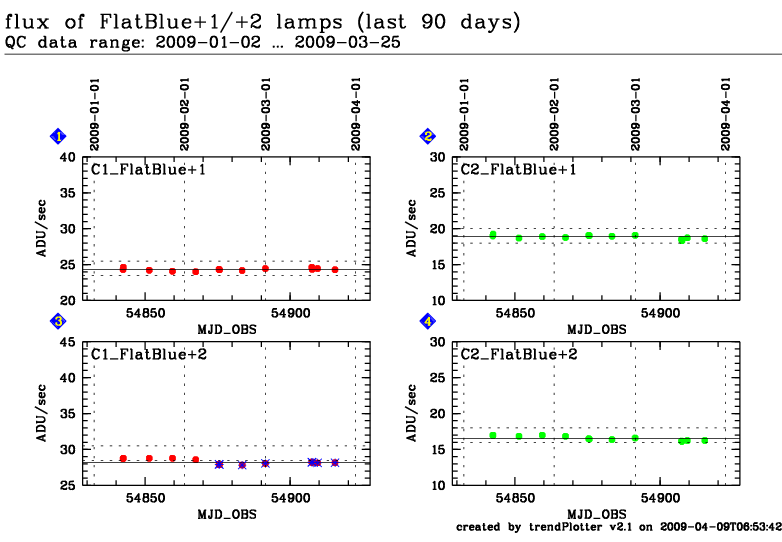
1 QC1DB yes (1) MEDIAN 25.34211 ADU VAL25,26 12 flux this | last_yr | all C1 (Garching)
3 QC1DB yes (1) MEDIAN 30.32557 ADU VAL29,32 12 flux this | last_yr | all C1 (Garching)
2 QC1DB yes (1) MEDIAN 19.44888 ADU VAL19,20 12 flux this | last_yr | all C2 (Garching)
4 QC1DB yes (1) MEDIAN 17.64436 ADU VAL17,19 12 flux this | last_yr | all C2 (Garching)
*Data sources: QC1DB: QC1 database; LOCAL: local text file | **OPS: to indicate that OPSLOG data are included
General information

Click on any of the plots to see a close-up version.

If applicable, the latest values from Paranal ops logs are plotted as blue dots. More information about those values, including a download option, is available in the OPS column.

The latest date is indicated on top of the plot, data points belonging to that date are specially marked.

If configured,

  • statistical averages are indicated by a solid line, and thresholds by broken lines
  • outliers are marked by a red asterisk. They are defined as data points outside the threshold lines
  • "aliens" (= data points outside the plot Y limits) are marked by a red arrow ( or )
  • you can download the data for each parameter set if the 'Data downloads' link shows up