[Top] [Prev] [Next] [Bottom]
15.3 Working with NICMOS Files
The quickest way to learn how each observation was performed is to use the iminfo task in the STSDAS toolbox.headers package to look at the headers of the science data. The output from iminfo summarizes on one screen the relevant information about an observation (Table 15.7) and the instrument configuration during the observations (Table 15.8), by reading and reporting the value of the appropriate keywords.
NICMOS-Specific Information in iminfo Listing
Field Descriptor
|
Header Keyword Source
|
|---|
|
Image type
|
IMAGETYP
|
|
Number of extensions
|
NEXTEND
|
|
Camera number
|
CAMERA
|
|
Aperture
|
APERTURE
|
|
Filter name
|
FILTER
|
|
Observation Mode
|
OBSMODE
|
|
Number of initial/final reads
|
NREAD (ACCUM)
|
|
Number of intermediate samples
|
NSAMP (MULTIACCUM or RAMP)
|
|
MULTIACCUM sequence
|
SAMP_SEQ
|
|
Exposure time (sec)
|
EXPTIME
|
|
Readout speed
|
READOUT
|
|
Association ID
|
ASN_ID
|
|
Number of Iterations
|
NUMITER
|
|
Calibration steps done
|
Switches whose values are set to "PERFORMED". Switches are: ZOFFDONE, MASKDONE, BIASDONE, NOISDONE, DARKDONE, NLINDONE, FLATDONE, UNITDONE, PHOTDONE, CRIDDONE, BACKDONE, WARNDONE
|
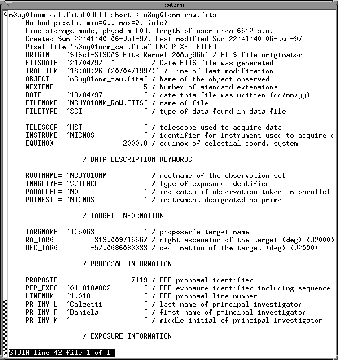
The entire suite of keywords from any header can be listed with the IRAF task imheader. Given that NICMOS data files contain multiple extensions, the number of the desired extension must always be specified. For example, to list the primary header content of a calibrated image, you type
cl> imheader n0g70106t_cal.fits[0] long+ | page
where [0] identifies the primary header. To list the header of the second science image in a MULTIACCUM sequence (the sixth extension):
cl> imheader n0g70106t_cal.fits[6] long+ | page
An example of a header listing is shown in Figure 15.3 below.
Figure 15.3: Long imheader
 Chapter 2 describes in detail how to work with FITS file extensions. Here we will recap the essentials. In order to simplify access to NICMOS FITS image extensions, each extension header contains the two keywords: EXTNAME (extension name) and EXTVER (extension version number). The EXTNAME keyword identifies the nature of the extension (SCI, ERR, DQ, SAMP, TIME, see Table 15.7). The EXTVER keyword contains an integer value which is used to uniquely identify a particular imset (quintuple of image extensions). For example, the five image extensions (single imset) contained in the science data file for an ACCUM, RAMP, or BRIGHT OBJECT observation will all usually be assigned an EXTVER value of 1 because there will only be one group of extensions in the file. In a MULTIACCUM science data file, each group of extensions associated with a given readout will have a unique EXTVER value, running from 1 up to the total number of readouts in that particular file.
To list the header of the second science image in a MULTIACCUM sequence, in addition to the command line above, one can give:
cl> imheader n0g70106t_cal.fits[sci,2] long+ | page
In general, to access a particular image extension, the name and version number of the desired extension in square brackets on the end of the file name. The EXTNAME value is specified first, then the EXTVER value, separated by a comma. Indeed, the use of the keywords EXTNAME and EXTVER is not limited to the task imheader, but can be used in all IRAF tasks.
 The primary header data unit in a NICMOS FITS file does not contain the EXTNAME or EXTVER keywords. The absolute extension number 0 (zero) refers to the
primary header.
The primary header data unit in a NICMOS FITS file does not contain the EXTNAME or EXTVER keywords. The absolute extension number 0 (zero) refers to the
primary header.
If a calibration keyword needs to be changed, the IRAF/STSDAS chcalpar task can be used. For instance, to modify the flatfield calibration from PERFORM to OMIT in a given data file, the following command can be given:
cl> chcalpar n0g70106t_raw.fits
The pset list appropropriate for the image will appear, and the calibration keyword can be modified. The operation performed with chcalpar can be equivalently performed (although in a more cumbersome way) with the general IRAF task hedit; in this case, the extension [0] of the primary header must be explicitly specified:
cl> hedit n0g70106t_raw.fits[0] flatcorr OMIT.
 Do not try to edit a keyword in an extension header unless you are certain that the
keyword does not reside in the primary header. (See "Header Keywords and
Inheritance" on page 2-6).
Do not try to edit a keyword in an extension header unless you are certain that the
keyword does not reside in the primary header. (See "Header Keywords and
Inheritance" on page 2-6).
Image sections can be specified in the case of NICMOS data with the same syntax as all IRAF images. For example, to specify a pixel range from 101 to 200 in the x direction and all pixels (denoted by an asterisk) in the y direction from the second error image in a file, the complete file name specification would be n0g70106t_cal.fits[err,2][101:200,*].
 If you use both extension and image section syntax together, the extension name
or number must come first enclosed in one set of brackets, and the image section
specification in a second set of brackets.
If you use both extension and image section syntax together, the extension name
or number must come first enclosed in one set of brackets, and the image section
specification in a second set of brackets.
[Top] [Prev] [Next] [Bottom]
stevens@stsci.edu
Copyright © 1997, Association of Universities for Research in Astronomy. All rights
reserved.
Last updated: 11/13/97 16:58:50