5. CCF Widgets
The CCF (ELT ICS Camera Control Framework) widgets provide ready-to-use PySide6 widgets for monitoring and controlling the CCF subsystem. Each widget encapsulates the communication facades it needs, the OLDB (Online Database) paths it monitors, and the UI logic for display and interaction.
All CCF widgets share the same base architecture:
They inherit from
BaseMalWidgetThey override
_setup_facades()to register the MAL facades they needThey use a frozen
@dataclassto build OLDB paths fromdcs_db_prefixThey call
_update_db_models()to bind Taurus labels to OLDB data pointsThey call
_init_gui()to wire up Qt signals for UI interactionsremove_bgrole()is called automatically at the end of__init__, allowing QSS themes to control widget appearance uniformly
5.1. Widget Constructor Signatures
All widgets accept parent, base_uri, and dcs_db_prefix as their
first three parameters. Some widgets require additional parameters for
camera, pipeline, or publisher identification.
Widget |
Additional Parameters |
|---|---|
CcfStateWidget |
none |
CcfSetupWidget |
none |
CcfAcquisitionWidget |
|
CcfRecordingWidget |
|
CcfPipelineWidget |
|
CcfBaseRecipeWidget |
|
CcfBasePublisherWidget |
|
CcfDdtPublisherWidget |
|
5.2. Instantiating a Widget
The basic pattern is:
from ifw.wdglib.widgets.ccf import CcfStateWidget

base_uri = "zpb.rr://127.0.0.1:12091"
dcs_db_prefix = "cii.oldb:///ccftest/testdcs"

state_widget = CcfStateWidget(self, base_uri, dcs_db_prefix)
layout.addWidget(state_widget)
Note
The dcs_db_prefix is typically queried from the running CCF
application at startup using a synchronous MAL call to
DcsCmds.GetConfig("sys::oldb_prefix"). See the ccfGui Design Decisions chapter for details.
5.3. OLDB Paths Dataclasses
Each widget pairs with a frozen dataclass that constructs OLDB paths from
the dcs_db_prefix and optional identifiers. These dataclasses are
visible in the public API via the module __init__.py.
For example, CcfStateOldbPaths:
@dataclass(frozen=True)
class CcfStateOldbPaths:
    dcs_db_prefix: str

    @property
    def state_path(self) -> str:
        return f"{self.dcs_db_prefix}/sm/state"

    @property
    def simulated_path(self) -> str:
        return f"{self.dcs_db_prefix}/status/server/simulation"
5.4. Widget Descriptions
5.4.1. CcfStateWidget
Displays the CCF state machine state and simulation status via Taurus labels. Provides controls to send Init, Enable, Disable commands through the STD IF.

CcfStateWidget displaying state machine state and simulation status
The widget connects to the StdCmdsFacade and DcsCmdsFacade via the
base_uri. OLDB paths are built from CcfStateOldbPaths.
Example:
from ifw.wdglib.widgets.ccf import CcfStateWidget

state_wdg = CcfStateWidget(parent, base_uri, dcs_db_prefix)
layout.addWidget(state_wdg)
5.4.2. CcfAcquisitionWidget
Handles acquisition control and displays acquisition statistics. Shows acquisition mode, frame rate, throughput, jitter, lost frames, and the frame counter for a given camera.
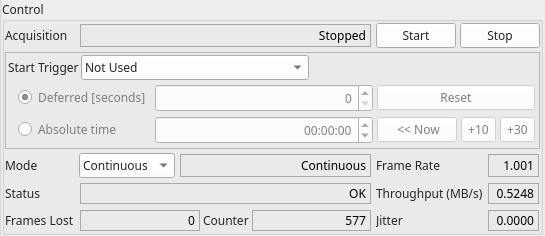
CcfAcquisitionWidget showing acquisition mode, statistics, and frame counter
Requires camera_name to construct camera-specific OLDB paths.
Example:
from ifw.wdglib.widgets.ccf import CcfAcquisitionWidget

acq_wdg = CcfAcquisitionWidget(parent, base_uri, dcs_db_prefix, "testsimcamera1")
layout.addWidget(acq_wdg)
5.4.3. CcfSetupWidget
Provides exposure configuration controls. Displays and allows editing of:
Exposure time
Frame rate
Number of frames
Binning (X, Y)
ROI window (start X, start Y, width, height)
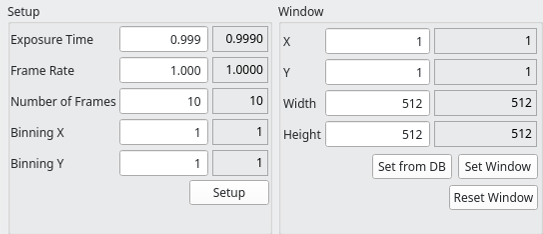
CcfSetupWidget providing exposure configuration and ROI window controls
Displays current values via Taurus labels bound to OLDB data points.
Sends configuration changes as DcsCmds.Setup commands triggered by the
“Setup” button for exposure parameters and the “Set Window” button for
window parameters.
Example:
from ifw.wdglib.widgets.ccf import CcfSetupWidget

setup_wdg = CcfSetupWidget(parent, base_uri, dcs_db_prefix)
layout.addWidget(setup_wdg)
5.4.4. CcfRecordingWidget
Manages raw data recording sessions. Shows recording status, session ID, remaining time, start/end times, frames processed and remaining, files generated, and the total recorded size.

CcfRecordingWidget managing raw data recording sessions
Requires camera_name for camera-specific OLDB paths.
Example:
from ifw.wdglib.widgets.ccf import CcfRecordingWidget

rec_wdg = CcfRecordingWidget(parent, base_uri, dcs_db_prefix, "testsimcamera1")
layout.addWidget(rec_wdg)
5.4.5. CcfPipelineWidget
A composite widget that dynamically assembles recipe and publisher widgets for a given pipeline. It discovers available recipes and publishers from OLDB at construction time, then creates sub-widgets for each.
Pipeline-level settings include enabled state, output queue size, and
frame skipping. Each recipe and publisher is wrapped in a CollapseButton
for expand/collapse behavior.
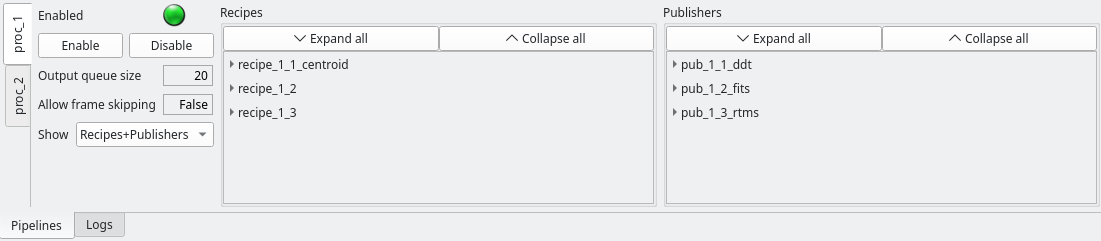
CcfPipelineWidget with dynamically assembled recipe and publisher sub-widgets
The widget uses get_datapoint_value() to read the adapter type for each
publisher and instantiates the appropriate widget subclass:
ifw::ccf::stdpub::PubDdt→CcfDdtPublisherWidgetAny other adapter →
CcfBasePublisherWidget
Publishers also accept a named_attributes parameter that maps
discovered datapoint names to custom display labels. The widget’s
_PUBLISHER_NAMED_ATTRIBUTES dict in ccfpipelinewidget.py defines
these mappings per adapter type:
_PUBLISHER_NAMED_ATTRIBUTES: dict[str, dict[str, str]] = {
    "ifw::ccf::stdpub::PubRtms": {
        "max_rate": "Max Rate",
        "bpp": "Bpp",
        "address": "Address", ... },
    "ifw::ccf::stdpub::PubFits": {
        "nb_of_frames": "Number of Frames",
    },
}
When a recipe needs adapter-specific handling, the commented block in
ccfpipelinewidget.py shows how to dispatch to a specialized widget
subclass. For example:
adapter_type = get_datapoint_value(
    f"{oldb_paths.recipes_path}/{recipe_name}/adapter"
)
if adapter_type == "ifw::ccf::stdrec::RecCustom":
    widget = CcfCustomRecipeWidget(...)
else:
    widget = CcfBaseRecipeWidget(
        ..., named_attributes=named_attributes)
The remote_ddt_dic parameter is a dictionary mapping remote DDT broker
URIs for DDT publishers. Each key is a publisher name and the corresponding
value is the broker URI used by CcfDdtPublisherWidget for remote
connection. For example:
remote_ddt_dic = {
    "publisher0": "zpb.rr://10.10.10.10:12011/broker",
    "publisher1": "zpb.rr://10.10.10.11:12021/broker",
}
A publisher not listed in the dictionary will use the local broker.
Example:
from ifw.wdglib.widgets.ccf import CcfPipelineWidget

pipeline_wdg = CcfPipelineWidget(
    parent, base_uri, dcs_db_prefix, "pipeline0", remote_ddt_dic
)
tab_widget.addTab(pipeline_wdg, "pipeline0")
5.4.6. Publisher Widgets
The publisher widgets display and control settings for data publishers
within a pipeline. They all share the same pipeline_name and
publisher_name parameters.
5.4.6.1. CcfBasePublisherWidget
Base publisher widget displaying enabled state, start time, status,
frames handled, and volume handled. Dynamically discovers additional
OLDB datapoints under the publisher’s setup path
(properties/setup/dcs/{pipeline}/{publisher}/) and adds them as
TaurusLabel widgets. Sets the Taurus format based on OLDB data type:
doubles use "{:~.3f}" (3 decimal places), integers use
"{0}". The named_attributes parameter provides custom display
labels for discovered datapoints. Example:
from ifw.wdglib.widgets.ccf import CcfBasePublisherWidget

widget = CcfBasePublisherWidget(
    parent, base_uri, dcs_db_prefix, "pipeline0", "publisher0",
    named_attributes={"max_rate": "Max Rate", "port": "Port"},
)
5.4.6.2. CcfDdtPublisherWidget
Specialized subclass of CcfBasePublisherWidget for the
PubDdt adapter. Inherits all base functionality and adds:
“Open DDT Viewer” button that launches
ddtViewerviaQProcessRemote Broker label showing the remote DDT broker URI or “Not Used”
DDT-specific named attributes (
ddt_broker,ddt_id,ddt_max_rate)
Subclasses of CcfBasePublisherWidget (which inherits
BaseMalWidget)
override _setup_adapter_specific() to inject their UI elements. This
widget provides the pattern for adding adapter-specific controls. Example:
from ifw.wdglib.widgets.ccf import CcfDdtPublisherWidget

widget = CcfDdtPublisherWidget(
    parent, base_uri, dcs_db_prefix, "pipeline0", "publisher0",
    remote_ddt_uri="zpb.rr://10.10.10.10:12011/broker",
)
5.4.7. Recipe Widget
5.4.7.1. CcfBaseRecipeWidget
Base widget for pipeline recipes. Displays and controls recipe enabled
state, adapter configuration, and delay. Dynamically discovers
additional OLDB datapoints under the recipe’s setup path
(properties/setup/dcs/{pipeline}/{recipe}/), skipping
enabled and delay which are always bound statically. Discovered
datapoints are formatted the same as publishers: doubles use
"{:~.3f}", integers use "{0}". The named_attributes parameter
provides custom display labels. Example:
from ifw.wdglib.widgets.ccf import CcfBaseRecipeWidget

widget = CcfBaseRecipeWidget(
    parent, base_uri, dcs_db_prefix, "pipeline0", "recipe0",
    named_attributes={"exposure_time": "Exp. Time"},
)
To create a specialized recipe widget for a specific adapter, subclass
CcfBaseRecipeWidget and override _setup_adapter_specific().
The base class handles facade registration and remove_bgrole():
class CcfCustomRecipeWidget(CcfBaseRecipeWidget):
    def __init__(self, parent, base_uri, dcs_db_prefix,
                 pipeline_name, recipe_name, custom_param=None):
        super().__init__(
            parent, base_uri, dcs_db_prefix, pipeline_name, recipe_name
        )
        self._custom_param = custom_param

    def _setup_adapter_specific(self):
        # Add custom UI elements here
        pass
5.5. Connection State Handling
All CCF widgets inherit connection state handling from
BaseMalWidget. Each
widget registers its facades via register_facade() during
_setup_facades(), and the base class automatically monitors all of
them. When any registered facade disconnects, the widget visually grays
out, providing immediate feedback to the user.
5.6. Laying Out a Basic Panel
A typical panel groups widgets by function. Here is an example layout:
from taurus.external.qt.QtCore import Slot

from ifw.wdglib.comm import ConnectionManager
from ifw.wdglib.widgets.ccf import CcfStateWidget
from ifw.wdglib.widgets.ccf import CcfSetupWidget
from ifw.wdglib.widgets.ccf import CcfPipelineWidget

base_uri = "zpb.rr://127.0.0.1:12091"
dcs_db_prefix = "cii.oldb:///ccftest/testdcs"

conn_mgr = ConnectionManager()
conn_mgr.auto_connect = True

# State and setup widgets
state_wdg = CcfStateWidget(self, base_uri, dcs_db_prefix)

setup_wdg = CcfSetupWidget(self, base_uri, dcs_db_prefix)

pipeline_wdg = CcfPipelineWidget(
    self, base_uri, dcs_db_prefix, "pipeline0", {}
)

# Add to layout
std_dock_layout.addWidget(state_wdg)
dcs_dock_layout.addWidget(setup_wdg)
pipeline_tab.addTab(pipeline_wdg, "pipeline0")
This pattern follows the same approach used in ccfGui, where widgets are
added to layouts defined in a Qt Designer .ui file.