6. Utilities
The utilities module (ifw.wdglib.utils) provides helper functions and
widgets that are commonly needed when building panels. This chapter covers
OLDB query helpers, the ErrorDialog, and the EventValueMap
Taurus event filter.
6.1. OLDB Query Functions
The OLDB (Online Database) utilities are imported from
ifw.wdglib.utils.ciidb. They provide synchronous access to the OLDB
for querying the hierarchy and reading datapoint values. These are intended
for occasional use at startup or during widget initialization, not for
continuous polling. The library uses CiiOldbFactory.get_instance() internally
to obtain a client.
6.1.1. get_children_from_ui_path
Retrieves the immediate children of a given OLDB path. By default, it excludes datapoints, returning only child node names.
- get_children_from_ui_path(path: str, exclude_datapoints: bool = True) list[str]
- Args:
path: OLDB path to query for children. exclude_datapoints: If
True, exclude datapoints from results.- Returns:
List of child node names.
Example:
from ifw.wdglib.utils import get_children_from_ui_path

dcs_db_prefix = "cii.oldb:///ccftest/testdcs"

cameras = get_children_from_ui_path(f"{dcs_db_prefix}/status/acquisition")
# cameras = ["camera0", "camera1"]

pipelines = get_children_from_ui_path(f"{dcs_db_prefix}/status/pipelines")
# pipelines = ["pipeline0"]
6.1.2. check_datapoint_exists
Checks whether a datapoint exists at a given OLDB URI. Useful for guarding Taurus listener creation when a datapoint path may or may not exist depending on the configuration.
- check_datapoint_exists(uri: str) bool
- Args:
uri: OLDB URI of the datapoint to check.
- Returns:
Trueif the datapoint exists,Falseotherwise.
Example:
from ifw.wdglib.utils import check_datapoint_exists

path = f"{dcs_db_prefix}/status/acquisition/camera0/acq_expired_error"

if check_datapoint_exists(path):
    listener = create_taurus_listener(path)
6.1.3. get_datapoint_value
Reads the current value of a datapoint synchronously. Intended for one-off reads during widget initialization, not for continuous monitoring.
- get_datapoint_value(uri: str) object
- Args:
uri: OLDB URI of the datapoint to read.
- Returns:
The current value of the datapoint.
Example:
from ifw.wdglib.utils import get_datapoint_value

adapter_type = get_datapoint_value(
    f"{dcs_db_prefix}/properties/config/pipelines/pipeline0/publishers/publisher0/adapter"
)
# adapter_type = "ifw::ccf::stdpub::PubFits"
6.1.4. get_datapoint
Returns the raw OLDB datapoint object for a given URI. Use this when you
need direct access to the CiiOldbTypedDataBase interface, for example
to call methods not covered by the convenience helpers below.
- get_datapoint(dp_uri: elt.config.Uri) elt.oldb.CiiOldbTypedDataBase
- Args:
dp_uri: OLDB URI of the datapoint (as an
elt.config.Uri).- Returns:
The OLDB datapoint object (
CiiOldbTypedDataBase).- Raises:
elt.oldb.CiiOldbDpUndefinedException: If datapoint does not exist. elt.oldb.CiiOldbInvalidUriException: If URI is invalid.
Example:
import elt.config
from ifw.wdglib.utils import get_datapoint

dp = get_datapoint(elt.config.Uri(
    f"{dcs_db_prefix}/properties/setup/dcs/pipeline0/publisher0/max_rate"
))
value = dp.read_value().get_value()
data_type = dp.get_type()
6.1.5. get_datapoint_type
Returns the OLDB data type of a datapoint as a CiiBasicDataType
enumeration value. Useful for determining how to format a value for
display (e.g., choosing a Taurus format string).
- get_datapoint_type(uri: str) elt.config.CiiBasicDataType
- Args:
uri: OLDB URI of the datapoint.
- Returns:
CiiBasicDataTypeenumeration value (e.g.,STRING,INT32,DOUBLE).- Raises:
elt.oldb.CiiOldbDpUndefinedException: If datapoint does not exist. elt.oldb.CiiOldbInvalidUriException: If URI is invalid.
Example:
import elt.config
from ifw.wdglib.utils import get_datapoint_type

dp_type = get_datapoint_type(
    f"{dcs_db_prefix}/properties/setup/dcs/pipeline0/publisher0/max_rate"
)
if dp_type == elt.config.CiiBasicDataType.DOUBLE:
    print("Datapoint is a DOUBLE")
elif dp_type == elt.config.CiiBasicDataType.STRING:
    print("Datapoint is a STRING")
else:
    print(f"Datapoint type: {dp_type}")
6.1.6. get_datapoint_value_and_type
Reads both the value and the data type of a datapoint in a single OLDB round-trip. This avoids the overhead of two separate calls when both pieces of information are needed.
- get_datapoint_value_and_type(uri: str) tuple[object, elt.config.CiiBasicDataType]
- Args:
uri: OLDB URI of the datapoint.
- Returns:
Tuple of
(value, CiiBasicDataType).- Raises:
elt.oldb.CiiOldbDpUndefinedException: If datapoint does not exist. elt.oldb.CiiOldbInvalidUriException: If URI is invalid.
Example:
import elt.config
from taurus.qt.qtgui.display import TaurusLabel
from ifw.wdglib.utils import get_datapoint_value_and_type

label = TaurusLabel(self)
value, dp_type = get_datapoint_value_and_type(
    f"{dcs_db_prefix}/properties/setup/dcs/pipeline0/publisher0/max_rate"
)
if dp_type == elt.config.CiiBasicDataType.DOUBLE:
    label.setFormat("{:~.3f}")
else:
    label.setFormat("{0}")
label.setModel(
    f"{dcs_db_prefix}/properties/setup/dcs/pipeline0/publisher0/max_rate"
)
if dp_type == elt.config.CiiBasicDataType.DOUBLE:
    label.setFormat("{:~.3f}")
else:
    label.setFormat("{0}")
label.setModel(
    f"{dcs_db_prefix}/properties/setup/dcs/pipeline0/publisher0/max_rate"
)
6.2. ErrorDialog
The ErrorDialog (from ifw.wdglib.utils.error_dialog) is a
modal dialog that displays a summary error message with an expandable
traceback detail section. It is commonly used to present MAL command errors
caught via facade command_error signals.
- class ErrorDialog(summary_text, traceback_txt, parent=None)
- Args:
summary_text: Short error description shown prominently. traceback_txt: Full traceback text, hidden until the user clicks “Show Details”. parent: Optional parent widget.
The dialog shows an error icon, the summary text, a “Show Details” button that toggles the traceback visibility, and an “OK” button to dismiss.
Example:
from taurus.external.qt.QtCore import Slot

from ifw.wdglib.utils.error_dialog import ErrorDialog

class MyWidget(QWidget, Logger):
    @Slot(object)
    def _error_slot(self, exception_err):
        exctype, value, tb = exception_err
        dlg = ErrorDialog(
            f"{exctype.__name__}: {value}",
            f"{exctype}\n{value}\n{tb}",
            parent=self,
        )
        dlg.exec_()
This pattern is used in ccfGui to catch errors from any facade globally:
from ifw.wdglib.utils.error_dialog import ErrorDialog

std_cmds.command_error.connect(self._error_slot)
dcs_cmds.command_error.connect(self._error_slot)
rec_cmds.command_error.connect(self._error_slot)
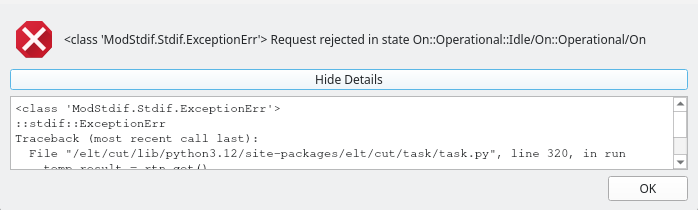
Example ErrorDialog showing a caught MAL command error with the summary message and expandable traceback details.
6.3. EventValueMap
The EventValueMap (from ifw.wdglib.utils.taurusutils) is a
Taurus event filter that maps raw integer or numeric event values to
human-readable strings. It is a subclass of dict and is designed to be
inserted as an event filter on Taurus display widgets.
- class EventValueMap(mapping: dict)
- Args:
mapping: Dictionary mapping raw values to display strings.
The filter only applies to Change (subscription) or Periodic
(polling) Taurus events. If the raw value is not found in the mapping,
the original value is left unchanged.
Example:
from ifw.wdglib.utils import EventValueMap

simulated_event_map = EventValueMap({0: "Normal", 1: "Simulated"})
self.ui.simulatedTaurusLabel.insertEventFilter(simulated_event_map)
When the OLDB datapoint bound to simulatedTaurusLabel has a value of
0, the label will display “Normal”; when the value is 1, it will
display “Simulated”.
This pattern is used in widgets throughout the library, such as in
CcfStateWidget for mapping simulation status and in CCF
acquisition widgets for mapping acquisition modes.