The Data Acquisition Process
Contents
Introduction
This section provides an overview of the Data Acquisition process, both in terms of what is currently implemented in OCM and what is planned for with DPM.
For an overview of conceptual model, processes and the relationships between components see the section Overview.
Stylistic Conventions
The following visual convention is used for states and transitions.
![digraph G {
# Config
background = transparent;
node [shape=Mrecord,fontname=helvetica,margin="0.22,0.09",fontsize=11];
graph [fontname = "helvetica",nodesep=0.45,bgcolor=transparent];
edge [fontname = "Lucida Console", fontsize=10, margin="0.23,0.09"];
# States
Normal [label="{Normal|\l}"];
Transitional [label="{Transitional|\l}", style=dashed];
}](../_images/graphviz-b917687cb02a6a5198d6507a56c2d767289af372.png)
- Normal
Normal state.
- Transitional
Transitional states are states where the Data Acquisition remain during handling of a command, if it cannot be completed immediately.
![digraph Daq {
# Config
background = transparent;
node [shape=Mrecord,fontname=helvetica,margin="0.22,0.09",fontsize=11];
graph [fontname = "helvetica",nodesep=0.45,bgcolor=transparent];
edge [fontname = "Lucida Console", fontsize=10, margin="0.23,0.09"];
A [label="{A|\l}"];
B [label="{B|\l}"];
# Transitions
A:se -> B:ne [label="Command()"];
A:sw -> B:nw [label="Event", style=dashed];
}](../_images/graphviz-7e1ec33a4b3f122f88fdee9e1adc44384344a699.png)
- Command()
Transition that occurred when initiating the handling of a command. That it is a request/command can be identified by the suffix “()”.
- Event
Transition that occurred due to an internally generated event, internal or external. This can also occur due to completion of the handling a command and is where the reply is sent.
Process Overview
Each successful Data Acquisition includes the following states (represented in the MAL API with
DaqState) which spans the following high-level activities:
- StateAcquiring
From the initial point it is created in OCM through the phase where data actually has been acquired by data sources.
- StateMerging
Through the phase where a Data Product is created from the acquired data and released to the Online Archive System (OLAS) or other configured recipients.
- StateCompleted
To the final state for a Data Acquisition. The two possible substates are:
which indicates a completed or user aborted Data Acquisition respectively.
These states, each with their own substates with an overview of transitions are visualized in Fig. 6.
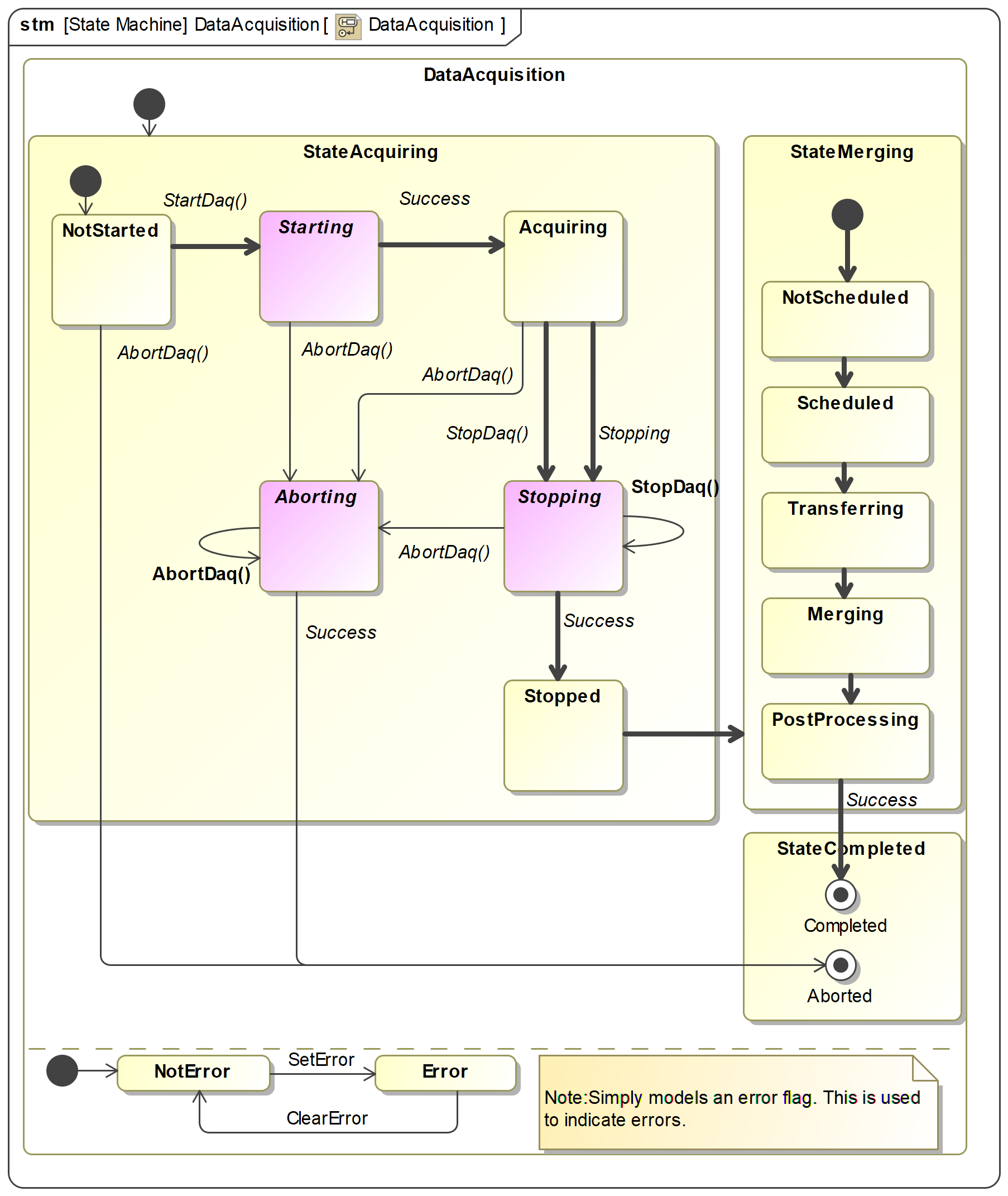
Fig. 6 SysML diagram of Data Acquisition states and transitions. Transitions in bold indicate the transition path for a successful Data Acquisition. Purple states are transitional states used for the duration of an operation. The orthogonal region with states NotError and Error is exclusively a means to model the error flag used in the implementation. Expect further refinement in StateMerging in following releases.
Important
The possible final states for a Data Acquisition is either Completed or Aborted. OCM and DPM will never abort a Data Acquisition on its own volition; only at the request of a client (normally the instrument operator).
Note
Error is possible in any state which is indicated with an error flag in the Data Acquisition status
structure DaqStatus (this can be considered an orthogonal error state as
shown in Fig. 6). This means for example that a Data Acquisition may be Aborted with or
without error.
Errors may prevent forward progress in some cases and in other cases errors may be ignored by
forcing forward progress with commands such as ForceStopDaq() (and
accepting degraded Data Product as a result).
The enumeration DaqState defines the top-level states and all the sub-states are
enumerated together in DaqSubState. See section Data Acquisition MAL API for
description of the states.
The next sections provide further details of the Data Acquisition life-cycle and how to interact with OCM for control.
StateAcquiring
This section documents the details of the top-level StateAcquiring
state of a Data Acquisition; the observable states, the transitions and how it relates to the
OCM command interface described here.
Warning
Although the OCM API disambiguates on which Data Acquisition to operate on (by requiring user to provide the Data Acquisition identifier), the interface to detector data sources recif does not, and will always operate on its current recording whether it is correct or not. This means that users must be extra careful and e.g. make sure to only have one active Data Acquisition at a time which use the same primary data source.
Overview
The following diagram shows an overview for a nominal Data Acquisition where commands succeed:
Note
For brevity ForceAbortDaq() is not shown in the diagram as it
performs the same transitions as AbortDaq() except that when
error occcurs it still performs the transition.
![digraph Daq {
# Config
background = transparent;
node [shape=Mrecord,fontname=helvetica,margin="0.22,0.09",fontsize=11];
graph [fontname = "helvetica",nodesep=0.45,bgcolor=transparent];
edge [fontname = "Lucida Console", fontsize=10, margin="0.23,0.09"];
# States
NotStarted [label="{NotStarted|\l}"];
Aborting [label="{Aborting|\l}", style=dashed];
# States
Stopping [label="{Stopping|\l}", style=dashed];
subgraph cluster_g {
rankdir="LR";
style=invis;
Aborted [label="{Aborted|\l}", rank=max];
Stopped [label="{Stopped|\l}", rank=min];
}
Starting [label="{Starting|\l}", style=dashed];
Acquiring [label="{Acquiring|\l}"];
# Transitions
NotStarted -> Starting [label="StartDaq()"];
NotStarted -> Aborted [label="AbortDaq()"];
Starting -> Acquiring [label="Acquiring", style=dashed];
Starting -> Aborting [label="AbortDaq()"];
Acquiring -> Stopping [label="StopDaq()"];
Acquiring -> Stopping [label="Stopping", style=dashed];
Acquiring -> Aborting [label="AbortDaq()"];
Stopping -> Stopping [label="StopDaq()"];
Stopping -> Stopped [label="Stopped", style=dashed];
Stopping -> Aborting [label="AbortDaq()"];
Aborting -> Aborted [label="Aborted", style=dashed];
Aborting -> Aborting [label="AbortDaq()"];
}](../_images/graphviz-5d675067ba3008ce225e1a4a18772de581537d8e.png)
Fig. 7 Data Acquisition state and transition overview
The transition for the event Stopping is performed automatically by OCM when all primary data sources stop. If e.g. detector is configured to integrate for 10 seconds it will automatically stop, which is then observed by OCM, which then triggers the transition to Stopping state where metadata sources are being stopped.
Starting
The following diagram show the initial states of a Data Acquisition created with
StartDaq(), from the initial state NotStarted which is the point where the
Data Acquisition has been created and registered internally in OCM but has not yet initiated any actions.
When ready OCM transitions to state Starting in which all data sources are requested to start
their data acquisition. When all sources acknowledge successfully the Data Acquisition transitions to
Acquiring.
Note
StartDaq() creates a new data acquisition and starts it
in one command, so the state NotStarted is never observed from outside. If a use-case requires
it this can be changed to a two-step command, one that creates the Data Acquisition and one
command that starts it.
![digraph Daq {
# Config
node [shape=Mrecord,fontname=helvetica,margin="0.22,0.09",fontsize=11];
graph [fontname = "helvetica",nodesep=0.45,bgcolor=transparent];
edge [fontname = "Lucida Console", fontsize=10, margin="0.23,0.09"];
# States
NotStarted [label="{NotStarted|\l}"];
Starting [label="{Starting|\l}", style=dashed];
Acquiring [label="{Acquiring|\l}"];
# Transitions
NotStarted -> Starting [label="StartDaq()"];
Starting -> Acquiring [label="Acquiring", style=dashed];
}](../_images/graphviz-a19601c5771fa9951ed30795a41f1d61de4e1061.png)
Important
If StartDaq() does not succeed the user should clean up
the failed data acquisition by aborting it. This will abort any partially started acquisitions
for the configured sources. If a data source is not responding or otherwise report error, this
will cause AbortDaq() to fail. For these cases
ForceAbortDaq() can be used to force the
transition to Aborted.
Stopping
The following diagram show from which states StopDaq() and
ForceStopDaq() is valid. The diagram shows only
StopDaq() but is valid also for
ForceStopDaq().
Using ForceStopDaq() command the only difference is
that the transition to Stopped is forcefully performed even in the presence of errors from e.g.
data sources.
Note
If StopDaq() fails the Data Acquisition remains in Stopping
state. At this point it is possible to retry StopDaq() or force it
with ForceStopDaq().
Important
Since ForceStopDaq() stops a Data Acquisition
even if data sources fail to stop, it means that user might have to perform manual error
recovery on the faulty components.
![digraph Daq {
# Config
node [shape=Mrecord,fontname=helvetica,margin="0.22,0.09",fontsize=11];
graph [fontname = "helvetica",nodesep=0.45, bcolor=transparent, nodesep=1];
edge [fontname = "Lucida Console", fontsize=10, margin="0.53,0.09"];
# States
Acquiring [label="{Acquiring|\l}"];
Stopping [label="{Stopping|\l}", style=dashed];
Stopped [label="{Stopped|\l}"];
# Transitions
Acquiring -> Stopping [label="StopDaq()"];
Stopping -> Stopping [label="StopDaq()"];
Stopping -> Stopped [label="Stopped", style=dashed];
}](../_images/graphviz-ccc25d6963182a756ee7cb771a3ecc61c706a48b.png)
Aborting
The following diagram show from which states AbortDaq() and
ForceAbortDaq() is valid. The diagram shows only
AbortDaq() but is valid also for
ForceAbortDaq().
Using ForceAbortDaq() command the only difference is that the transition to
Aborted is forcefully performed even in the presence of errors from e.g. data sources.
Note
If AbortDaq() fails the Data Acquisition remains in Aborting
state. At this point it is possible to retry AbortDaq() or force it
with ForceAbortDaq().
Important
Since ForceAbortDaq() aborts a Data Acquisition even if data
sources fail to abort, it means that user might have to perform manual error recovery on the
faulty components.
![digraph Daq {
# Config
background = transparent;
node [shape=Mrecord,fontname=helvetica,margin="0.22,0.09",fontsize=11];
graph [fontname = "helvetica",nodesep=0.45,bgcolor=transparent];
edge [fontname = "Lucida Console", fontsize=10, margin="0.23,0.09"];
# States
NotStarted [label="{NotStarted|\l}"];
Aborting [label="{Aborting|\l}", style=dashed];
# States
Stopping [label="{Stopping|\l}", style=dashed];
subgraph cluster_g {
rankdir="LR";
style=invis;
Aborted [label="{Aborted|\l}", rank=max];
}
Starting [label="{Starting|\l}", style=dashed];
Acquiring [label="{Acquiring|\l}"];
# Transitions
NotStarted -> Starting [ style=invisible, arrowhead=none];
NotStarted -> Aborted [label="AbortDaq()"];
Starting -> Acquiring [style=invisible, arrowhead=none];
Starting -> Aborting [label="AbortDaq()"];
Acquiring -> Stopping [style=invisible, arrowhead=none];
Acquiring -> Stopping [style=invisible, arrowhead=none];
Acquiring -> Aborting [label="AbortDaq()"];
Stopping -> Aborting [label="AbortDaq()"];
Aborting -> Aborted [label="Aborted", style=dashed];
Aborting -> Aborting [label="AbortDaq()"];
}](../_images/graphviz-18b1f53bf40baa4dd22f15347bc8e59aafd6cee0.png)
StateMerging
Note
This section will document the details of the top-level StateMerging
state of a Data Acquisition. This is not yet implemented.