Client
The provided command line client ocmServerCtl can interact with ocmServer which is described in the following sections.
Environment Variables
$OCM_REQUEST_EPSpecifies the default OCM request/reply endpoint, e.g.
zpb.rr://127.0.0.1:12345/.$OCM_PUBLISH_EPSpecifies the default OCM publish endpoint, e.g.
zpb.ps://127.0.0.1:12345/.
Command Line Arguments
Exhaustive command line help is available under the option --help. The following list
enumerates a subset of common commands.
Synopsis:
ocmServerCtl [options] <command> [options] <command-args>...
Standard interface commands:
std.initSends the
Init()command.std.enableSends the
Enable()command.std.disableSends the
Disable()command.std.exitSends the
Exit()command.std.setloglevel <logger> <level>Sends the
SetLogLevel()command with provided logger and level.std.getstateSends the
GetState()command.std.getstatusSends the
GetStatus()command.std.getversionSends the
GetVersion()command.
Data Acquisition commands:
daq.start [options] <primary-sources> <metadata-sources>Sends the
StartDaq()command with provided arguments.daq.stop [options] <id>Sends the
StopDaq()command with provided arguments.daq.forcestop [options] <id>Sends the
ForceStopDaq()command with provided arguments.daq.abort [options] <id>Sends the
AbortDaq()command with provided arguments.daq.forceabort [options] <id>Sends the
ForceAbortDaq()command with provided arguments.daq.getstatus <id>Sends the
GetDaqStatus()command to query status of Data Acquisition identified by<id>.daq.awaitstate <id> <state> <substate> <timeout>Sends the
AwaitDaqState()command with provided arguments.<id>Data Acquisition identifier.
<state>Data Acquisition state to await.
<substate>Data Acquisition state to await.
<timeoutTime in seconds to wait for state to be reached or unable to be reached anymore.
daq.updatekeywords <id> <keywords>Sends the
UpdateKeywords()command with provided arguments.daq.getactivelistSends the
GetActiveList()command.
Server
The main OCM application is ocmServer, which implements all the Data Acquisition control and coordination features. The interface to control Data Acquisitions is covered in section The Data Acquisition Process whereas the much simpler application state control is described in this section.
State Machine
The ocmServer state machine is shown in Fig. 8 with states and transitions described below.
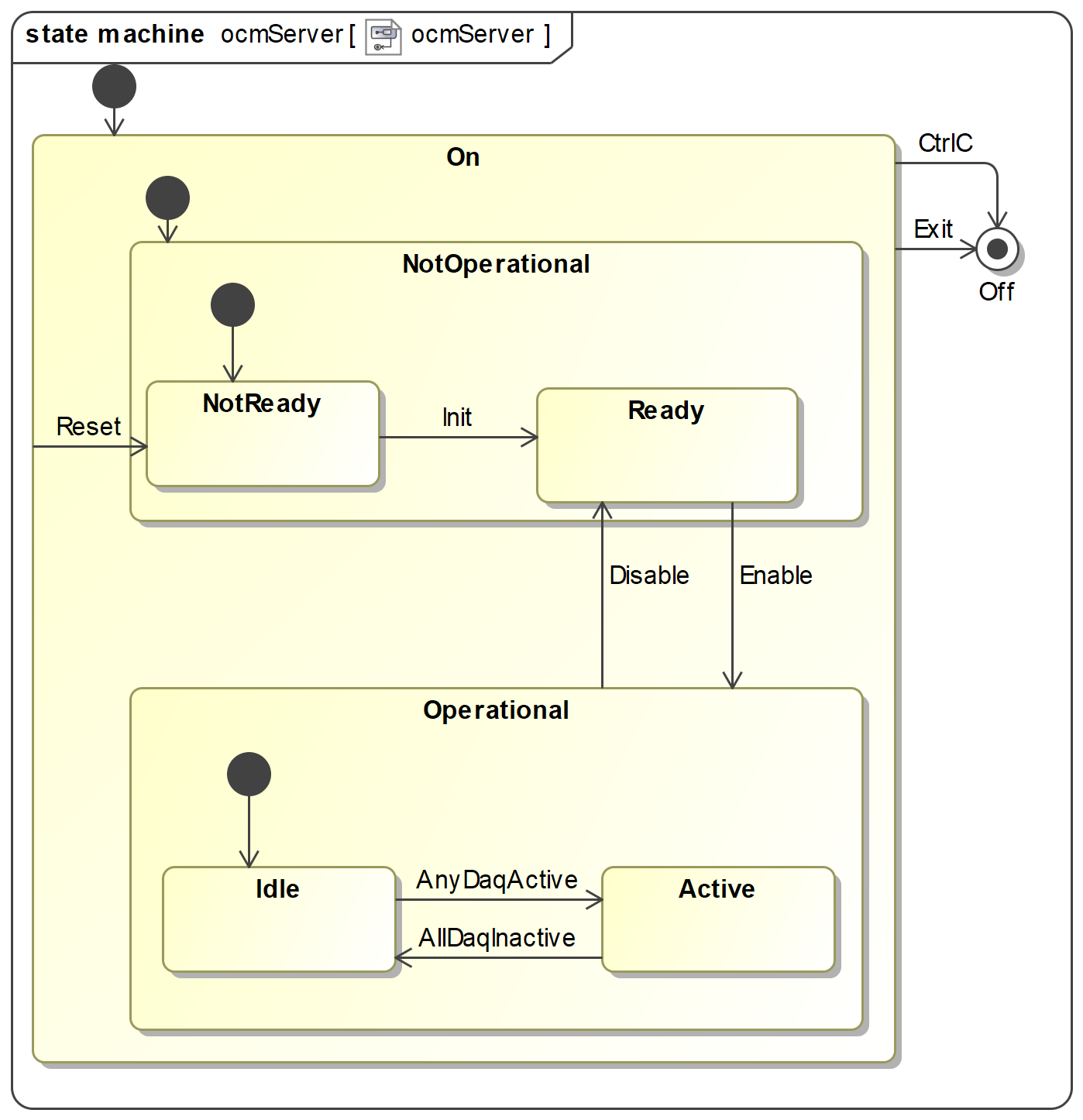
Fig. 8 Application statemachine implemented by ocmServer which satisfies the state machine
expected by stdif.
States
- On
Application is running.
- Off
Application is not running.
- NotOperational
Composite state that means that ocmServer is running, is able to accept
StdCmdsrequests, but is not yet fully operational. For ocmServer it means in particular that theOcmDaqinterface is not registered and won’t accept any requests.- NotReady
This is the first non-transitional state. Current implementation has already loaded configuration and has registered the
stdif.StdCmdsinterface at this point.- Ready
Has no particular meaning for ocmServer.
- Operational
In the transition to Operational ocmServer registered the
OcmDaqinterface and is ready to perform Data Acquisitions.- Idle
Indicates that there are no active Data Acquisitions.
- Active
Indicates that there is at least one active Data Acquisition.
Note
Active does not mean that ocmServer is busy and cannot handle additional requests. It simply means that there is at least one Data Acquisition is not yet finished.
Since merging is not yet implemented the definition of active is up to the point the Data Acquisition is stopped or aborted.
Transitions
- Init
Triggered by
Init()request.- Enable
Triggered by
Enable()request.- Disable
Triggered by
Disable()request.- Stop
Triggered by
Stop()request.Note
The behaviour is currently unspecified if this request is issued if OCM is in state Active.
- AnyDaqActive
Internal event that is created when any Data Acquisition becomes active.
- AllDaqInactive
Internal event that is created when all Data Acquisitions are inactive.
MAL URI Paths
The following tables summarize the request/reply service paths and topic paths for pub/sub.
URI Path |
Root URI Configuration |
Description |
|---|---|---|
|
|
Standard control interface |
|
|
Data Acquisition control interface |
Topic Type |
URI Path |
Root URI Configuration |
Description |
|---|---|---|---|
|
|
Standard interface status topic providing information on OCM overall state. Same information
is provided with the command |
|
|
|
Data Acquisition status topic |
Command Line Arguments
Command line argument help is available under the option --help.
--proc-name | -n(string) [default: ocm]Process instance name.
--config | -c(string) [default: config/ocmServer/config.yaml]Config Path to application configuration file e.g.
--config ocs/ocm.yaml(see Configuration File for configuration file content).--log-level | -l(enum) [default: INFO]Log level to use. One of ERROR, WARNING, STATE, EVENT, ACTION, INFO, DEBUG, TRACE.
--db-host | d(string) [default: 127.0.0.1:6379]Redis database host address.
Environment Variables
$CFGPATHUsed to resolve Config Path configuration file paths.
$DATAROOTSpecifies the default root path used as output directory for e.g. OCM FITS files and other state storage. The data root can be overridden by the configuration key
cfg.dataroot.
Configuration File
The configuration file is currently based on YAML. This section describes what the configuration parameters are and how to set them.
If a configuration parameter can be provided via command line, configuration file and environment variable the precedence order (high to low priority) is:
Command line value
Configuration file value
Environment variable value
Enumeration of parameters:
cfg.instrument_id(string)ESO designated instrument ID. This value is also used as the source for FITS keyword INSTRUME.
cfg.dataroot(string) [default: $DATAROOT]Absolute path to a writable directory where OCM will store files persistently. These are mainly FITS files produced as part of a Data Acquisition. If directory does not exist OCM will attempt to create it, including parent directories, and set permissions to 0774 (ug+rwx o+r).
cfg.log.properties(string)Config Path to a log4cplus log configuration file.
cfg.sm.scxml(string) [default: config/ocmServer/sm.xml]Config Path to the SCXML model. This should be left to the default which is provided during installation of ocmServer.
cfg.req.endpoint(string) [default: zpb.rr://127.0.0.1:12081/]MAL server request root endpoint on which to accept requests. Trailing slashes are optional, e.g. example:
"zpb.ps://127.0.0.1:12345/"or"zpb.ps://127.0.0.1:12345".cfg.pub.endpoint(string) [default: zpb.ps://127.0.0.1:12082/]MAL server publish root endpoint on which to publish topics from. Trailing slashes are optional, e.g. example:
"zpb.ps://127.0.0.1:12345/"or"zpb.ps://127.0.0.1:12345".cfg.db.endpoint(string) [default: 127.0.0.1:6379]Redis database endpoint address.
cfg.db.timeout_sec(integer) [default: 2]Timeout in seconds to use when communicating with the Redis server.
Full example:
cfg.instrument_id: "TEST"
cfg.dataroot: "/absolute/output/path"
cfg.sm.scxml: "config/ocmServer/sm.xml"
cfg.req.endpoint: "zpb.rr://127.0.0.1:12345/"
cfg.pub.endpoint: "zpb.ps://127.0.0.1:12346/"
cfg.db.endpoint: "127.0.0.1:6379"
cfg.db.timeout_sec: 2
cfg.log.properties: "log.properties"