Health Check monitor


Agora | CAL | HC | refs | QC
HealthCheck Monitor
    HOME | UsersGuide
FORS1:
detector: bias
Other HC:
QC links:
[best viewing with style sheets and javascript enabled]
FORS1 trending system: HEALTH CHECK plot
Last update: 2008-10-11T22:25:28 (UT)
now: 2008-10-12T06:25:24 (UT)
INFO USERS-GUIDE MORE
same group: med_master ron_raw ron_master fp_raw struct_raw
history ... | plot tutorial ...   daily/often; important to check     [info]
last OPSLOG data:
2008-10-11
Plot: 1 2 3 4   latest_files
N_data: number of recent OPSLOG entries plotted here
N_data: 15 15 15 15 availability
Print: Information and research: News:
- png file - advanced studies: QC1 browser | QC1 plotter
 
Plot
[info]
Symbol
[info]
Source* OPS?** Average [info] Thresholds [info] N_data Data downloads Remarks
method value unit method value
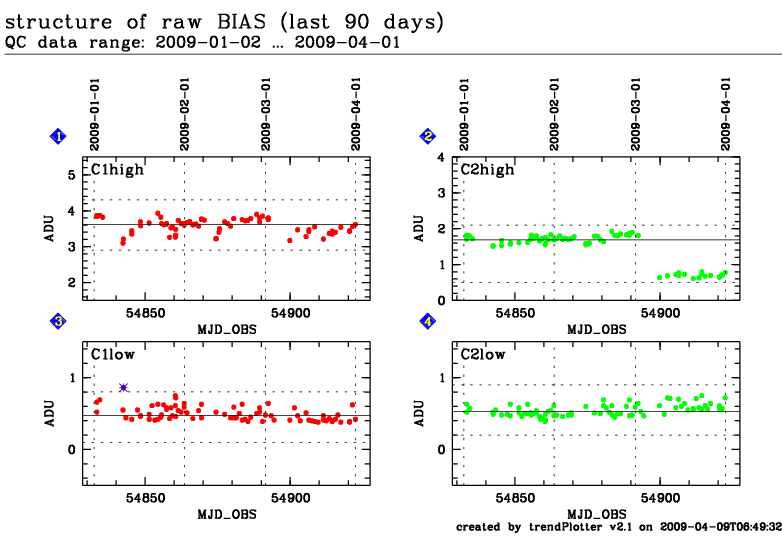
1 QC1DB yes (15) MEDIAN 3.69000 ADU 3SIG± 0.34506 90 this | last_yr | all 100Kps/2ports/high_gain (Garching; only non-zero values are shown)
2 QC1DB yes (15) MEDIAN 2.51000 ADU 3SIG± 0.37994 90 this | last_yr | all 100Kps/2ports/high_gain (Garching; only non-zero values are shown)
3 QC1DB yes (15) MEDIAN 0.43000 ADU 3SIG± 0.25059 86 this | last_yr | all 200Kps/2ports/low_gain (Garching; only non-zero values are shown)
4 QC1DB yes (15) MEDIAN 0.49000 ADU 3SIG± 0.22707 86 this | last_yr | all 200Kps/2ports/low_gain (Garching; only non-zero values are shown)
*Data sources: QC1DB: QC1 database; LOCAL: local text file | **OPS: to indicate if OPSLOG data are included
This plot

The population standard deviation of the pixel values of the first input raw bias is computed. This is the combination of structure, fixed pattern noise, and read out noise. The read out noise and the fixed pattern noise contributions are then quadratically subtracted.  


General information

Click on any of the plots to see a close-up version.

If applicable, the latest values from Paranal ops logs are plotted as blue dots. More information about those values, including a download option, is available in the OPSLOG section on top of the page.

The latest date is indicated on top of the plot, data points belonging to that date are specially marked.

If configured,

  • statistical averages are indicated by a solid line, and thresholds by broken lines
  • outliers are marked by a red asterisk. They are defined as data points outside the threshold lines
  • "aliens" (= data points outside the plot Y limits) are marked by a red arrow ( or )
  • you can download the data for each parameter set if the 'Data downloads' link shows up