*Data sources: QC1DB: QC1 database; LOCAL: local text file | **OPS: to indicate that OPSLOG data are included
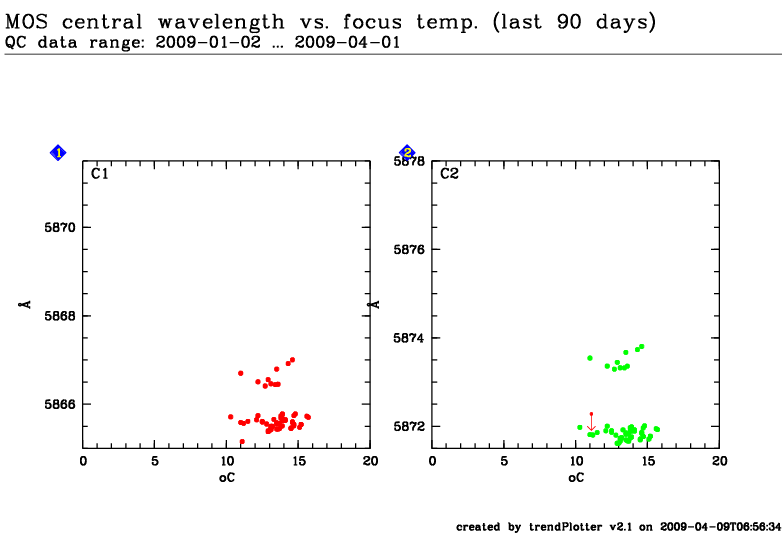
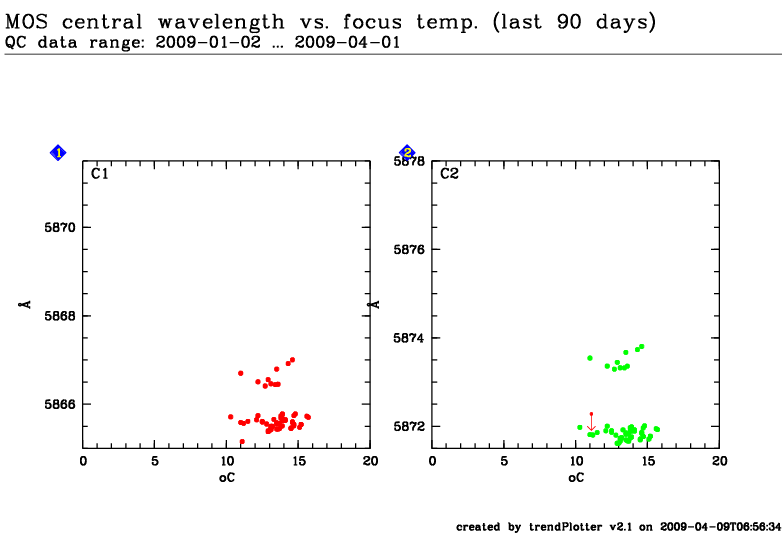
This plot
After the wavelength calibration is obtained from a MOS arc lamp exposure, the
wavelength corresponding to the center of the CCD is computed (only if all
slitlets are in the center of the CCD). The
values trended here are for the 300V grism with a slit width of
1.0" and the GG435 order separation filter and they are trended versus the
temperature at the instrument focus.
General information
Click on any of the plots to see a close-up version.
The latest date is indicated on top of the plot, data points belonging to that date are specially marked.
If configured,
statistical averages are indicated by a solid line, and thresholds by broken lines
outliers are marked by a red asterisk. They are defined as data points outside the
threshold lines
"aliens" (= data points outside the plot Y limits) are marked by a red arrow (↑ or ↓)
you can download the data for each parameter set if the 'Data downloads' link shows up
 mirror sites:
PL (internal
link) HQ
[?]
mirror sites:
PL (internal
link) HQ
[?]
 detector: bias


 less ...