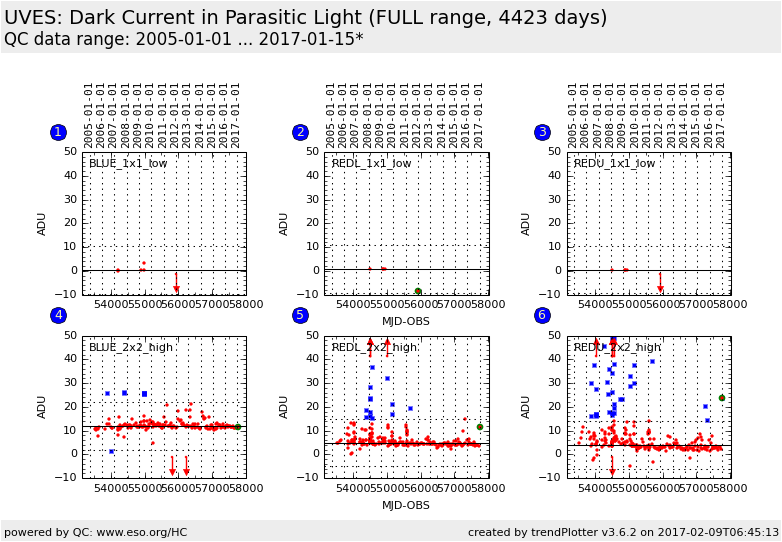
Plot
? |
Symb
? |
Source
* |
Average ? |
Thresholds ? |
N_
data |
QC1
parameter |
Data
downloads |
Remarks |
| method |
value |
unit |
method |
value |
| 1 |
• | QC1DB |
MEDIAN |
0.426 |
ADU |
OFF | ± 10.0 |
6 |
current_dark |
all (full time range)
| dark current in Parasitic Light, readout mode 225kHz,1x1,low; BLUE CCD; scoring is not implemented since data are too scattered |
| 2 |
• | QC1DB |
MEDIAN |
0.783 |
ADU |
OFF | ± 10.0 |
5 |
current_dark |
all (full time range)
| same, for REDL CCD |
| 3 |
• | QC1DB |
MEDIAN |
0.603 |
ADU |
OFF | ± 10.0 |
5 |
current_dark |
all (full time range)
| same, for REDU CCD |
| 4 |
• | QC1DB |
MEDIAN |
11.9 |
ADU |
OFF | ± 10.0 |
184 |
current_dark |
all (full time range)
| dark current in Parasitic Light, readout mode 50kHz,2x2,high; BLUE CCD; scoring is not implemented since data are too scattered |
| 5 |
• | QC1DB |
MEDIAN |
4.98 |
ADU |
OFF | ± 10.0 |
267 |
current_dark |
all (full time range)
| same, for REDL CCD |
| 6 |
• | QC1DB |
MEDIAN |
3.99 |
ADU |
OFF | ± 10.0 |
265 |
current_dark |
all (full time range)
| same, for REDU CCD |
| |
|
*Data sources: QC1DB: QC1 database; LOCAL: local data source
|
Plot 1
scores: not implemented
| | data source: | uves_dark
(QC1 database) |
| dataset: | current_dark | • |
| median: | 0.426 | ADU |
| rel. thresholds: | -9.574...10.426 | ADU |
| N_data plotted: | 6 |
| [click on plot for closeup] |
Plot 2
scores: not implemented
| | data source: | uves_dark
(QC1 database) |
| dataset: | current_dark | • |
| median: | 0.783 | ADU |
| rel. thresholds: | -9.217...10.783 | ADU |
| N_data plotted: | 5 |
| [click on plot for closeup] |
Plot 3
scores: not implemented
| | data source: | uves_dark
(QC1 database) |
| dataset: | current_dark | • |
| median: | 0.603 | ADU |
| rel. thresholds: | -9.3965...10.6035 | ADU |
| N_data plotted: | 5 |
| [click on plot for closeup] |
Plot 4
scores: not implemented
| | data source: | uves_dark
(QC1 database) |
| dataset: | current_dark | • |
| median: | 11.9 | ADU |
| rel. thresholds: | 1.916...21.916 | ADU |
| N_data plotted: | 184 |
| [click on plot for closeup] |
Plot 5
scores: not implemented
| | data source: | uves_dark
(QC1 database) |
| dataset: | current_dark | • |
| median: | 4.98 | ADU |
| rel. thresholds: | -5.023...14.977 | ADU |
| N_data plotted: | 267 |
| [click on plot for closeup] |
Plot 6
scores: not implemented
| | data source: | uves_dark
(QC1 database) |
| dataset: | current_dark | • |
| median: | 3.99 | ADU |
| rel. thresholds: | -6.009...13.991 | ADU |
| N_data plotted: | 265 |
| [click on plot for closeup] |
This is the trending report for UVES QC parameters derived from Parasitic
Light frames.
These frames are taken approximately once per month, as a single exposure of
3600 secs in a dark enclosure BUT with the CCD shutter OPEN (as compared to
the DARK frames where the CCD shutter is closed). These data are de-biased
and combined into a MASTER_DARK, in which the average dark level is measured
(in ADU/px/hr). [There are also shorter exposures, they are subject to false
results. If you find an outlier, check first the exposure time under 'Data
downloads'!]
The purpose of these exposures is to detect low-level contaminating light
sources (e.g. LEDs) originating INSIDE the instrument.
The thresholds are set to the values defined by the KPI document from IS
These plots describe:
- the DARK current in master PARASITIC_DARK (or PDARK) frames of the BLUE|REDL|REDU chips in the 1x1 binning, 225kHz, low gain readout mode
- same for the BLUE|REDL|REDU chips in the 2x2 binning, 50kHz, high gain readout mode.
General information
Click on any of the plots to see a close-up version.
The latest date is indicated on top of the plot.
If configured,
- data points belonging to the latest date are specially marked
- statistical averages are indicated by a solid line, and thresholds by broken lines
- outliers are marked by a red asterisk. They are defined as data points outside the
threshold lines
- "aliens" (= data points outside the plot Y limits) are marked by a red arrow (↑ or ↓)
- you can download the data for each parameter set if the 'Data downloads' link shows up
|
 mirror sites:
PL (internal
link) HQ
[?]
mirror sites:
PL (internal
link) HQ
[?]