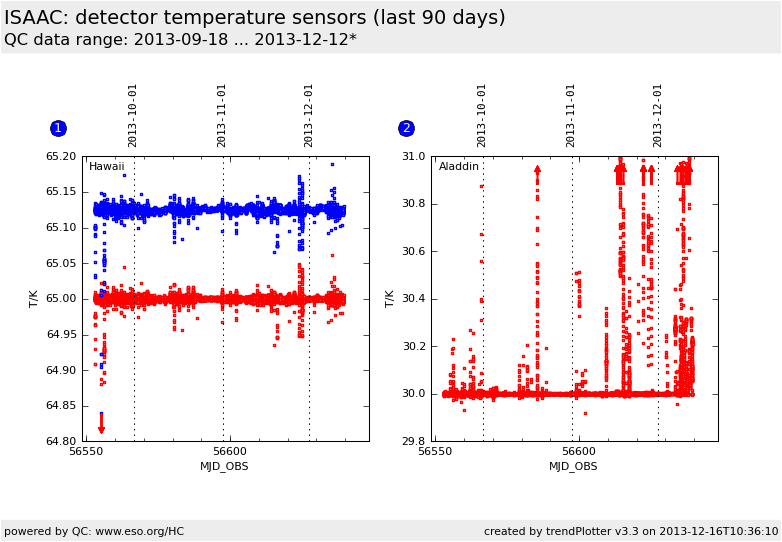
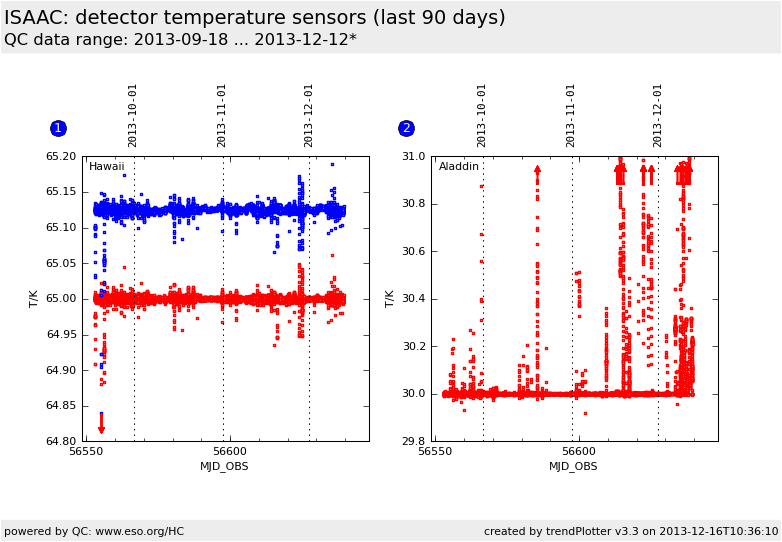
This is the trending plot for the ISAAC
detector temperature sensors.
These plots describe: Fig. 1. temperature of the ISAAC
Hawaii detector (keyword INS.TEMP-DETSW) and the backup sensor
(blue) (keyword INS.TEMP-DETSW.CONTROL) Fig. 2. temperature of the ISAAC Aladdin detector (keyword
INS.TEMP-DETLW). The Aladdin backup sensor is out of order since
2004-07-18.
Values are read from the ingested ISAAC raw frames fits headers.
General information
Click on any of the plots to see a close-up version.
The latest date is indicated on top of the plot, data points belonging to that date are specially marked.
If configured,
statistical averages are indicated by a solid line, and thresholds by broken lines
outliers are marked by a red asterisk. They are defined as data points outside the
threshold lines
"aliens" (= data points outside the plot Y limits) are marked by a red arrow (↑ or ↓)
you can download the data for each parameter set if the 'Data downloads' link shows up
 mirror sites:
PL (internal
link) HQ
[?]
mirror sites:
PL (internal
link) HQ
[?]
 score overview