Plot
? |
Symb
? |
Source
* |
OPS?
** |
Average ? |
Thresholds ? |
N_
data |
QC1
parameter |
Data
downloads |
Remarks |
| method |
value |
unit |
method |
value |
| 1 |
o | QC1DB |
yes (1) |
none |
|
sec |
none | |
88 |
qc_dispco2 |
this |
last_yr |
all
|
SW arm, LR grating Dispersion(Lambda) relation |
| 2 |
o | QC1DB |
yes (0) |
none |
|
sec |
none | |
27 |
qc_dispco2 |
this |
last_yr |
all
|
LW arm, LR grating Dispersion(Lambda) relation |
| 3 |
o | QC1DB |
yes (0) |
none |
|
sec |
none | |
276 |
qc_dispco2 |
this |
last_yr |
all
|
SW arm, MR grating Dispersion(Lambda) relation |
| 4 |
o | QC1DB |
yes (0) |
none |
|
sec |
none | |
116 |
qc_dispco2 |
this |
last_yr |
all
|
LW arn, SW grating Dispersion(Lambda) relation |
| |
|
*Data sources: QC1DB: QC1 database; LOCAL: local text file | **OPS: OPSLOG data are included
|
Plot 1
scores: no current data
| | data source: | isaac_arc
(QC1 database) |
| dataset: | qc_dispco2 | o |
| average: | none |
| thresholds: | none |
| N_data plotted: | 88 |
| [click on plot for closeup] |
Plot 3
scores: no current data
| | data source: | isaac_arc
(QC1 database) |
| dataset: | qc_dispco2 | o |
| average: | none |
| thresholds: | none |
| N_data plotted: | 276 |
| [click on plot for closeup] |
Plot 2
scores: no current data
| | data source: | isaac_arc
(QC1 database) |
| dataset: | qc_dispco2 | o |
| average: | none |
| thresholds: | none |
| N_data plotted: | 27 |
| [click on plot for closeup] |
Plot 4
scores: no current data
| | data source: | isaac_arc
(QC1 database) |
| dataset: | qc_dispco2 | o |
| average: | none |
| thresholds: | none |
| N_data plotted: | 116 |
| [click on plot for closeup] |
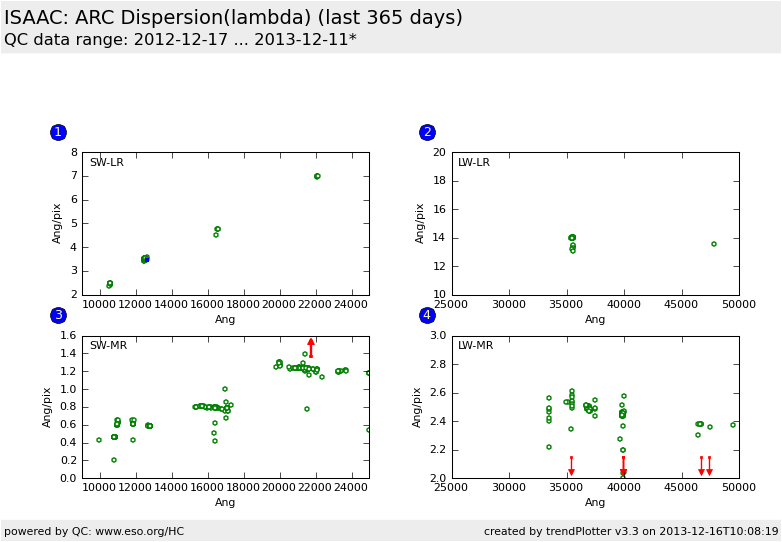
This is the relation plot for the ISAAC
QC parameters derived from ARC frames.
These plots describe:
1. Dispersion (qc_dispc02) as a function of the wavelength for setup SW LR (four fixed-wavelength setups).
3. as Fig.1 but for Hawaii MR grating (all wavelengths used withing
Filter band).
2. as Fig.1 but for Aladdin LR grating (two fixed-wavelength setups).
4. as Fig.1 but for Aladdin MR (all wavelengths used withing
Filter band).
Find more information about ISAAC ARC frames
here.
General information
Click on any of the plots to see a close-up version.
If applicable, the latest values from Paranal ops logs are plotted as blue dots. More information about those values, including a download option, is available in the OPS column.
The latest date is indicated on top of the plot, data points belonging to that date are specially marked.
If configured,
- statistical averages are indicated by a solid line, and thresholds by broken lines
- outliers are marked by a red asterisk. They are defined as data points outside the
threshold lines
- "aliens" (= data points outside the plot Y limits) are marked by a red arrow (↑ or ↓)
- you can download the data for each parameter set if the 'Data downloads' link shows up
|
 mirror sites:
PL (internal
link) HQ
[?]
mirror sites:
PL (internal
link) HQ
[?]
 score overview