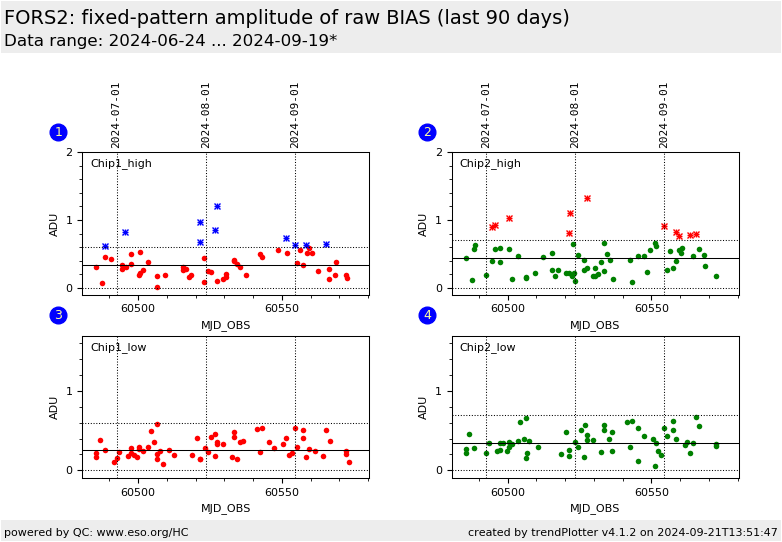
Plot
? |
Symb
? |
Source
* |
Average ? |
Thresholds ? |
N_
data |
QC1
parameter |
Data
downloads |
Remarks |
| method |
value |
unit |
method |
value |
| 1 |
• | QC1DB |
MEDIAN |
0.173 |
ADU |
VAL | 0,0.6 |
49 |
FP_r |
this |
last_yr |
all
|
Chip 1, 100Kps/2ports/high_gain, 2x2 (only non-zero values are shown) |
| 2 |
• | QC1DB |
MEDIAN |
0.278 |
ADU |
VAL | 0,0.7 |
61 |
FP_r |
this |
last_yr |
all
|
Chip 2, 100Kps/2ports/high_gain, 2x2 (only non-zero values are shown) |
| 3 |
• | QC1DB |
MEDIAN |
0.188 |
ADU |
VAL | 0,0.6 |
74 |
FP_r |
this |
last_yr |
all
|
Chip 1, 200Kps/2ports/low_gain, 2x2 (only non-zero values are shown) |
| 4 |
• | QC1DB |
MEDIAN |
0.249 |
ADU |
VAL | 0,0.7 |
79 |
FP_r |
this |
last_yr |
all
|
Chip 2, 200Kps/2ports/low_gain, 2x2 (only non-zero values are shown) |
| |
|
*Data sources: QC1DB: QC1 database; LOCAL: local data source
|
Plot 1
scores:  4| 4|
| | data source: | fors2_bias
(QC1 database) |
| dataset: | FP_r | • |
| median: | 0.173 | ADU |
| fixed thresholds: | 0...0.6 | ADU |
| N_data plotted: | 49 |
| [click plot for closeup] |
Plot 2
scores: 5|
| | data source: | fors2_bias
(QC1 database) |
| dataset: | FP_r | • |
| median: | 0.278 | ADU |
| fixed thresholds: | 0...0.7 | ADU |
| N_data plotted: | 61 |
| [click plot for closeup] |
Plot 3
scores: 6|
| | data source: | fors2_bias
(QC1 database) |
| dataset: | FP_r | • |
| median: | 0.188 | ADU |
| fixed thresholds: | 0...0.6 | ADU |
| N_data plotted: | 74 |
| [click plot for closeup] |
Plot 4
scores: 6|
| | data source: | fors2_bias
(QC1 database) |
| dataset: | FP_r | • |
| median: | 0.249 | ADU |
| fixed thresholds: | 0...0.7 | ADU |
| N_data plotted: | 79 |
| [click plot for closeup] |
The difference between the first raw bias and the second raw bias (in ADU) shifted by 10x10 pixels, is computed. This is the combination of fixed pattern noise and read out noise (scaled by sqrt(2)). The population standard deviation of this difference is computed and divided by the square root of 2. The read out noise contribution evaluated as QC OUTi RON is then quadratically subtracted from the total noise.
Details
can be found in the plot tutorial.
DB Name: fors2_bias
TPL.ID: img_cal_bias
Fits header keyword: QC.BIAS.FPN
QC1 DB parameter: FP_r
General information
Click on any of the plots to see a close-up version.
The latest date is indicated on top of the plot.
If configured,
- data points belonging to the latest date are specially marked
- statistical averages are indicated by a solid line, and thresholds by broken lines
- outliers are marked by a red asterisk. They are defined as data points outside the
threshold lines
- "aliens" (= data points outside the plot Y limits) are marked by a red arrow (↑ or ↓)
- you can download the data for each parameter set if the 'Data downloads' link shows up
|
 mirror sites:
PL (internal
link) HQ
[?]
mirror sites:
PL (internal
link) HQ
[?]