


Instructions for Visiting Astronomers
This page contains information specific to the preparation of FLAMES Visitor Mode observing runs and the creation of FLAMES Observations Blocks (OBs) for Visitor Mode programs. It was last updated on 03-April-2020. For more general OB creation information, see the P2 Web page. Finally, for astronomers not coming to Paranal, much of the information here will still be of use, along with that on service mode page (with FLAMES chosen in the instrument selector).
Preparation of FLAMES visitor observing runs
FLAMES OB Recommendations
FPOSS Requirements and Recommendations |
General information about the instrument
Problems with the instrument
(FLAMES)-UVES and GIRAFFE Pipelines on Paranal |
Preparation of FLAMES visitor observing runs
FLAMES visiting astronomers arrive two days before the begin of their observing run on Paranal. However, it is important that the following preparations for the observing run are carried out before arriving at Paranal.
More general information for Paranal Visiting Astronomer can be found on the Paranal Science Operations webpage in the section VA info.
Read the Manuals
It is essential that all users read the following manuals:
- The FLAMES User's Manual, FLAMES Template Reference Guide, and the FPOSS User's Manual all available here
It is also useful to check the FLAMES Webpages for instrument status information and the FPOSS tool web page.
Further useful information and tools for the OB preparation can be found on the Tools and Services Web page (for instance exposure time calculator,object visibility, catalogues, etc.)
FLAMES P2 Tutorial
A FLAMES P2 Tutorial has been prepared to guide you through the preparation of successful Observation Blocks (OBs). This tutorial is especially recommended to new users of P2.
FLAMES Target Catalogues
The most crucial step in the preparation of a visitor run is to prepare all required astrometric catalogues with sufficient accuracy in the special format as required by the FLAMES preparation software FPOSS. It is encouraged to do at least a few dry runs with FPOSS and the prepared catalogues on your home computer before coming to Paranal.
Further, it is highly recommended to arrive on Paranal with the fibre configurations for all fields already prepared. Then, the observing blocks (OBs) can be easily finalized with the help of the Paranal support staff.
FLAMES Backup Programmes and change of target
Please recall that it is desirable to have an approved backup programme in case of medium-strong wind. If no programme exists, and your target is not visible due to e.g. wind, Service Mode observations will be performed instead, and you will lose your time!. If the wind is above a certain limit then the telescope has to point 90+ degrees away from it. The wind normally (but not always; see here) comes from the North, so if possible it is good to have targets with amix of RAs/Decs; in particular both North and South of Declination=-24.6 degrees. Before arriving at the VLT, these should get prior approval.
Similarly, if you have targets that are not in your Phase 1 proposal, then you need to request permission that they can beobserved.
Please, to request a change of target or backup program approval follow the procedure described here.
FLAMES OB Recommendations
Total Execution Time
During the execution of the observation blocks at the telescope, the prepared field has to be configured on the Fiber Positioner plate for the expected mid-time of the science exposures defined in the OB. To properly determine this configuration time, the total execution time of the OB must be known.
This total execution time must include an estimate for the time required to attach the plate to the telescope rotator, the telescope overheads (preset, acquisition of guide star and the start of the active optics), the time for the acquisition of the Fiducial (FACB) Stars, the instrument overheads (setup and CCD readout), and the science exposure times. The total execution time, including overheads, can be found in the p2 tool under "Exec. Time".
At the telescope, whenever an OB is fetched the system already knows how long the total execution time will be. When executing the first OB of the night, the astronomer or telescope operator must enter by hand the expected starting time of the OB, and the system will then configure the plate for the expected mid-time of the science exposures. If a FLAMES OB is already running, no extra information needs to be provided when configuring the next OB, as the system already knows when the OB currently running will finish.
Configuration Wavelengths
The FLAMES acquisition templates require a configuration wavelength per instrument to be specified by the user. During the execution of the observation blocks at the telescope, the prepared field will be configured on the Fiber Positioner plate for these wavelengths.
Therefore, the selected configuration wavelengths must match the respective specified wavelength settings in the observation template(s) of the same OB.
Please, keep in mind when selecting the wavelength settings in combined mode (GIRAFFE + UVES) that a large difference in the configuration wavelengths will lead to increased fibre entrance losses of the UVES fibres depending on the airmass and length of the actual observation. If your FLAMES-UVES observations are more important to you than the GIRAFFE ones, you can always fool the system by setting the GIRAFFE wavelength to be close to the UVES one e.g. H572.8 in the case when you are using FLAMES-UVES at 580 nm.
GIRAFFE Simultaneous Calibrations
The FLAMES-GIRAFFE observing templates allow to specify the use of a simultaneous Thorium-Argon calibration lamp during the science exposure (possible values "ON" or "OFF"). If "ON" then the lamp is on for the whole of the science exposure, with intensities adjusted by the use of ND filters.
The intensity of the calibration spectra is adjusted according to the total exposure time. However, for wavelengths larger than about 650 nm, the object spectra adjacent to the 5 simultaneous calibration spectra can be contaminated by strong Argon lines. See here for an example of how this affects the observed images at 769.1 nm.
Finally, even with blue settings, if your objects are faint enough, you may still choose to switch the lamp off. If high wavelength accuracy is required and you are worried about contamination, then you can bracket your main science target (with the lamp OFF), by short 60 s exposures with the lamp ON.
UVES Simultaneous Calibrations
The FLAMES-UVES observing templates allow to specify the use of a simultaneous Thorium-Argon calibration lamp during the science exposure when observing at 580 nm only (the "7+1" mode). The lamp strength is optimised for 15 minutes and may saturate for long exposures.
Standard Calibrations
The FLAMES instrument is calibrated by the Science Operations staff in the morning after the science observations. All instrument setups used inthe science observations are calibrated automatically.
The following table summarises the standard calibration products provided by the observatory. If additional calibrations are required, this must be discussed with the support staff on the mountain. For ARGUS and IFU observations especially it is recommended to take an attached screen flat in twilight.
| FLAMES - UVESScience Data Calibration Plan | |||
| (per instrumentsetting, i.e. plate, fibre mode, and central wavelength) | |||
| Calibration | number | frequency [1/days] | |
| Fibre Flatfields | 3 | 1 / 1 | |
| Slit Flatfields | 3 | 1 / 7 | |
| attached Fibre Flatfields | n | o.r. | |
| Wavelength | 1 | 1 / 1 | |
| Sim. Fibre Order Definition | 1 | 1 / 1 | |
| Sim. Fibre Format Check | 1 | 1 / 1 | |
| Bias | 5 | 1 / 7 | |
| Dark | 3 | 1 / 30 | |
| o.r. = on requestonly, corresponding OBs to be provided by user | |||
| n = number to bedefined by user | |||
| FLAMES -GIRAFFE Science Data Calibration Plan | |||
| (per instrumentsetting, i.e., plate, fibre mode, resolution and central wavelength) | |||
| Calibration | number | frequency [1/days] | |
| Flatfields | 3 | 1 / 1 | |
| attached Flatfields | n | o.r. | |
| Wavelength | 1 | 1 / 1 | |
| Bias | 5 | 1 / 7 | |
| Dark | 3 | 1 / 30 | |
| IFU: Flux Standard + attached Flatfields |
1+3 |
1 / 1 |
|
| ARGUS: Flux Standard + attached Flatfields | 1+3 | 1 / 1 | |
| o.r. = on requestonly, corresponding OBs to be provided by user | |||
| n = number to bedefined by user | |||
The nighttime calibrations which are marked "on request only"must be discussed with the Paranal support staff and eventually be defined by the visitor. Finally, you should take a standard star with an attached screen flat when using ARGUS in visitor mode. In service mode the screen flats will be provided by the observatory.
FPOSS Requirements and Recommendations
Guide and Fiducial (FACB) Stars
For a successful execution of your program, we highly recommend to choose the VLT Guide Stars and the Fiducial Stars within the followingmagnitude limits:
| Reference Star | R magnitude | Comments |
| VLT Guide Star | 9 - 11 | select guide stars close to 9 mag (but not brighter) if your constraints allow a seeing of >1.4". The optimal range is 9-11 with the NGTCCD. If the conditions are optimal (good seeing, clear conditions), then a fainter guide star (to R=) may work, but there is the risk that thetelescope AO will not function. In this case another GS would need tobe chosen, which could cause vignetting of your targets by the guidestar probe. |
| Fiducial Stars (FACBs) | 8 - 15 | the maximum difference in magnitude among the selected stars should not exceed 3 mag, and ideally 1 mag. |
Further requirements:
- make sure that the Guide Star is selected inside the 25 arcmin field of view,
- make sure that the Guide Star can be clearly identified in the30" field of view of the guide probe,
- make sure that the Fiducial Stars are isolated objects so thatthey can be clearly identified and well centered in the 2" field of view of the FACB fibres,
- make sure that all four FACB fibres are allocated to Fiducial Stars even if only a minimum of 3 is required by FPOSS
- it is crucial that all reference stars (VLT Guide Star and Fiducial Stars) are given in the same astrometric system as the science targets.
Finally, if you have problems with the guide star you selected, another one can sometimes be chosen, although often at the expense of vignetting fibres in thefield due to the different position of the VLT guide star probe.
Fibre Status Information (latest changes in bold)
| Type | Plate | RP | FPS | Status | Comments |
| UVES | 2 | 3 | 2 | disabled | Broken (May 1 2025) |
| UVES | 2 | 37 | 4 | disabled | Broken |
| IFU Sky |
1 | 153 | 192 | enabled | low transmission |
| IFU Sky | 1 | 225 | 278 | disabled | Low transmission |
| IFU Sky | 1 | 259 | 320 | enabled | Low transmission |
| IFU Sky | 2 | 153 | 192 | disabled | Low transmission |
| IFU Sky | 2 |
225 |
278 |
enabled |
Low transmission |
| IFU Sky | 2 | 259 | 320 | disabled | Low transmission |
| IFU | 1 | 25 | 23-42 | enabled | Transmission on plate 1 only 65% of other IFUs |
| IFU | 1 | 183 | 229 | enabled |
Low/no transmission, PSSN #15 (i.e. in the corner of the array, see FLAMES user manual) |
| IFU | 1 | 237 | 279-298 | enabled | Transmission on plate 1 only 55% of other IFUs |
| IFU | 1 | 253 | 300-319 | enabled | Some fibres of the bundle fall outside the CCDdetector; the exact number depends on the selected instrument setting |
| IFU | 2 | 77 | 87-106 | enabled | Transmission on plate 2 only 50% of other IFUs |
| IFU | 2 | 253 | 303 | enabled | Some fibres of the bundle fall outside the CCDdetector; the exact number depends on the selected instrument setting |
| Medusa |
1 |
32 |
19 | enabled | continuous problems with the fibre positions (disabled 22 Jan 2023, enabled Jan 29) |
| Medusa | 1 |
52 |
27 |
disabled | |
| Medusa | 1 | 120 | 54 | disabled | fibre got damaged during the morning calibrations and was left disabled. (25 June 2024) |
| Medusa |
1 |
152 |
81 | disabled | |
| Medusa | 1 | 242 | 137 | enabled | Fibre falls outside the CCD detector |
| Medusa | 1 | 244 | 136 | enabled | Fibre falls outside the CCD detector |
| Medusa | 1 | 246 | 135 | enabled | Fibre falls outside the CCD detector |
| Medusa | 2 | 2 | 13 | enabled | should be disabled, broken? |
| Medusa | 2 | 84 | disabled | fibre got damaged during a startup and was left disabled. | |
| Medusa | 2 | 126 | 66 | enabled | Transmission only 56% on plate 2 |
| Medusa | 2 | 218 | 109 | disabled |
fibre broken |
| Medusa | 2 | 222 | 107 | enabled | Transmission=50 percent |
| Medusa | 2 | 242 | 137 | enabled | Fibre falls outside the CCD detector |
| Medusa | 2 | 244 | 136 | enabled | Fibres fall outside the CCD detector dependingon the selected instrument setting |
| Medusa | 2 | 246 | 135 | enabled | Fibres fall outside the CCD detector dependingon the selected instrument setting |
The following two images give an idea of the relative throughput in each IFU for the two plates. They should not be used to compare the different plates because the data are taken of the sky at different times with different integration times. The IFUs were placed near to the centre of the plate.
 Plate 1 IFU solar spectra. Don't compare with plate 2.
 Plate 2 IFU solar spectra. Don't compare with plate 1.
Validity Check
Please keep in mind that Allocation OK in the Messages window of the FPOSS Control Panel means that your successful configuration is valid only at meridian. The safety margins encoded in the FPOSS toolare chosen to avoid fibre-fibre collisions at configuration time onthe Fiber Positioner over a hour angle range of +/-4 hours for most of the configured fields.
However, as part of the basic FPOSS allocation sequence it is mandatory to check the actual hour angle range for which a configuration is valid (step Check HA range). This validity interval is recorded in the Target Setup file.Try to maximise the valid hour angle range before saving the Target Setup file to increase the execution probability of your observation. In most cases this can be achieved by deallocating the few fibres which are found to be the most sensitive for collisions.
For Service Mode observations it is mandatory to use the Instrument Comments field of each OB to report the magnitude of the guide star and FACBs and the targeted S/N at a given wavelength. In Visitor Mode this it is left up to the visitor to decide whether or not to provide this information (we point out that it might help to understand the cause of an eventual problem during the observations).
FLAMES Finding Charts
For visitor mode observations it can be useful to have finding charts for each fibre configuration, although normally they are used ifthere is for example a problem with the guide star selected. The following requirements should be fulfilled:
- the field of view of all finding charts must be 25' by 25' insize, with a clear indication of field center and orientation,
- the VLT Guide Star must be clearly indicated; a field of some30" in diameter around the star must be clearly visible,
- the Fiducial Stars must be clearly indicated; a field of some10" in diameter around the star must be clearly visible,
- to be able to evaluate the quality of the reference stars, werecommend to produce full-size A4 charts.
The above requested indications for the reference stars can beeasily achieved by saving from FPOSS your fibre allocations in Skycat format and using the SkycatFinding Chart Plugin. This procedure is described in detail in the FPOSS User's Manual, Section 4.5.
General information about the instrument
HR Grating Resolutions and Wavelength Ranges
Due to the installation of a new high resolution grating in October2003, the resolution of a number of the HR standard settings fell due to a decrease in the observed echelle order, with a corresponding increase in efficiency (46% on average) and wavelength coverage. The affected settings are: HR5, HR7, HR9, HR14, HR17, HR19, HR20 and HR22.
From P73 in visitor mode, and P74 in service mode, for the affected settings, users have the choice of using either lower or higher order, "A" or "B" settings respectively (one must choose H447.1A or H447.1B, if, e.g., one wishes to use setting #5), which have the same central wavelength. Observations using the "B" settings have an efficiency between 25-70% of the "A" settings. Further details can be found here (tables summarising all the high-res settings) and/or in the UserManual.
Also, from P74, the new setting HR15N/H665.0 is available for both Service and Visitor Mode users. This setting covers both H-alpha and the Li6707 line.
ARGUS
ARGUS is the large integral field unit of FLAMES available on plate 2 only. For more details see the Users manual. For the preparation of OBs please note the following:
- The fifteen ARGUS sky fibres are single fibres only.
- The BIGGER field of view is obtained with the scale 1:1. The SMALLER field of view is obtained with scale 1:1.67.
- Screen flats and a specphot standard are available at the Observatory for all ARGUS observations. The specphot standards are taken from the list available here.
- The ARGUS fast template, which enables observations of different targets without reconfiguring the plate, is only available in visitor mode. At present only ARGUS and the ARGUS sky fibres can be used (NOT UVES fibres). This template saves on overheads, although only if the (a) The ARGUS sky fibres are at the same radius and/or not used (b) The plate scale is the same for the two observations. Note that the pointing precision of ARGUS FAST is set by the astrometric precision of the guide star chosen; this must be in the same coordinate system as the main target. By default the guidestar is set to "CATALOGUE" which means that a guide star is chosen by the telescope operator from the VLT guide star catalogue. You can also choose a particular guide star by setting the guide star mode to "SETUPFILE". If you choose this option, make sure that the guide star chosen has a small proper motion and is in the same astrometric systemas your target.
- When using the FLAMES_giraf_obs_argoff template, the offsets are relative to the telescope position. See the Template Manual for details.
- Recall that for Argus, the SSN, FPS and PSSN increase from RIGHT TO LEFT inthe current (and only) version of the fibre table. This is in the opposite sense to the Medusa/IFU fibres.
- While configuring a field using ARGUS, please remember not to change the ARGUS angle in the 'Argus Settings' window (this may open automatically once any fibre combination including the ARGUS mode has been selected, or may be called via the pull-down menu View ShowARGUS settings). Instead, you should re-start the configuration from scratch, or select first another fibre type (e.g. Medusa) to invalidate the current configuration and then select ARGUS again.
- In order to view ARGUS cubes you can use Version 2.0 of QFitsView which comes with the October 2008 version of scisoft. You need to look for "HIERARCH ESO PRO CATG" of "SCIENCE_CUBE_SPECTRA" which will be something like: r.GIRAF.2009-02-14T02:39:37.821_0009.fits - this now displays the correct wavelength scale.
- Image reconstruction is now carried out by the new version of the ESO GIRAFFE pipeline.
- The default position angle of 0.0 is along the long axis of Argus. The PA increases from North to East. For example, consider the Argus reconstructed images shown below with Position angle in the acquisition set to +45 degrees. Top panel: Original pointing. Bottom panel: Telescope moved by 1.0 arcseconds North and 1.0 arcseconds East i.e. the object moves 1.0 arcseconds Southand 1.0 arcseconds West on ARGUS.
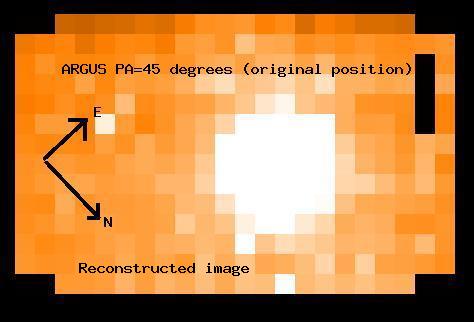 Original Argus pointing.
 Telescope moved 1.0" N and 1.0" E.
More technical information can be found in the Argus Commissioning report prepared after the commissioning of ARGUS.
ARGUS fast templates
Please note that the ARGUS fast templates (e.g.FLAMES_giraf_acq_argfast and FLAMES_giraf_obs_argfast) are only available in Visitor Mode although can be prepared at home using p2.
- The ARGUS fast template, which enables observations of different targets without reconfiguring the plate, is only available in visitor mode. This template saves on overheads, although only if the (a) The ARGUS sky fibres are at the same radius and/or not used (b) The plate scale is the same for the two observations
- Note that the pointing precision of ARGUS FAST is set bythe astrometric precision of the guide star chosen; this must be in the same coordinate system as the main target. By default the guidestar is set to "CATALOGUE" which means that a guide star is chosen from the VLT guide star catalogue. There is of course no guarantee that theguide star selected will be in your coordinate system or that it doesnot have a proper motion. Both factors can of course cause your objects not to be well centred on ARGUS, especially a problem when using the small plate scale. Hence you can also choose a particular guide star by setting the guide star mode to "SETUPFILE". If you choose this option,make sure that the guide star chosen has a small proper motion and isin the same astrometric system as your target.
Skyflats taken are in the ESO archive atarchive.eso.org and reduced solar spectrum
Sky flatfields that can be used to create a Solar Spectrum have been taken for all Medusa HR and LR setttings, plus FLAMES-UVES 520, 580, 860-nm. They are available in the ESO archive. They are in the process of being reduced by Data Flow/Quality Control in Garching, get in touch with kueyen@eso.org for details. The programme ID used was: 60.A-9022(B). The Object name for all data is: SKY_spectrum_field. The dates taken were; 2004-09-26, 2004-09-28 (HR settings) and 2004-10-11(LR settings). Sky flatfields that can be used to create a Solar Spectrum have also been taken for all ARGUS HR and LR setttings. The programme ID used was: 60.A-9022(B). The Object name for all data is: SKY_spectrum_field. The dates taken were; 2004-11-26 (LR settings), 2004-11-30 and 2004-12-02 (HR settings). The derived solar spectrum is available here for the old CCD (Bruce). We hope to provide the corresponding spectra taken with the new CCD in early-mid 2009.
Radial Velocity standards
Radial velocity standard star observing blocks have been made up for the following objects; HD 32923, HD82106, HD140538, HD19007, HD210667. Ask your night astronomer to look in the OT queue called "FLAMES RVStd". With the exception of HD140538 (which gives 10,000 ADU in 100-s for HR627.3) these OBs have not been tested and may not be useful, in particular after acquisition you may have to offset the telescope to take into account proper motion since epoch 2004.95 and because the standards are bright the SimCal ThAr emission lines may not be strong enough. These standards are in the North. The stars are a subset of the list shown here.
Problems with the instrument
History effect for Biases
The history effect for Biases affected new CCD biases between May 25 2008 - Jul 10 2008 and possibly all old CCD biases at a lower level. Now fixed.
GIRAFFE CCD Memory Effect
If you got GIRAFFE data between 2003-09-18 and 2003-11-20, your data might be affected by a "memory effect", that is part of the image (mainly on columns 128 and 129) have the count levels from the previous exposure. Thanks to the work of many at ODT and Paranal, this effect is no longer present.
Pickup noise on the GIRAFFE and UVES CCDs
There is sometimes pickup noise present on the GIRAFFE and UVES CCDs, which has a level of around the readout noise. Attempts are obviously made to eliminate this noise although the biases should always be checked and your support astronomer informed if the effect has increased.
FLAMES Pipelines on Paranal
The FLAMES-UVES part of the pipeline on Paranal gives a quick-look reduction of ALL settings, while the FLAMES-GIRAFFE part of the pipeline only reduces certain settings.
The list of FLAMES-UVES pipeline products produced on Paranal is available here.
The GIRAFFE settings reduced by the pipeline are listed here. Additionally, the GIRAFFE pipeline produces also a reconstructed image for 2D spectroscopic observations taken with IFU and ARGUS.
Viewing reduced GIRAFFE and FLAMES-UVES reduced spectra
In order to inspect the reduced spectra produced by the GIRAFFE or UVES pipeline you have to do the following:
- On wgsoff2: Left hand mouse button, Dataflow-Gasgano and open gasgano with preferences FLAMES@WGSOFF2
- Load the reduced directory into gasgano (e.g. /data-ut2/reduced/2008-12-25)
- Click on the spectrum that you want to display. This should have a classification of SCIENCE_RBNSPECTRA for GIRAFFE or MWXB_SCI_RAW_REDL/REDU for FLAMES-UVES spectra.
- Now click on the Script board (the icon with the lightning)
- Double click on splot_FLAMES.sh
- Answer yes to 'Run following command' prompt...
This will fire up splot within IRAF. It will ask you what line to plot, just hit return. To cycle through the spectra just use the '(' and ')' keys (brackets). To quit just hit 'q'. Note that the script is contained in: /home/astro2/gasgano/scripts/gas-scripts/splot_FLAMES.sh